Why One-Size-Fits-All Platforms Fail Across Teams

What happens when each team uses their preferred app?
At Glances, we meet with business owners and teams every week across many different industries. One of the more common themes we hear during these client meetings is a desire for teams to be on the same page. Their story often involves moving everyone to a single platform that “can do everything” to make daily work more efficient. Once the one-size-fits-all platform is rolled out, they require every team to use it (with good intentions, of course). While it all sounds effective in theory, it can often backfire in real-life practice.
Keep reading to understand how Glances is a works-with-all solution that lets your data live in its native apps and gives individual teammates freedom to thrive in their favorite platforms.
Why the one-size-fits-all strategy can fail
The truth is that different business roles have different needs. Sales likes SugarCRM. Support swears by Zendesk. The marketing team lives in Mailchimp. Accounting prefers QuickBooks (and doesn’t want anyone else in there, thank you very much). Leadership wants the latest updates visible in monday.com.
With so many apps and platforms, it can easily feel like there’s no cohesive structure throughout the business and a common quick-fix solution can often be to pick one platform and have everyone work from there.
But the result? Your new, carefully picked one-size-fits-all platform is likely to become cluttered with duplicate data (or worse, missing data). The result is often frustrated teams who are missing the context they need for their jobs. Teams don’t fully adopt the new platform and end up creating workflows outside of the main platform, meaning teams end up disconnected and siloed in their work.
Ultimately, nobody is happy. No teams are thriving. And business slows or becomes unnecessarily bureaucratic.
While some companies do well with every department using the same tool, many find that it slows everyone down and doesn’t improve collaborative efforts as originally planned.
Let teams work where they want to work
Every department has different needs. This means they need tools built just for them. Instead of replacing your apps with one multi-purpose app, or duct-taping them together with a dizzying array of complicated integrations, what if you just helped your teams have greater visibility in the areas where it matters?
With Glances, your teams can continue working in their preferred workplace apps, but use our go-anywhere browser extension to get real-time data from the other apps they need at the moment they need it. Not another one-size-fits-all platform; you could say we’re more of a works-with-all kind of solution.
- Sales can stay in Pipedrive or SugarCRM, and still see if support tickets are open in Intercom or Zendesk
- Support can work in Zendesk or Intercom, and still view marketing engagement from Constant Contact or Mailchimp
- Operations can live in monday.com or Google Sheets, and still view invoice details from QuickBooks or bill.com
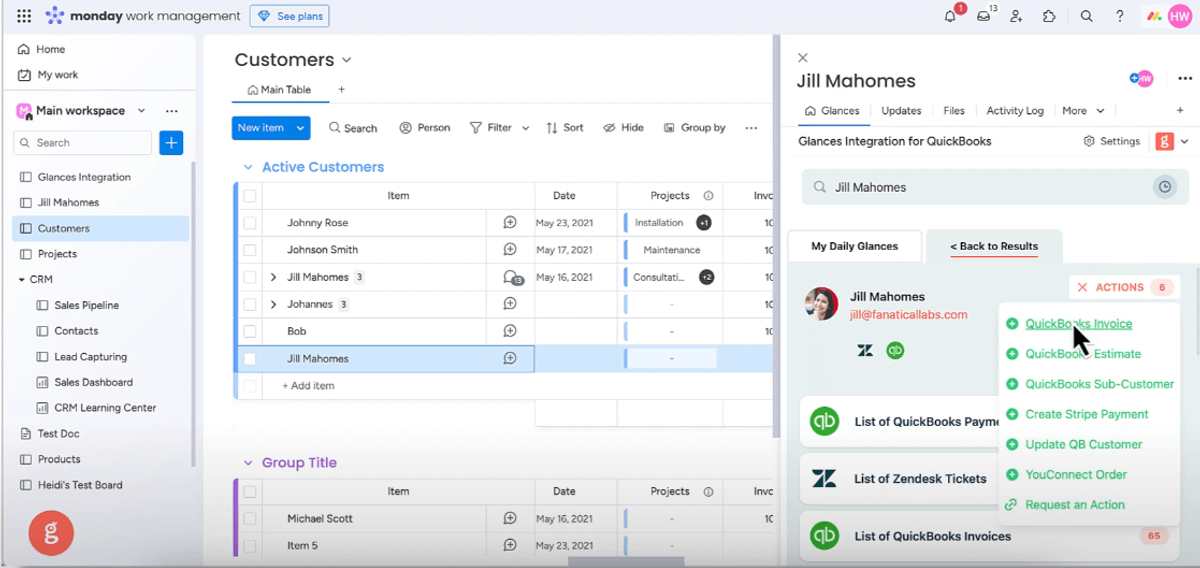
Let data live where it wants to live
When you have multiple tools, it can feel like you need a mass movement of data. But mass data migration and continuous syncing is not only overwhelming and complicated to maintain, it’s also often unnecessary. It can be tempting to grant users access to all the platforms, but that increases costs and makes teams overburdened by too many tools.
Glances takes a more thoughtful and intentional approach. While the Glances browser extension lets you SEE data from other platforms, what do you do when viewing is not enough? That’s where Glances Actions and post-Action app updates come in. If a sales rep needs to create an invoice in QuickBooks or a customer in bill.com, or a support agent needs to refund a Stripe payment or send PandaDoc documentation to a customer, they can do it instantly, without leaving the app they’re in or logging into another system.
- No app switching
- No toggling through endless tabs
- No extra app licenses
Just Actions that are meaningful to their work and select data movements that propel your work forwards. By letting data live where it wants to live, you give your teams the power to act when needed without sacrificing any unique data needs.
Let your people stay in the tools they already know, while removing the silos that slow them down. With Glances, you’re not building new systems; you’re building bridges between the ones you already love.
Want to see how it plays out across your apps? Start a free trial today.
Achieve your dream workflows with Glances
Start your free trial to make your favorite business apps work together and perform time-saving Actions. You can find and connect apps like Salesforce, QuickBooks, Zendesk, Stripe and more when you are logged in to your Glances account.
More helpful steps
Schedule a demo to see the time-saving benefits of Glances in action or ask our team questions.
If you need to connect a specific app or platform with Glances that is not currently available on glances.com, please send your requests to hello@glances.com.
Find more step-by-step articles with the latest information on our support site.