Level Up Glances Actions with Post-Action App Updates

If you and your team rely on Glances Actions as your daily, one-stop-shop to complete tasks across your business apps, we have an amazing new feature to announce. Now you can further optimize your daily workflows with post-Action app updates, which automatically bring back select pieces of data to specific apps after you complete Actions. Though the use-case ideas are endless, we’ll use invoice creation as one example to cover how this new feature works.
Enhance your billing and payment tracking workflows
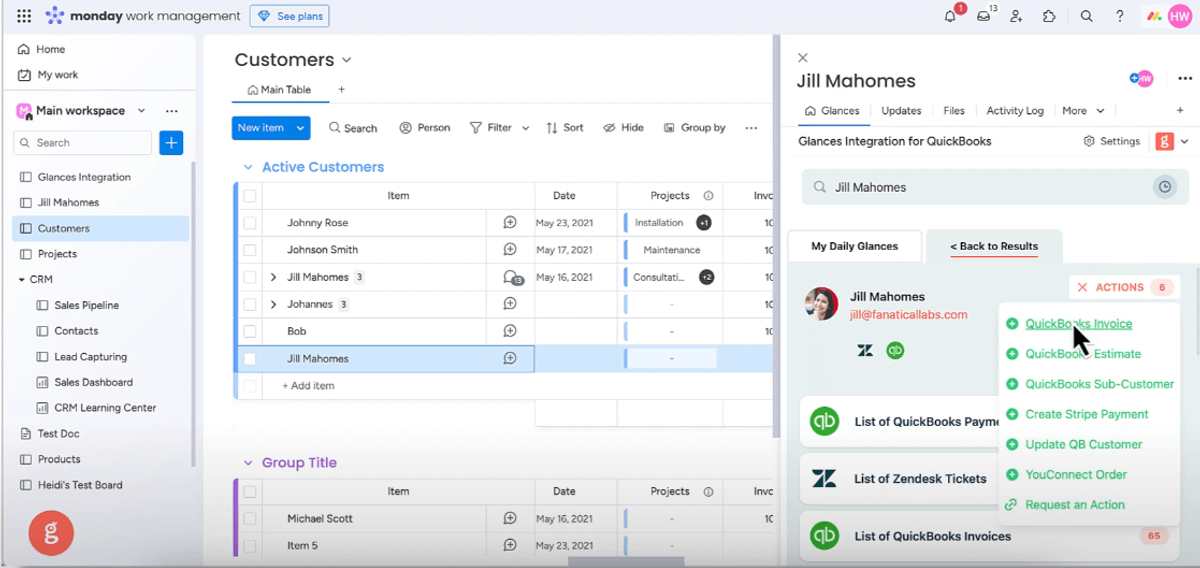
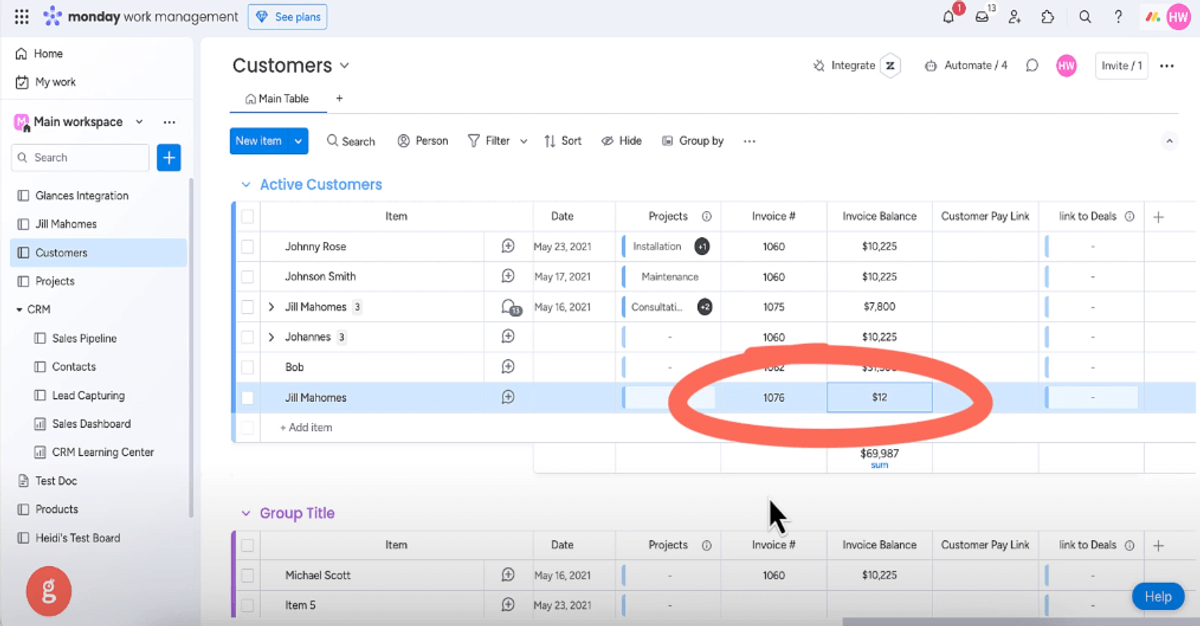
Using Actions, you can already create a new invoice for your favorite billing app, edit the invoice fields, and send the finalized invoice to a customer. All of these steps happen directly within the Glances widget, while working anywhere online. Now with post-Action app updates, you can ensure specific data events that happen following completed Actions are then updated and displayed in your app of choice. Tracking payments and triggering your team’s desired workflows have never been easier!
Sequence of events (example):
- Connect your favorite billing and project management apps with Glances
- Use Glances Actions to create and send billing app invoice to customer
- Customer pays off billing app invoice 30 days later, updating balance to $0
- Post-Action app update shows $0 balance data in your project management app
Watch Video: Bring Back Data with Post-Action App Updates
Can post-Action app updates work for any app?
While the video example shows Glances connected with monday.com and QuickBooks, the possibilities are open for helping your team enhance Actions, streamline workflows, and stay updated in real-time with post-Action app updates. All it takes is connecting your desired business apps and working through our team’s unique data mapping process to identify what data pieces make sense for your team to see (and where).
If you have questions about this new feature or want to get started, check out our support article or email us at support@glances.com.
What are Actions?
Glances Actions empower you and your teammates to complete time-saving tasks across different business apps without navigating away from your work. For example: create and send invoices for your accounting app, update customers for your CRM system, start web calls for your telephony software, and complete many other helpful functions directly within Glances, while you work anywhere online.
Any Glances customer can take advantage of Actions, which are included and available based on the apps you have connected.
Integrate all your apps and perform Actions, using Glances
Start your free trial to connect your favorite business apps and access your data in one easy click, from any app or webpage. You can find and connect Salesforce, monday.com, QuickBooks and more apps when you are logged in to your Glances account.
More helpful steps
Schedule a demo to see the time-saving benefits of Glances in action or ask our team questions.
If you need to connect a specific app or platform with Glances that is not currently available on glances.com, please send your requests to hello@glances.com.
Find more step-by-step articles with the latest information on our support site.