Key Differences Between Glances and Two-Way Data Integrations

One common question our support team receives is, “Does Glances sync data between this app and that app?” Many businesses looking to streamline their workflows start by exploring traditional two-way sync options. This is usually driven by the need to access or manage data across multiple apps efficiently.
But Glances isn’t like a traditional two-way sync…and that’s intentional. Instead, we offer a more human-led approach to consistently act upon your data without the need for constant background noise or a dizzying array of moving data.
Today, we’ll walk through the differences between a traditional two-way sync and the innovative approach Glances takes, helping you better understand which one suits your needs and how Glances can simplify your daily workflows.
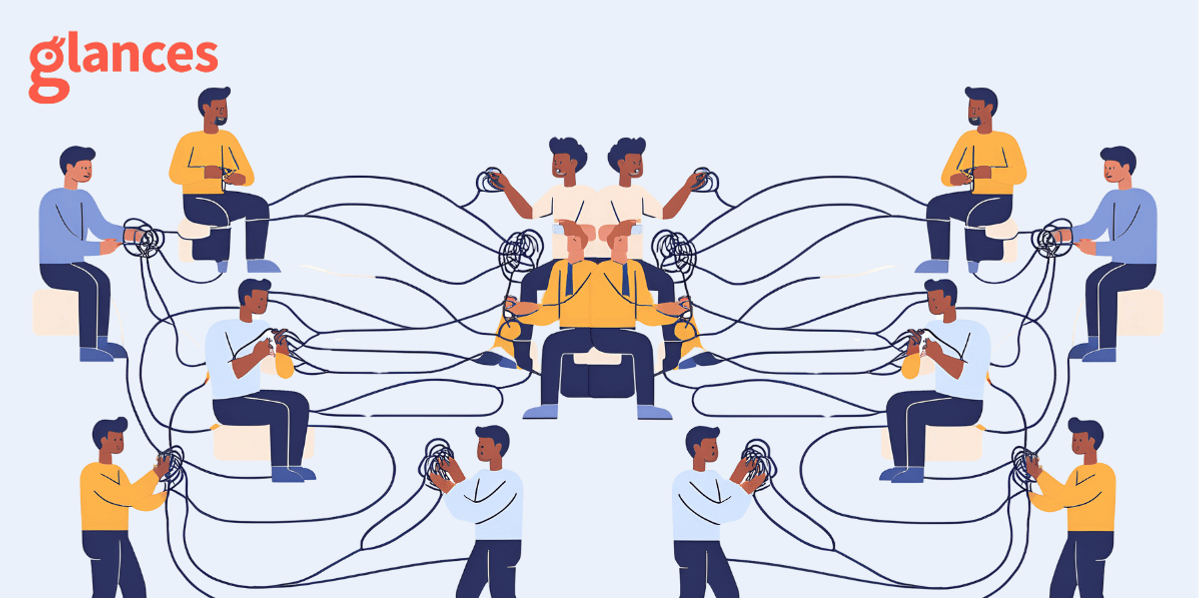
What is a two-way sync?
Integrations that offer a two-way sync continuously update data between two apps, ensuring they remain identical on both ends. It’s typically bi-directional, meaning changes in Platform A sync to Platform B and vice versa. Because it's difficult to predict which data will be essential, two-way syncs often transfer large amounts of fields to cover any “just in case” needs. This can be helpful in some situations where platforms must stay aligned.
However, a traditional integration may not be the most efficient solution as there are some pitfalls, including:
- Complex setup and maintenance. As your app needs grow, your integrations (and costs) do as well. One integration for monday.com to QuickBooks, another for QuickBooks to Stripe, and another one for monday.com to Clustdoc all lead to one overwhelming technology mess.
- Inadvertent data overwriting. If you’re not careful to map and take into consideration all contingencies and one-offs, automatic updates may lead to overwriting data incorrectly, leading to lost data you can’t retrieve.
- Slow data movement or slowing systems. Having a constant sync in the background that’s queuing and sending data can burden your platforms, causing slowness of the system itself or inconsistent timing of data updates.
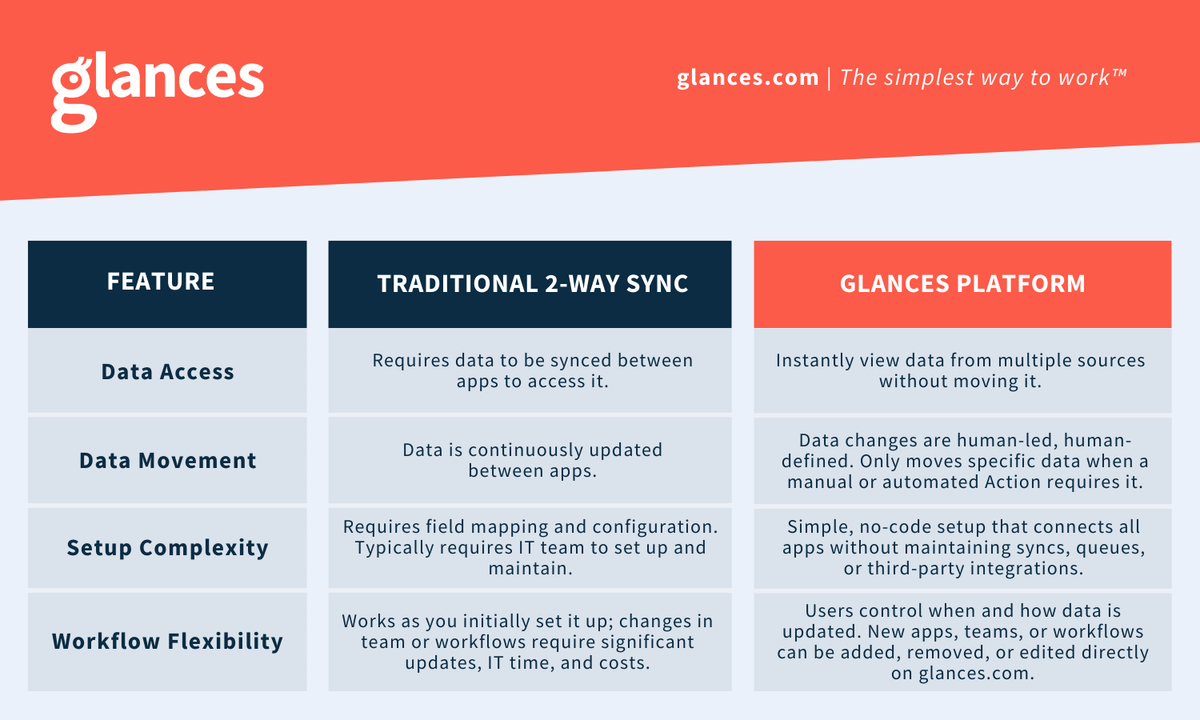
How Glances is different
Glances takes a modern, more flexible approach to manage data across your workplace apps. Its patented no-code platform enables you to have direct, quick access to meaningful insights without moving data unless you choose to. No constant syncing, no queues to manage, and no tangled data to sort through.
View data without moving it
With Glances, you don’t need to move data in order to access it. Instead, you can search across multiple sources (all your workplace apps, like QuickBooks, bill.com, SugarCRM, and more) and view the relevant data in one place. Our convenient browser extension lets you view this unified view from any app or webpage.
Take Action without switching apps
Need to create an invoice, send an estimate, or start a call? Glances Actions lets you perform tasks as needed, without blind or automated syncing, right from the app you’re in. Whether you prefer to work in your email, monday.com, Zendesk, or a Google Doc, you can generate a QuickBooks invoice or a FreshBooks estimate and send it instantly. Power Glances users also use data on the page they’re on to pre-fill data, like invoice line items or customer contact details, to reduce errors and manual data entry.
With Glances Actions, you can:
- Create an invoice in QuickBooks from a HubSpot contact
- Add a new customer to bill.com while viewing a spreadsheet
- Refund a Stripe payment while working in Zendesk
- And dozens of more time-saving ideas!
Only move specific data
When data does need to move from one app to another, post-Action app updates ensure relevant data transfers seamlessly. For instance, when you need QuickBooks invoice data to live in monday.com, we’ll pull over the invoice number, payment status, and other key pieces of data to keep your workflows on track. This powerful feature allows you to use native automation features using the data you need at the moment you need it.
Instead of maintaining multiple one-to-one app integrations, Glances connects all of your apps so you always see the most up-to-date information whenever you need it, without making unnecessary changes in the background that can slow you down.
Glances vs. two-way sync: which is right for you?
If you need continuous syncing between two apps and don’t mind the complexity that comes with it, a traditional two-way integration may be the right choice. But if you prefer a simpler, more flexible way to access and act on your data that moves only when needed, Glances is the smarter alternative.
Glances keeps things efficient, accessible, and conflict-free, so you can focus on getting work done without worrying about data getting out of sync.
Ready to simplify your workflow? Try Glances today!
Achieve your dream workflows with Glances
Start your free trial to make your favorite business apps work together and perform time-saving Actions. You can find and connect apps like Salesforce, QuickBooks, Zendesk, Stripe and more when you are logged in to your Glances account.
More helpful steps
Schedule a demo to see the time-saving benefits of Glances in action or ask our team questions.
If you need to connect a specific app or platform with Glances that is not currently available on glances.com, please send your requests to hello@glances.com.
Find more step-by-step articles with the latest information on our support site.