Best Integrations for monday.com and QuickBooks: Comparing Glances and IQ by Platform Pioneers

Make monday and QuickBooks work better, together
For businesses that manage projects, customer data, invoices, and tasks across multiple apps, choosing the right solution to seamlessly link them all together is critical. Often customers and potential customers benefit from a head-to-head comparison of an app’s most popular features. Today’s comparison looks at two great products for managing your work within monday.com or QuickBooks.
Data visibility across platforms
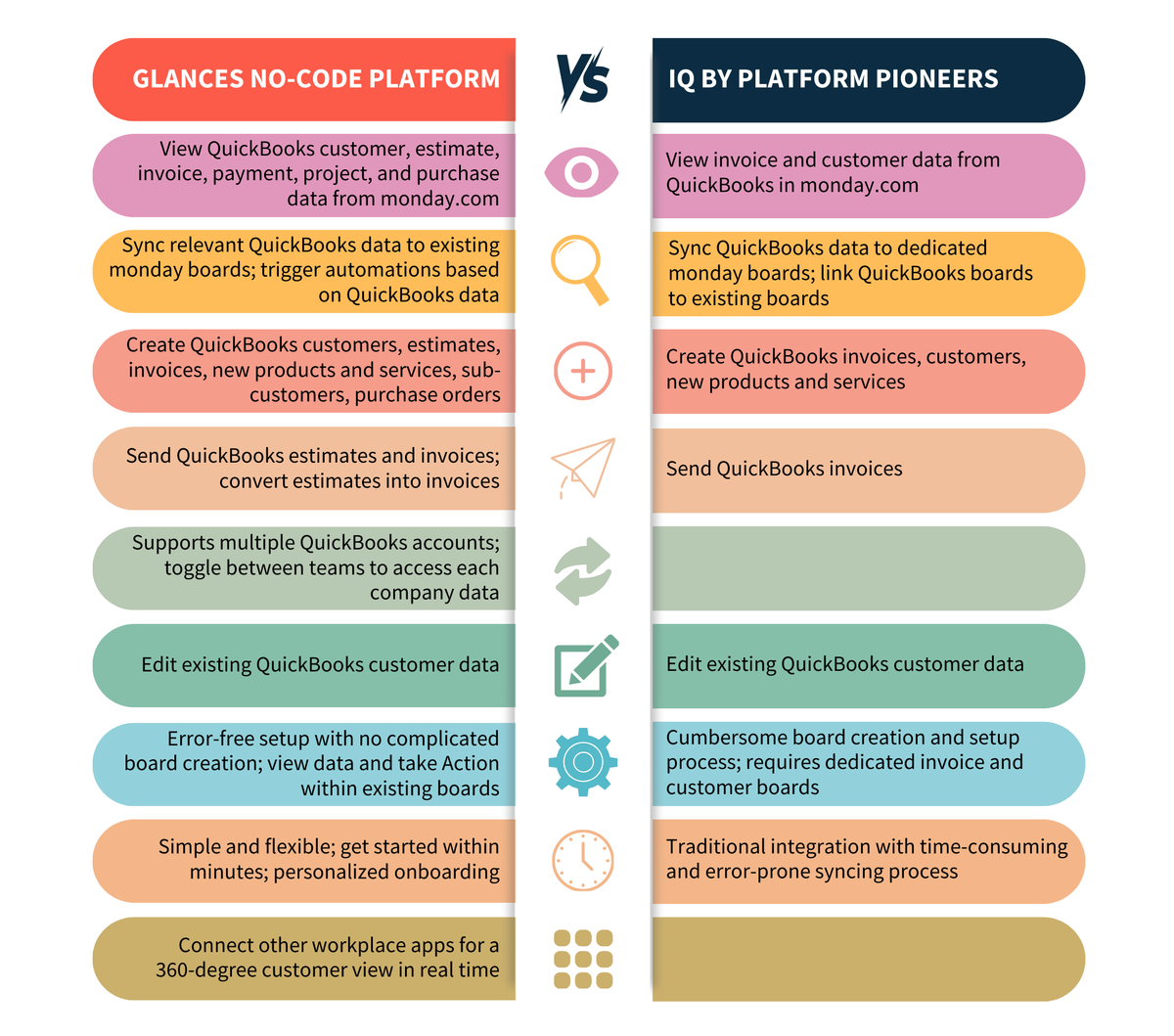
Available for install on the monday marketplace, both the QuickBooks Integration by Glances and Integration for QuickBooks (IQ) by Platform Pioneers provide data visibility into QuickBooks. This includes customer estimates, invoices, payments, and more all accessible within monday.com. This data is available to display at the board level, or for Glances, within the Glances app itself.
Glances goes the extra mile on data visibility, however, because only Glances provides insight into monday data from QuickBooks, with the ability to see project and customer statuses and items. Additionally, Glances connects with additional workplace apps, such as Zendesk, Mailchimp, or Stripe, offering a more holistic, unified view of your customer data across all your workplace apps. This enables teams to access and manage all relevant customer information in one place, making it easier to make informed business decisions.
Syncing data to monday.com boards
Both Glances and IQ allow you to sync essential data from QuickBooks to your monday.com boards. These pieces of data can then be used in monday.com automations to send notifications, update the item, or other workflow preferences.
Creating and managing QuickBooks data
Both Glances and IQ allow users to create estimates and invoices directly from monday.com. However, Glances offers even more flexibility, allowing users to create sub-customers, purchase orders, and even convert estimates to invoice with 1-click. Such added features gives businesses even more control and efficiency in managing QuickBooks data without navigating away from monday.com.
Multiple QuickBooks account support
For businesses that operate more than one QuickBooks account, Glances is the only option that allows you to toggle between two or more companies with ease. This flexible feature means you can provide the right invoice and bill from the correct company, further saving time and reducing the need for multiple integration or unnecessary navigation.
Ease of setup and support
Both Glances and IQ provide sync QuickBooks data into monday.com boards. IQ typically creates dedicated boards that link and connect to your main, workflow and day-to-day boards. Alternatively, Glances allows you to use existing boards, such as projects and leads, to reduce the overall number of boards you have to manage. Because Glances allows you to view and use data on your existing boards, and we offer personalized onboarding, Glances is often the quicker and easiest way for teams to get up and running.
To see if Glances is right for you, start a free trial or schedule a demo call. We’re excited to learn more about your workflow and how we can turn it from a dream to a reality.
What does a mapping call look like?
You’ve started a trial for Glances or maybe you’ve just been eye-balling Glances from afar, not quite ready to take the plunge. We get it. Starting a new workplace app can be intimidating and sometimes a lot of work. That’s why when you use Glances to connect monday.com with QuickBooks we offer a personalized onboarding experience, making your journey from scattered work pieces to a comprehensive workflow a reality.
When you meet with our team for your personalized onboarding call, we install Glances into monday and connect QuickBooks (and any other workplace apps, if needed). We also walk through data mapping, which is a customization feature we offer to create just the right Glances process for your work. As part of this process we’ll ask about your workflow and how your team works together to complete their tasks.
We’ll review the data you need to sync from monday to QuickBooks
This means we’ll ask about how you create invoices, estimates, etc. (what we call Actions) and the data you need. This allows us to customize Actions to pre-fill relevant data that reduce your manual data entry as well as sync data back from QuickBooks into monday.com columns, so that you can create new QuickBooks records without retyping or copy/pasting from one platform to the other.
The data mapping process is essential to ensuring that data from monday.com is accurately pre-filled to QuickBooks Actions and that a QuickBooks data syncs seamlessly back into monday columns as desired. During this process we’ll learn about your workflow, including your process and requirements. We then review your specific fields.
Learn more about personalized onboarding with Glances for your monday and QuickBooks needs.
Glances makes all your business apps work together
Glances securely connects all of your business apps, empowering you and your team with a 360-degree view of customer and personal data while working anywhere online. Built with patented, no-code technology and backed by 5-star support, Glances has reimagined software integrations with all of the convenience and none of the data-syncing, downtime, and maintenance costs. You can find and connect support software like monday.com, QuickBooks, Zendesk, Intercom, and many others when you are logged in to your Glances account.
Start your free trial today and check out Glances on the monday app marketplace.
More helpful steps
Schedule a demo to see the time-saving benefits of Glances in action or ask our team questions.
If you need to connect a specific app or platform with Glances that is not currently available on glances.com, please send your requests to hello@glances.com.
Find more step-by-step articles with the latest information on our support site.