How Our Data Mapping Process Elevates Glances Actions

Make the move from manual processes to magical workflows
Using Glances as your data-viewing sidekick already saves you hours of time from app overload and constant context-switching, but are you also utilizing the full workflow benefits of Actions? Visualize a professional world where your relevant customer data – no matter its native application – lands right where and when you need it, making repetitive tasks significantly faster. Imagine a workday with less tab-toggling, less clicks, less data entry, and less typos. These dream workflows can be your reality too when you harness the incredible features built into Glances.

What are Actions?
Glances Actions empower you and your teammates to complete time-saving tasks across different business apps without navigating away from your work. For example: create and send invoices for your accounting app, update customers for your CRM system, start web calls for your telephony software, and complete many other helpful functions directly within Glances, while you work anywhere online.
Any Glances customer can take advantage of Actions, which are included and available based on the apps you have connected. However, if you need to ramp up your daily workflows with less data entry and more automation, consider working with our team’s unique data mapping process to take Actions to the next level. Below, we’ll explain the difference of what you can expect when using Actions with and without data mapping in place.
Glances Actions without data mapping
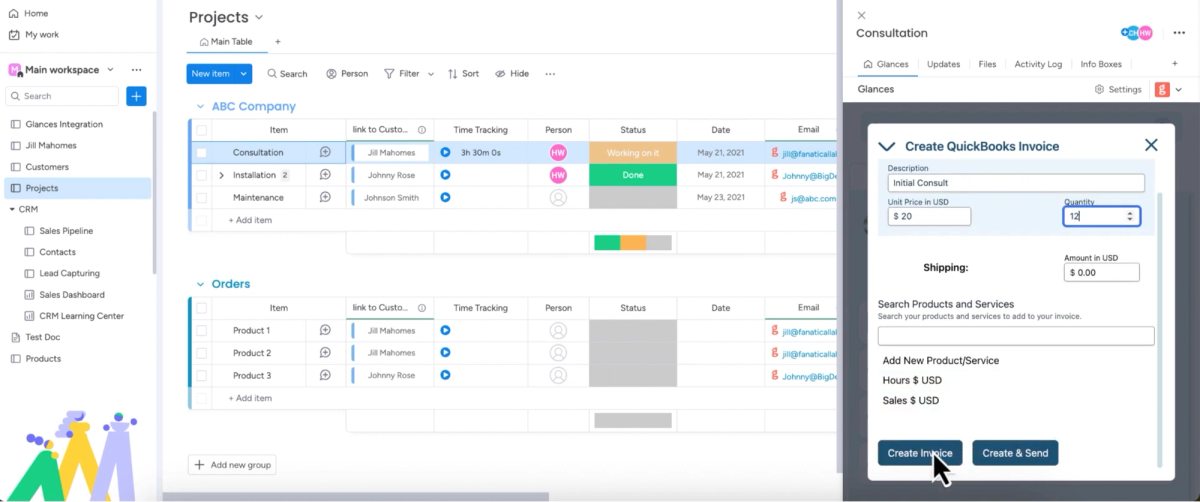
Let’s say you have QuickBooks as one of 11 apps connected with Glances and you’d like to create a new invoice for a client. Simply open Glances, click the Action menu and select Create QuickBooks Invoice, then select and edit your desired fields. While the ability to create a QuickBooks invoice directly within Glances saves you time, you will still be typing to enter the invoice details manually.
Check out the product shot below showing a professional working in monday.com and using the in-app version of Glances to create a QuickBooks invoice.
Glances Actions with data mapping
Now let’s take the scenario above and add to it. Not only do you have QuickBooks connected, you also have monday.com connected with Glances as part of your 11 apps. Creating new QuickBooks customers, estimates, and invoices are part of your daily processes, but you are tired of switching tabs and manually entering or copying/pasting data from monday to QuickBooks. After discussing your workflow goals with Team Glances and completing the data mapping process, using Actions now looks a bit different for you (in a good way).
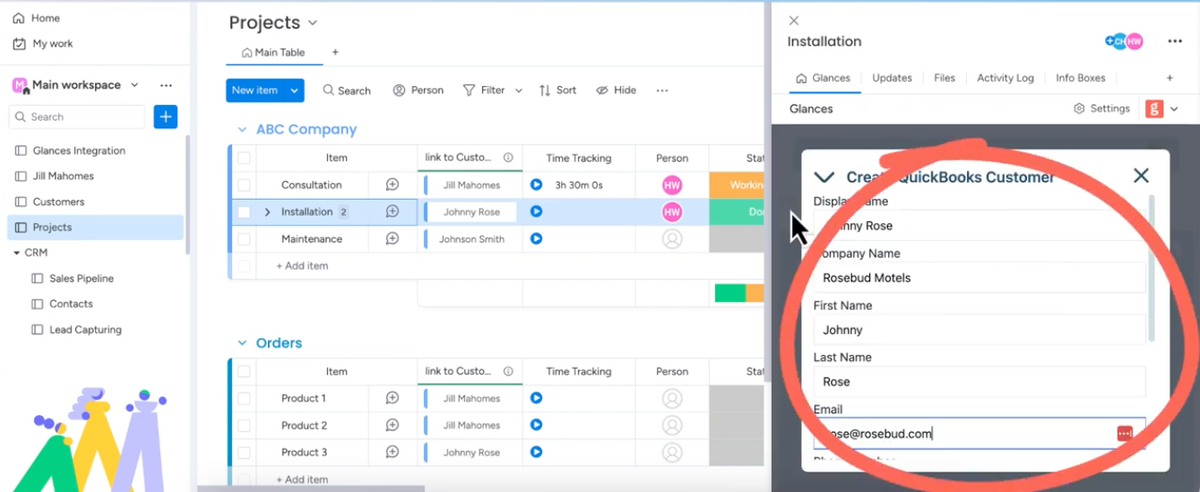
Once you select Actions such as Create QuickBooks Customer or Create QuickBooks Invoice within Glances, the fields are automatically pre-filled with the correct monday.com customer data. While you still have the ability to review and manually edit any of the information, you can see how the data mapping process to activate Glances pre-filled forms feature has shaved off valuable minutes from these billing tasks. You can see how it looks in the quick product shot below.
Why elevate Actions for your workflow needs
Working with our team to map your specified data fields between your most-used apps helps you spend less time on data entry, which naturally reduces errors and the re-work needed to resolve them. Glances pre-filled forms are compatible with loads of popular SaaS platforms and the use-case ideas are virtually endless. Here is a quick sampling of how this feature helps real teams cut hours from manual data work, every single day:
✔️ Wiz through invoice and estimate creation with barely any typing
✔️ Keep your customer records up to date without lifting a finger
✔️ Speed up expense reporting by auto-filling details from receipts or POs
✔️ Easily fill out requests in custom platforms without breaking a sweat
Watch Video: Glances Pre-Filled Forms Automate Data Entry
Getting started with Glances data mapping and pre-filled forms
Whether you use pre-filled forms for a few simple fields or you have dozens of data entry points you need automated, it starts with our team’s process to understand your desired app connections and workflow needs. From there, we apply the correct mappings to your apps and Actions, test them out, then let you fly!
Once your pre-filled forms feature is ready, you can simply click to open the Glances widget anywhere online. Next, select your Glances Action of choice – like creating a new customer, invoice, estimate, or similar form – and like magic, your form will have the relevant data you require already in place.
Email support@glances.com or visit our support site article to learn more.
More helpful steps
Schedule a demo to see the time-saving benefits of Glances in action or ask our team questions.
If you need to connect a specific app or platform with Glances that is not currently available on glances.com, please send your requests to hello@glances.com.
Find more step-by-step articles with the latest information on our support site.