Glances View-Only Role Empowers Bank Employees and Safeguards Data

From loan officers, to tellers, to customer support, to back-office analysts — most banking roles require access to critical customer data housed in multiple software platforms. While having visibility into the right systems and data are key to daily production, providing teammates with general access to core accounts can easily lead to damaging data-entry errors and compliance headaches.
That’s where Glances powered by Realwired opens the door to smarter data visibility. Our partnership allows banking teams to share relevant information with the right employees at the right time, all without giving unnecessary access to view sensitive data and complete Actions that alter it.
Today we’ll explore Company Roles within Glances that help managers in the banking industry provide their employees with an appropriate level of access to customer data and Actions. This level of hyper-customization helps to keep your bank’s workflows safe, data secure, and teams serving customers without inflicting risk and time-wasting mistakes.
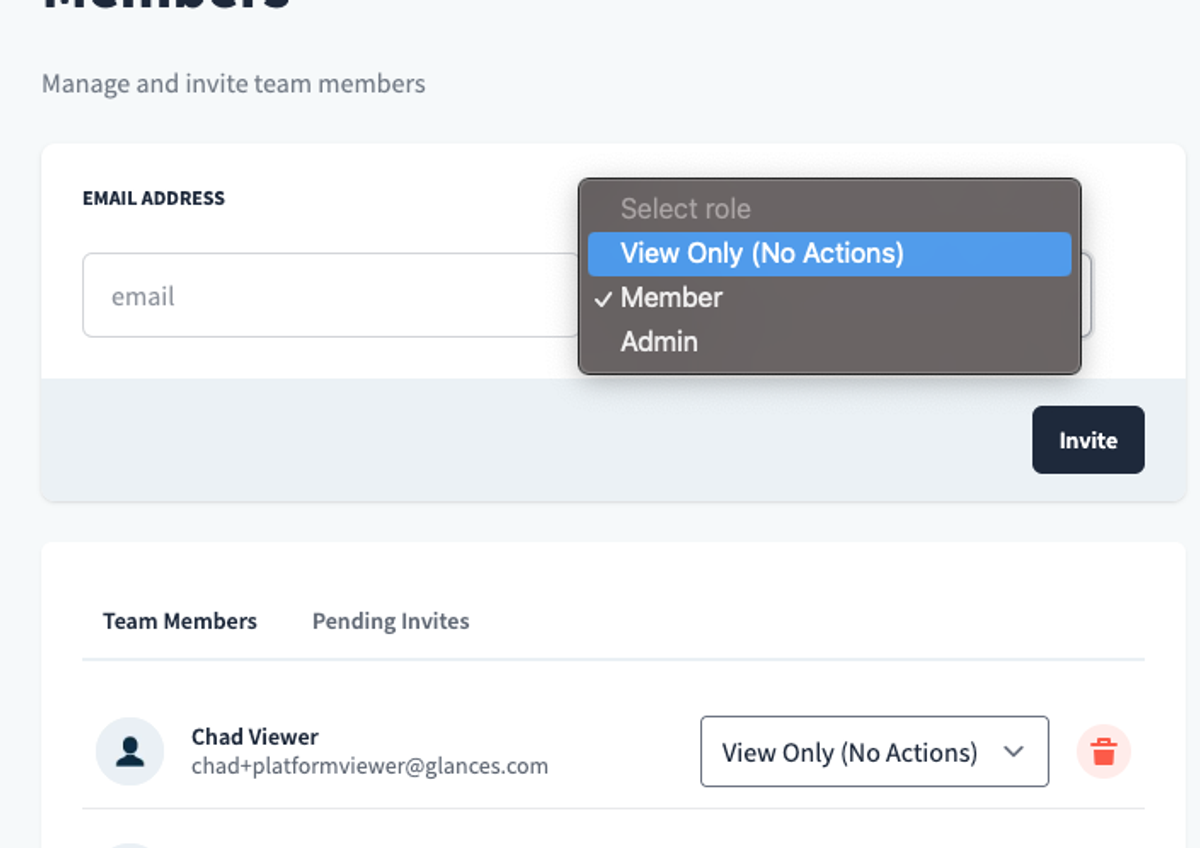
Why data visibility matters across banking roles
Banks manage highly-sensitive customer data and complex workflows across various tools, ranging from off-the-shelf applications to custom in-house systems. Not all departments will share the same tools and different roles will require the most relevant, safest levels of access to core accounts. In the examples below, these bank employees are the perfect candidates for the View-Only option Glances offers.
Loan Officer Assistants
Assistants often need to view application data, verify documents, or track loan statuses, but typically should not have the ability to change account balances or edit sensitive customer records.
Scenario: Maria supports a loan officer by reviewing applications. With Glances, she can see loan details, track pending approvals, and prepare customer follow-ups all in real time. Yet she cannot alter account balances, change loan terms, or edit customer data, ensuring both efficiency and security.
Tellers and Branch Staff
Branch personnel might need read-only access to verify information quickly during calls or in-person visits.
Scenario: During a customer inquiry, teller Holly can pull up account snapshots to verify balances or transaction histories. Glances allows this information to be displayed directly from the core banking software without giving the teller editing privileges, saving time and reducing risk.
Back-Office Compliance Teams
Auditors and compliance officers require broad visibility across accounts, but rarely need to interact with transactions directly.
Scenario: Compliance officer James needs to audit lending data. Using Glances, he can view dashboards, review document trails, and validate processes without touching sensitive customer data, preserving audit integrity and compliance standards.
How Glances helps banks simplify access without compromising security
Providing broad access to core software accounts doesn’t make sense for what most bank employees actually need to get work done, not to mention the risks involved. On the other hand, overly restricted access slows workflows and frustrates staff. Glances strikes the perfect balance with one simple view of data across banking apps and smart options for a hierarchy of Company Roles.
- View-Only Roles: Assign view-only permissions for any software, so team members can monitor data without risking accidental edits.
- Context-Specific Visibility: Share only the information needed for a specific task, workflow, or team. Example: loan details for an assistant but not full account access.
- Seamless Integration Across Software: Glances connects to core banking systems, loan origination systems (LOS), appraisal management software (YouConnect), and back-office tools, giving staff a unified view without juggling multiple apps.
Efficient banking operations require careful balancing of access, visibility, and security. Glances powered by Realwired helps every team member to do their job effectively — whether reviewing loans, assisting customers, or auditing data — without putting sensitive information at risk.
Ready to give your bank teammates the visibility they need?
Explore Company Roles in Glances, learn how to send a team invitation and select the right role, and discover more about Team versus Personal Connections on the blog.
Get your bank on board with Glances
Seamlessly and securely integrating your bank’s software applications from Abrigo to YouConnect (and everything between) starts with a courtesy demo and app consultation so we can understand your tech stack and workflow goals. From there, we can discuss implementation strategies, security requirements, user pricing, and answer any other questions your banking team may have.