View-Only Roles: Smart Visibility Across Apps without the Risk

When it comes to managing your team’s access within Glances (and while connected to your stack of workplace apps), not every employee needs or should have the same level of control. Fortunately, Company Roles exist to empower Owners/Admins to match select teammates with their appropriate level of access to company data. One helpful role we’ll explore today is View Only – and why it’s designed to keep your workflows safe, data secure, and teammates empowered to do their jobs without inflicting risk and errors.
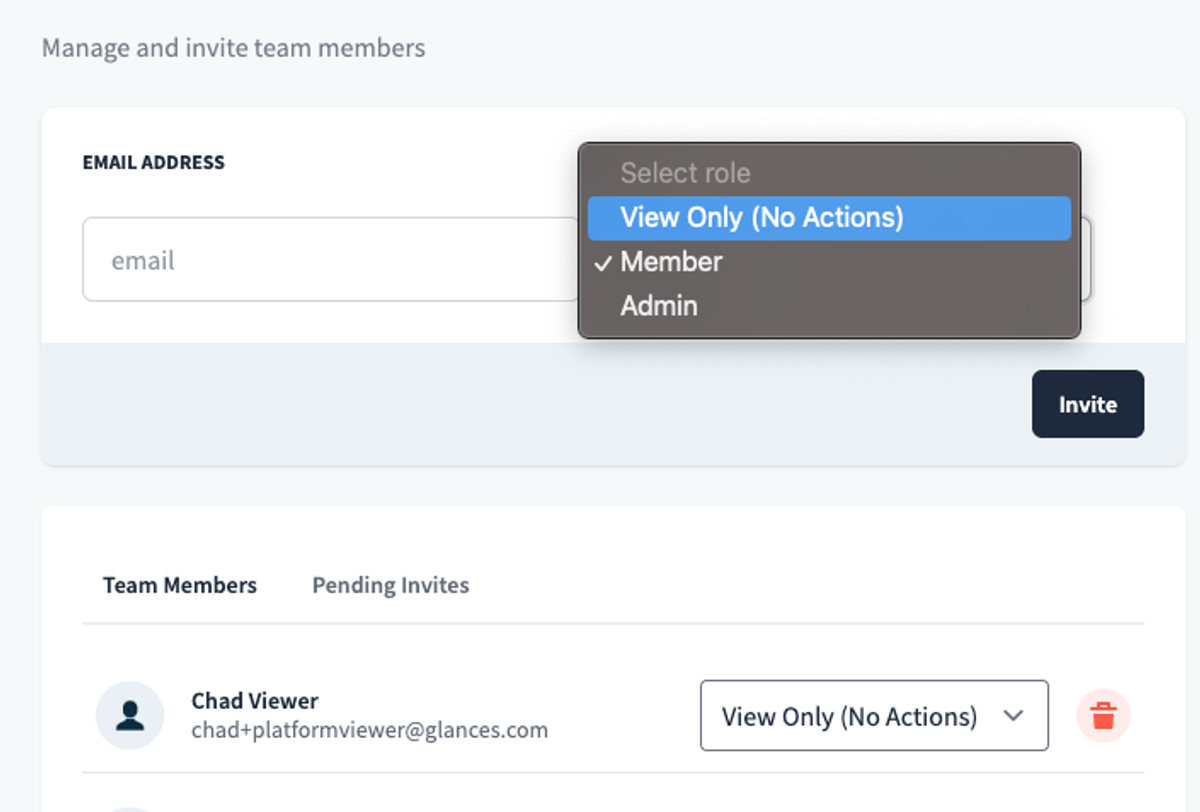
View-Only users can see all the valuable customer and business insights that Glances brings together, but they cannot perform Actions or make updates that might impact records such as customer data points, billing information, sensitive account details, and so much more. This setting offers the perfect balance for teammates who rightfully need the visibility, but should not be responsible for editing, updating, or executing data-altering tasks in a company’s apps connected with Glances.
Think of it as providing all the viewing, without the doing.
Below we’ll cover how selecting View Only for certain teammates can benefit processes from onboarding and training to the different functionality needed across company departments.
Onboarding and training
New employees need to explore systems and learn workflows without the fear of making mistakes. Using Glances with View-Only access, trainees can safely shadow teammates, pull up customer data, and understand processes before they graduate to Member roles with Actions and additional access.
For example, let’s say a new sales rep is onboarding and needs to understand how customer data flows across the CRM, accounting, and support platforms. Instead of granting full Member access, the rep can explore Glances dashboards and see live data from Salesforce, HubSpot, QuickBooks, and Zendesk without being able to change records or complete various Actions.
The Benefits
- Reduce new employee anxiety to “click the wrong thing”
- Create a safe, compliance-friendly learning path that builds confidence without jeopardizing data
- Provide gradual levels of access as new teammates ramp-up or complete cross-training
Customer Support teams
Support agents work best when they have a 360-degree view of customer data from recent orders, billing status, ticket history, and more. However, not every rep should have the authority to issue refunds, change account details, or accidentally close tickets. View-Only roles allow newer reps to see everything they need to respond quickly, while escalations go to senior staff with Member or Admin levels of access.
The Benefits
- Faster support with fewer risks to financial or account accuracy
- Provides hands-on exposure to the same tools senior reps are using
Sales teams
Both seasoned sales managers and newer reps need to prep for calls by reviewing customer details across the CRM, QuickBooks, and support systems. Giving them View-Only access lets them research past invoices, open tickets, or view marketing history without the risk of accidentally moving a deal stage, altering a record, or sending Actions that affect live deals.
The Benefits
- Provide context to succeed, while sales leadership keeps tight control over pipeline data
- Prepare quality outreach without risking accidental errors in accounting or CRM systems
Accounting teams
Department managers often need visibility into financial data like invoices, expenses, and outstanding payments to make smarter budgeting decisions. With View-Only access, they can see QuickBooks or Xero data in Glances but cannot post entries, approve payments, or modify sensitive records. In another scenario, any new accountant that joins a company may be placed on a probationary period where they simply need to observe how invoices, payments, and expenses appear across systems. The View-Only setting helps them learn processes and data structures, then graduate to an advanced role within Glances once they are comfortable.
The Benefits
- Ensures accuracy while trainees are learning
- Reduces costly errors in sensitive systems like QuickBooks or Xero
- Finance maintains data integrity, while managers stay informed and agile
Data access without accidents
Not every teammate needs to take Action, but every teammate benefits from having tailored levels of visibility. With View-Only roles, you can share the power of Glances across your organization, empowering more people to work smarter while protecting the accuracy and integrity of your company’s data.
Ready to give your teammates the visibility they need, without the risks?
Explore Company Roles in Glances, learn how to send a team invitation and select the right role, and discover more about Team versus Personal Connections on the blog.
Watch Video: How to Add Personal Connections
More helpful steps
Schedule a demo to see the time-saving benefits of Glances in action or ask our team questions.
If you need to connect a specific app or platform with Glances that is not currently available on glances.com, please send your requests to hello@glances.com.
Find more step-by-step articles with the latest information on our support site.