Get Schooled in Glances to Master Your Apps and Workflows

A+ features behind Glances
The bell has rung and class is officially back in session for fall 2025. While students are stocking up on fresh notebooks and calculators, professionals like you are restocking to-do lists, juggling projects, and trying to keep grades up in the ever-demanding subject of work-life balance.
For many teams, “business as usual” often translates into too many apps, endless context-switching, and workflows that feel more like detention than productivity. But what if you could graduate from that chaos to a streamlined, straight-A way of working?
That’s where Glances steps in as your star tutor. With its patented, no-code technology, Glances helps your company simplify processes, consolidate platforms, and ace your daily tasks (without the stress or cram sessions). Ready to take your workflows from barely passing to top of the class? Let’s open the book on the ABCs (and now D!) of Glances.
A is for A+ Automation
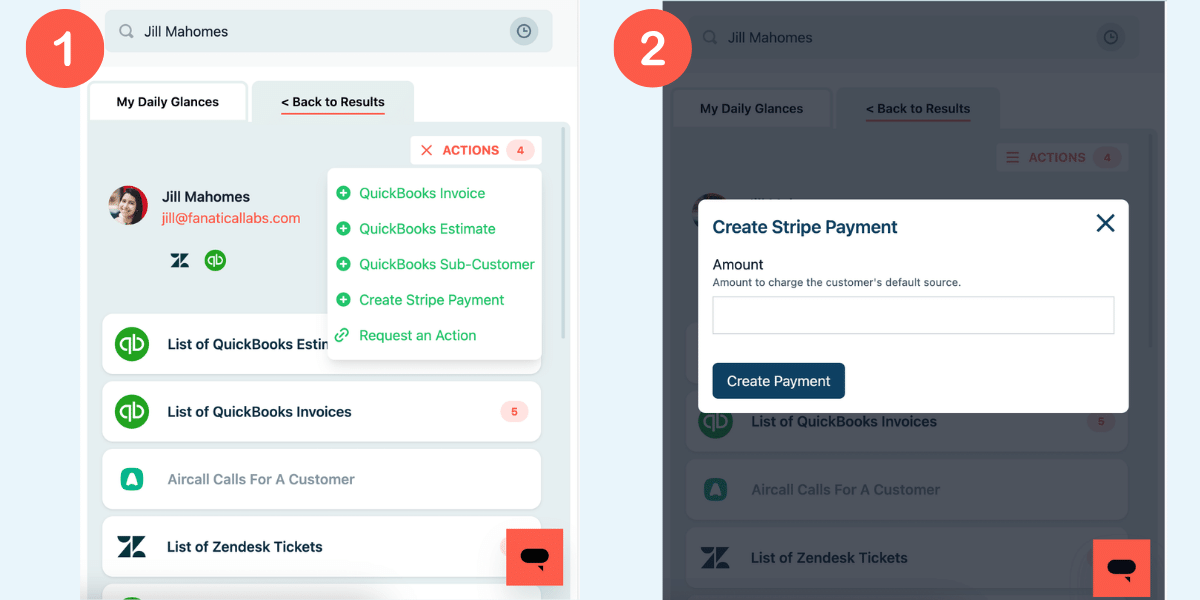
Glances Actions helps you automate tasks across your favorite business apps that typically cannot be automated. Handled directly within Glances while you work anywhere online, Actions allow you to complete tasks in other apps without navigating away from your work. Our customers report saving up to 20 minutes of time per completed task, which adds up to hours of work saved per teammate, every single day. Here are a few ideas of what you can accomplish using Actions for your top business apps:
- Create, send, and resend invoices and estimates
- Pre-fill various online forms
- Create new customers and update existing profiles
- Start online calls and virtual meetings
- Create new payments and refund existing payments
- Create new products and services
- And dozens of other helpful Actions!
Want to automate to the next level? You can further optimize your daily workflows with post-Action app updates, which automatically bring back select pieces of data to specific apps after you complete Actions. Learn more below in section D.
B is for Build-Your-Own Curriculum
No two tech stacks and workflows are the same, which is why Glances is an adaptable fit for businesses of all kinds and sizes. Construct Glances to work as uniquely as your team needs it to, no matter the…
- Industry you work in
- Amount of business apps you use, from Asana to Zendesk
- Number of accounts or instances per app your team relies on
- Type of daily tasks you need to perform
Building Glances starts with connecting your favorite business apps for yourself or as an admin on behalf of your specified teammates. Even your private apps and legacy systems are connectable! Customize even further by utilizing the multitasking powers of Actions, from dozens of built-in Actions available for specific apps to whatever your team can dream up (send us a request here).
C is for Connected and Confidential
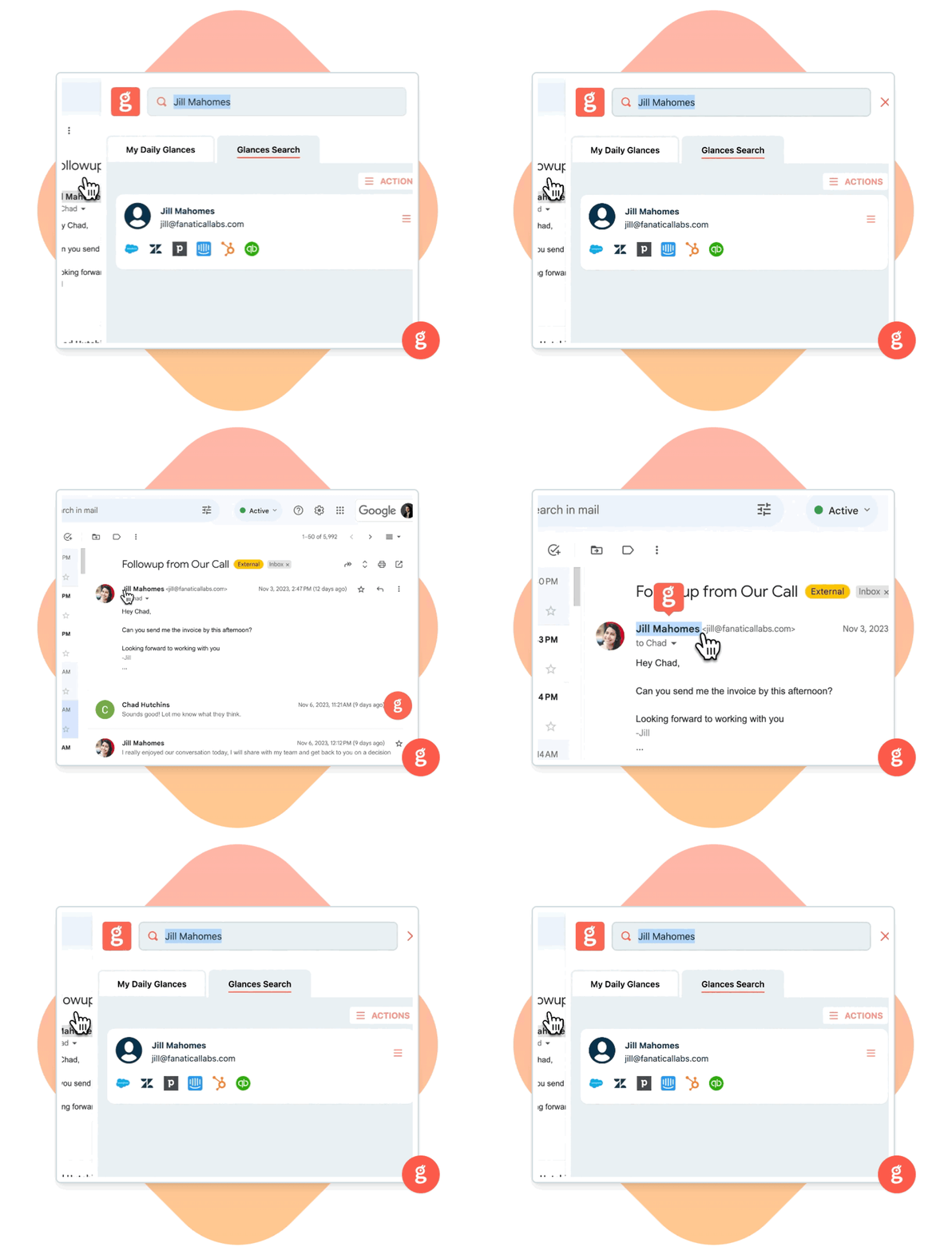
Staying connected to the data you need in the moment you need it has never been more convenient and accessible. Directly from the Glances browser extension (our favorite way), online at glances.com, or in-app with platforms like monday.com, Glances is your go-to for viewing more and doing more with your data across apps while working anywhere online. Ditch tab toggling, stop switching apps, and finally stay focused working in your platform of choice without continually navigating away.
Data security and privacy, plus team confidentiality, are also huge benefits. Glances lets your data live in its native application, so it does not require syncing or storing of your (or your customers’) data.
Internally, not every employee needs full access to an app account and the complete data it hosts. Whether for confidentiality, security, or another valid reason, having these parameters in place is important. That is why Glances allows admins to specify who can view what data on a team using personal connections. For example, enable a specific team member to only view CRM leads assigned to them without granting full access to the Salesforce account data.

D is for Diploma-Level Data Syncs
Just as post-Action app updates bring your workflows full circle, this feature earns a diploma in modern workflow design.
Using Actions, you can already create a new invoice for your favorite billing app, edit the invoice fields, and send the finalized invoice to a customer. All of these steps happen directly within the Glances widget, while working anywhere online. Now with post-Action app updates, you can ensure specific data events that happen following completed Actions are then updated and displayed in your app of choice. Tracking payments and triggering your team’s desired workflows have never been easier!
Sequence of events (example):
- Connect your favorite billing and project management apps with Glances
- Use Glances Actions to create and send billing app invoice to customer
- Customer pays off billing app invoice 30 days later, updating balance to $0
- Post-Action app update shows $0 balance data in your project management app
Watch how it works in the video below.
Make your dream workflows possible with Glances
Start your free trial to connect your favorite business apps and access your data in one easy click, from any app or webpage. You can find and connect Salesforce, monday.com, QuickBooks, Mailchimp, and more apps when you are logged in to your Glances account.
More helpful steps
Schedule a demo to see the time-saving benefits of Glances in action or ask our team questions.
If you need to connect a specific app or platform with Glances that is not currently available on glances.com, please send your requests to hello@glances.com.
Find more step-by-step articles with the latest information on our support site.