Feature Update: See Success Notifications After Completing Actions

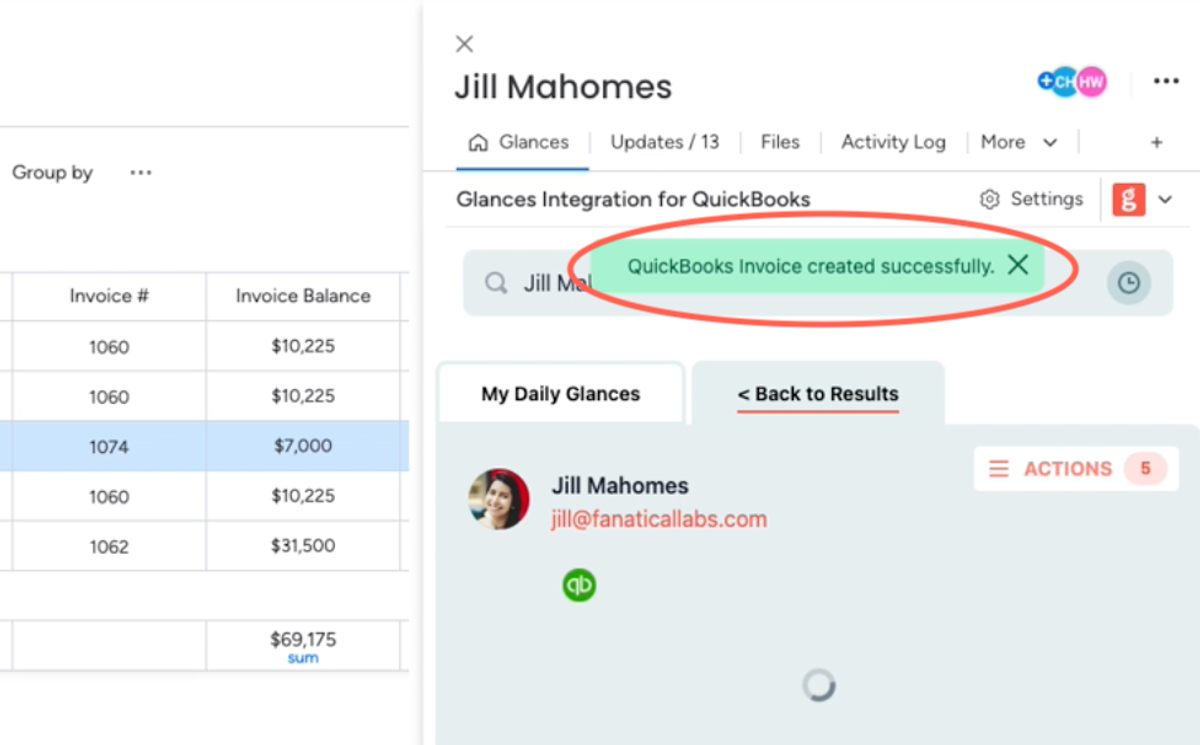
Glances Actions were built to help you confidently complete tasks across apps without tab-toggling away from the app or webpage you prefer to work in. As with all things in the SaaS world, our talented development team continually focuses on user-centered improvements and new features to make your dream workflows possible. After listening to recent customer feedback, all Actions will now include an immediate pop-up notification reassuring users that their desired task was successfully completed. Think of it like a virtual thumbs up for added peace of mind.
While this feature update will work for any connected app that has Actions, check out how it looks below for a user working in monday.com and completing the QuickBooks invoice Action.
Why is this update needed?
Previously, some users may have felt a little unsure if an Action was finalized after clicking the create or save button, since there was not any message or visual indicator to verify completion. Even though the desired Action would process successfully, adding a quick validation pop-up would be helpful for users to see and feel reassured. Note that the core functionality of Actions is not changing; this is simply an enhancement to the user experience with Actions.
What are Actions?
Glances Actions empower you and your teammates to complete time-saving tasks across different business apps without navigating away from your work. For example: create and send invoices for your accounting app, update customers for your CRM system, start web calls for your telephony software, and complete many other helpful functions directly within Glances, while you work anywhere online.
Any Glances customer can take advantage of Actions, which are included and available based on the apps you have connected. However, if you need to ramp up your daily workflows with less data entry and more automation, consider working with our team’s unique data mapping process to take Actions to the next level.
Watch Video: Create QuickBooks Invoices in Less Than 30 Seconds!
What Actions can improve your daily workflow?
Did you know new Actions are possible for Glances users based on customer demand? If you have an action or function in mind for any of your apps connected with Glances that will make your workday simpler, we’re here for it. Use our Request an Action calendar to select a time to briefly discuss your current apps and needs with our team.
Integrate all your favorite apps and perform Actions, using Glances
Start your free trial to connect your favorite business apps and access your data in one easy click, from any app or webpage. You can find and connect QuickBooks and more apps when you are logged in to your Glances account.
More helpful steps
Schedule a demo to see the time-saving benefits of Glances in action or ask our team questions.
If you need to connect a specific app or platform with Glances that is not currently available on glances.com, please send your requests to hello@glances.com.
Find more step-by-step articles with the latest information on our support site.