Take a Deeper Data Dive: Now View Full Conversation Details Using Glances

Your complete conversation history is a glance away
At Glances, our entire purpose has been to give professionals like you the big picture of your data across multiple business apps, in real time. Our development team has just launched another high-five-worthy product update and we’re calling it the “Deeper Data Dive” because it empowers you to view your entire chat histories and conversation threads when apps such as Intercom and Zendesk are connected with Glances. This framework can also work for virtually any other web app that hosts threads of content!
Love working in your CRM but need to know the full context of a customer’s support ticket? Stay right where you prefer to work and get all the content you need when your apps are connected with the Glances no-code integration platform. We’ll show you how this fresh update works below.
Watch demo: see our Deeper Data Dive in action!
How to view conversation details while working in any application
In the demo screenshots below, Glances user Chad is working in Pipedrive CRM and has clicked the orange ‘g’ stamp next to an email address to quickly open the Glances browser extension and see the contact’s related data across apps. From there, Chad clicked the Intercom icon to check out his List of Intercom Conversations Glance. With this update, he now has the ability to see Single Conversation Details with a helpful notification number (4) to know there are several lines of back-and-forth content unique to this specific customer.
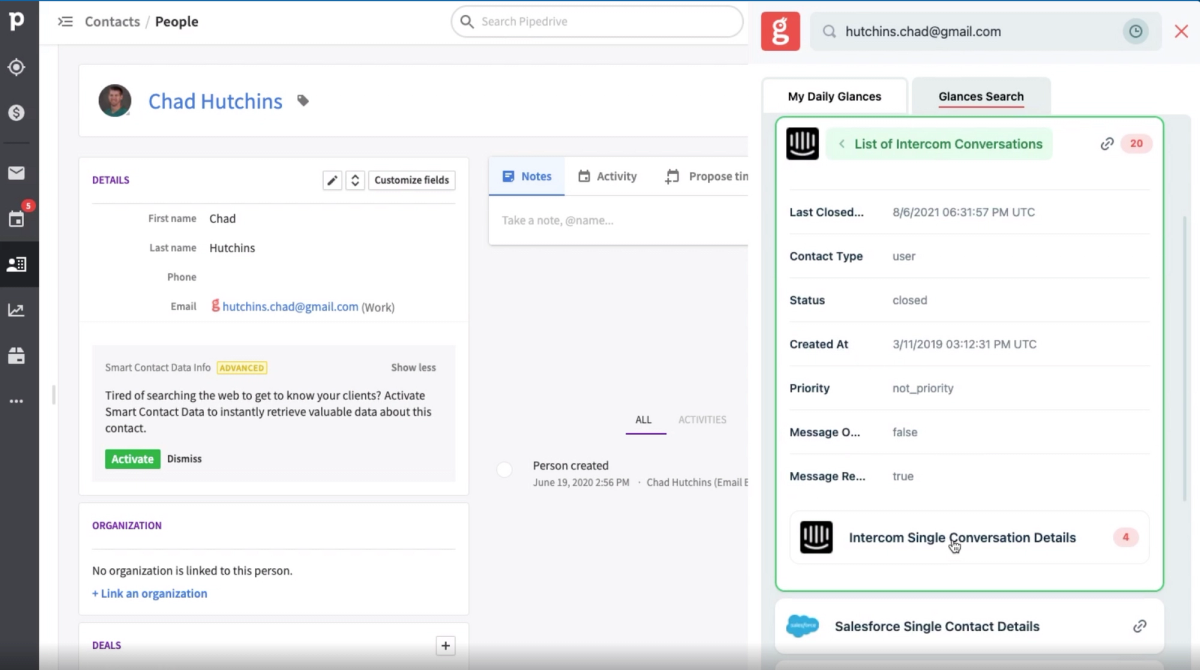
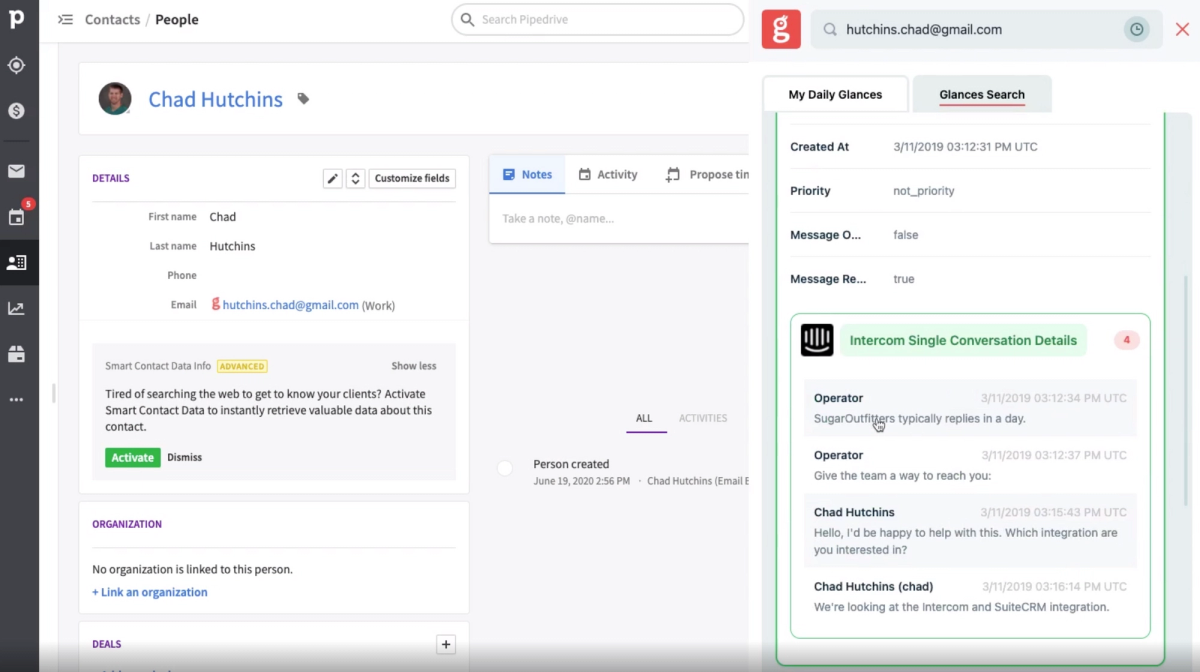
After clicking on Single Conversation Details, the customer conversation fully expands for Chad to review. For lengthy chats, he can simply scroll through to view the complete history and gain total understanding of where this customer stands from the latest Intercom communications.
Now that Chad understands the latest happenings in Intercom, he wants to also check if this customer has any open support cases. He goes back and clicks on the Zendesk icon to open his Zendesk Tickets Glance. Right away, he sees the Zendesk Ticket Notification Details, then clicks to expand the support thread to review the status of this customer’s case.
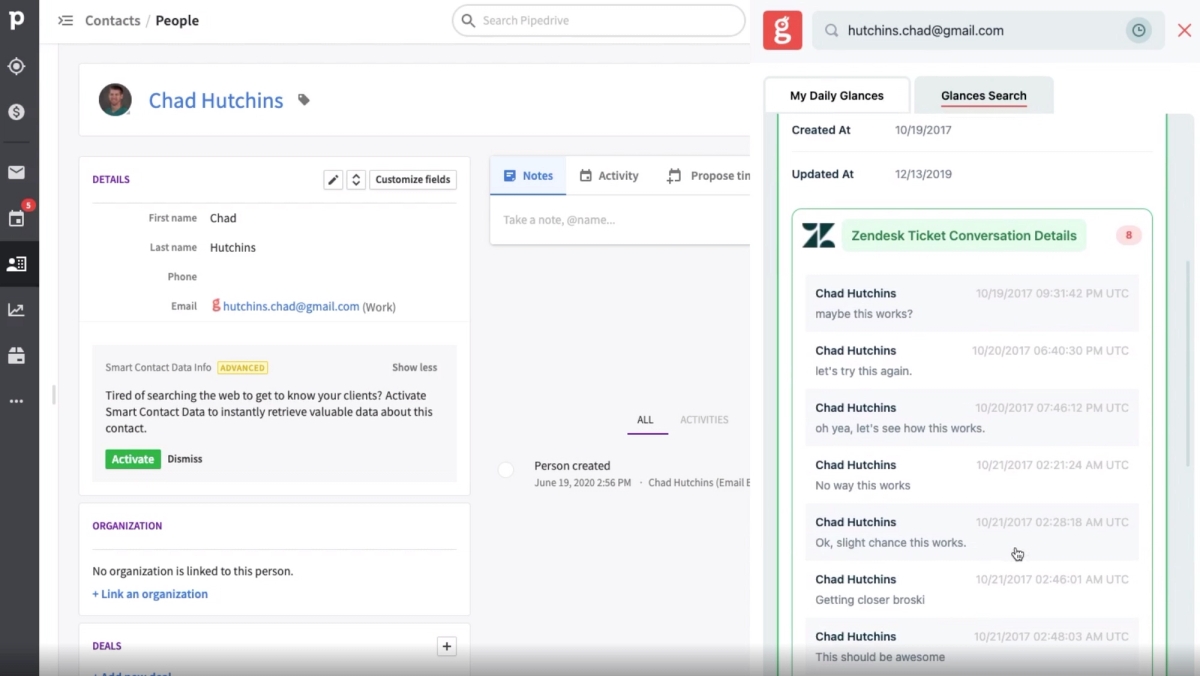
Boom. In less than a minute, Chad is up to date on this customer’s situation and can follow up with full context and full confidence – all while continuing to work in his preferred platform, Pipedrive.
We built the framework, now take advantage of it
For current and future Glances users, the sky is the limit with this added feature. So, think about what additional data you would like to see and how it can give your team complete context. Consider it for your customer chat apps, conversational marketing platforms, or even line-item data for accounting apps like QuickBooks. Send your preferences to our team so we can review your current tech stack and help make it happen.
Simplify the way you work with Glances
Start your free trial to connect your favorite business apps and access your data in one easy click, from any app or webpage. You can find and connect apps like Intercom and Zendesk when you are logged in to your Glances account.
More helpful steps
Schedule a demo to see the time-saving benefits of Glances in action or ask our team questions.
If you need to connect a specific app or platform with Glances that is not currently available on glances.com, please send your requests to hello@glances.com.
Find more step-by-step articles with the latest information on our support site.