Now Create QuickBooks Invoices in Any App, Using Glances

Don’t just view invoices using Glances, create them!
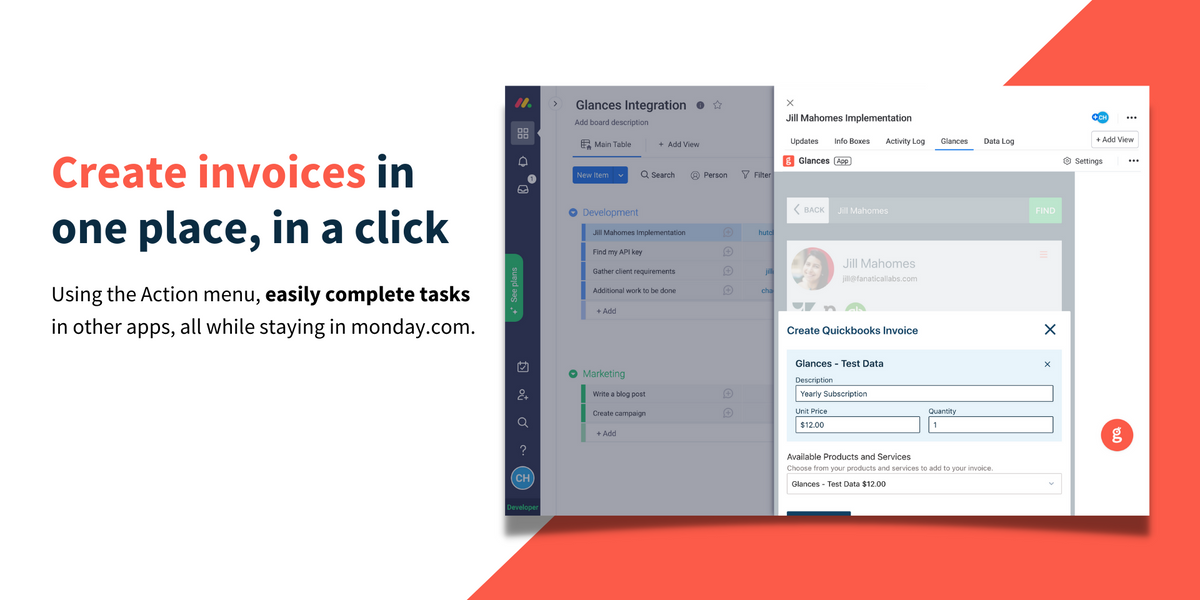
If you use QuickBooks accounting software as one of your connected apps with Glances, your productivity levels are going to reach new heights. Our development team just rolled out one of the first action-based features for the Glances no-code integration platform: the ability to create QuickBooks invoices while using any other application, in one simple click! Viewing your QuickBooks data within any app was already a time-saving benefit of Glances, but now we have driven the usability factor up several notches to help you shave off even more time from your daily workday tasks.
How it works
After connecting QuickBooks with Glances, you will be able to easily create new invoices while working on any webpage or within any application. From the customer view, locate the Action menu in the top right corner. Watch this quick video to see how it works.
Outside of using Glances Actions to create invoices, estimates, and more, you can glance at the following data categories within any app, platform, or webpage you are working in when QuickBooks is connected to Glances:
- List of QuickBooks invoices per contact
- List of QuickBooks estimates per contact
- List of QuickBooks payments per customer
- List of QuickBooks projects per customer
- List of QuickBooks invoices for specific project, per contact
Glances unites monday.com and QuickBooks
As one of our most popular customer app combinations, many monday users need a way to see their QuickBooks data in their monday.com account. Glances bridges the missing gap between these two apps and many others. Whether you use Salesforce, Shopify, Zendesk, Mailchimp, or any other combo of popular business applications, we understand that finding customer information within various systems is a huge, time-consuming struggle. That’s why we built Glances as your go-to hub for customer insights and personal tasks. It securely connects all of your apps and provides a simplified view of the data you need in real time, no coding necessary.
Try Glances with QuickBooks to create invoices and estimates anywhere online
Start your free trial to connect your favorite business apps and access your data in one easy click, from any app or webpage. You can find and connect QuickBooks when you are logged in to your Glances account.
More helpful steps
Schedule a demo to see the time-saving benefits of Glances in action or ask our team questions.
If you need to connect a specific app or platform with Glances that is not currently available on glances.com, please send your requests to hello@glances.com.
Find more step-by-step articles with the latest information on our support site.