How Glances Actions Help You Tackle Your Big, Scary To-do List

What strikes the most fear into hearts all around the world on Halloween? It’s not ghouls, witches, zombies, goblins, or even werewolves. It’s that nightmarish to-do list waiting for them at the office the next day.
To-do lists and stress
According to a VitalSmarts study cited by HR Dive, three in five people put more on their to-do lists than they can actually get done. Half of the respondents said that they are moderately stressed while 35% said they are highly stressed and 9% said they are very highly stressed. Now that’s downright terrifying!
And while technology often helps us get work done faster and easier, it also creates what author Craig Lambert calls “shadow work” that eats away at our free time and mental energy. This work consists of “all the unpaid tasks we do on behalf of businesses and organizations,” things like checking notifications from work apps, watching how-to videos, using self-checkout kiosks at the store, chatting with online customer support, and so on. It’s enough to send a shiver down your spine.

To-do list tips
Fortunately, there are some wicked smart ways to make your to-do list less overwhelming and more helpful. NPR’s Life Kit offers several tiny hacks to improve it. Here are the top three:
1. Employ the two-minute rule
If a task will take less than two minutes, you’re better off doing it right away. Writing it down, remembering it, and doing it later will take more time in the long run, so get it out of the way while it’s on your mind.
2. Use automation to your advantage
For those same tasks you add to your list every week or month, look for ways you can automate them. For instance, instead of adding “reorder prescription” to the list, sign up for auto-refill from your pharmacy. At the workplace, you can use apps like Zapier to automate some of your daily to-dos—and when Zaps aren't enough, Glances can help automate your tasks that can't typically be automated.
3. Keep tasks specific and small
While it’s fine to include large, ambitious goals on your to-do list, you probably won’t make much progress on them until you break them down into manageable steps. Something like “learn a second language” is better listed as “buy a dual-language dictionary,” “watch TV programs in new language,” “create vocabulary flashcards,” and so on.
Actions "creep" it real
Perhaps even better than simplifying your to-do list is cutting down on that frightening work hiding in the shadows. But is there really an easy way to save time and energy by streamlining your daily workflows? Well, hold onto your broomsticks—yes, there is!
Glances Actions allow you to complete a task in another app directly from Glances. In fewer clicks and without tab switching, you can check that task off your to-do list without navigating away from whichever website or app you’re using. For example, you can create a QuickBooks invoice, update a SugarCRM customer profile, start a Zoom meeting, and much more—all from wherever you’re currently working.
In the product shots below, see how easy it is to access the Actions menu using Glances, then select various activities based on the apps you have connected.
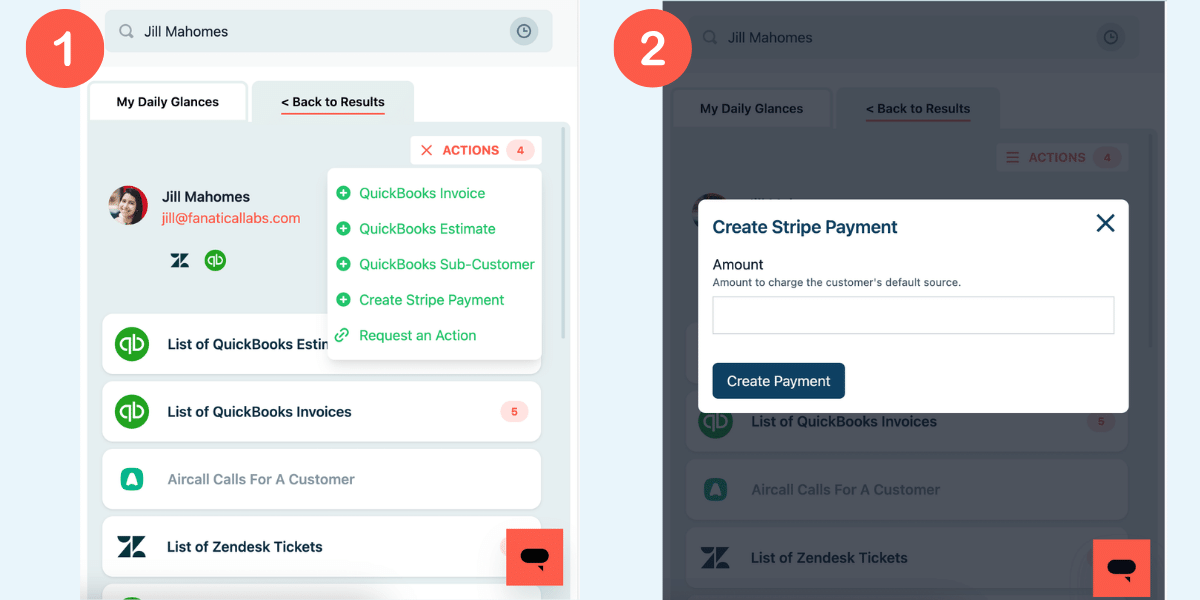
If you don’t see an action or function that would simplify your to-do list, have no fear. You can request an Action, and we’ll gladly look into how we can create it for you.
Tackling that to-do list is no longer “witchful” thinking. Trick or treat yo’self with a free trial of Glances today!
More helpful steps
Schedule a demo to see the time-saving benefits of Glances in action or ask our team questions.
If you need to connect a specific app or platform with Glances that is not currently available on glances.com, please send your requests to hello@glances.com.
Find more step-by-step articles with the latest information on our support site.