Harnessing Sub-items for Effective QuickBooks Billing on monday.com

Over the years, we’ve worked with numerous businesses and have seen a lot of ways to manage monday.com and QuickBooks. One common area where efficiency often lags is in the billing process. Leveraging tools like Glances in combination with monday and QuickBooks can help your workflow feel less cumbersome. In this final article of our 3-piece series focused on monday and QuickBooks, we’re excited to share with you one technique that will revolutionize your process for creating QuickBooks invoices and estimates.
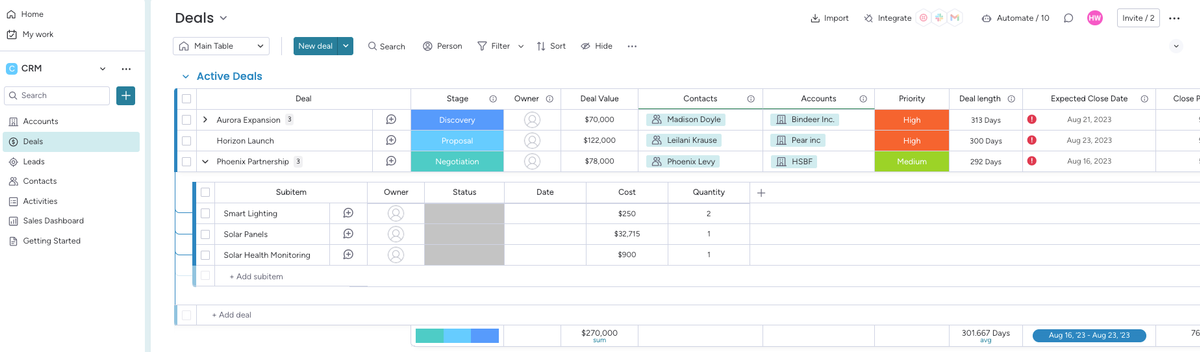
monday.com is well-known for being flexible and customizable, allowing your team to best organize your customers and projects in a way that makes the most sense for you. One powerful, but often overlooked feature, is the ability to create sub-items within tasks, allowing your team to break down complex projects into smaller and more manageable pieces. When used for billing, these sub-items can include detailed descriptions, quantities, or other relevant information.
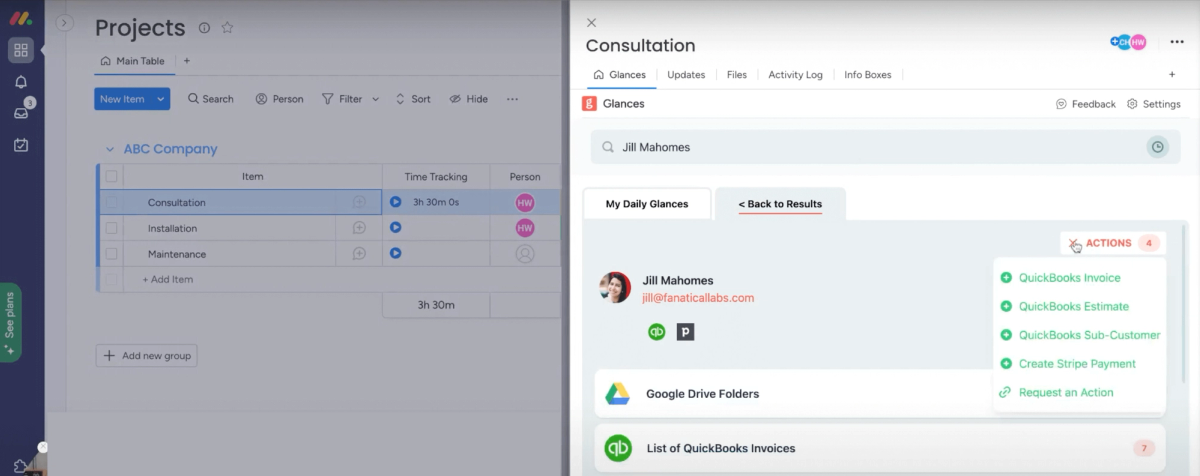
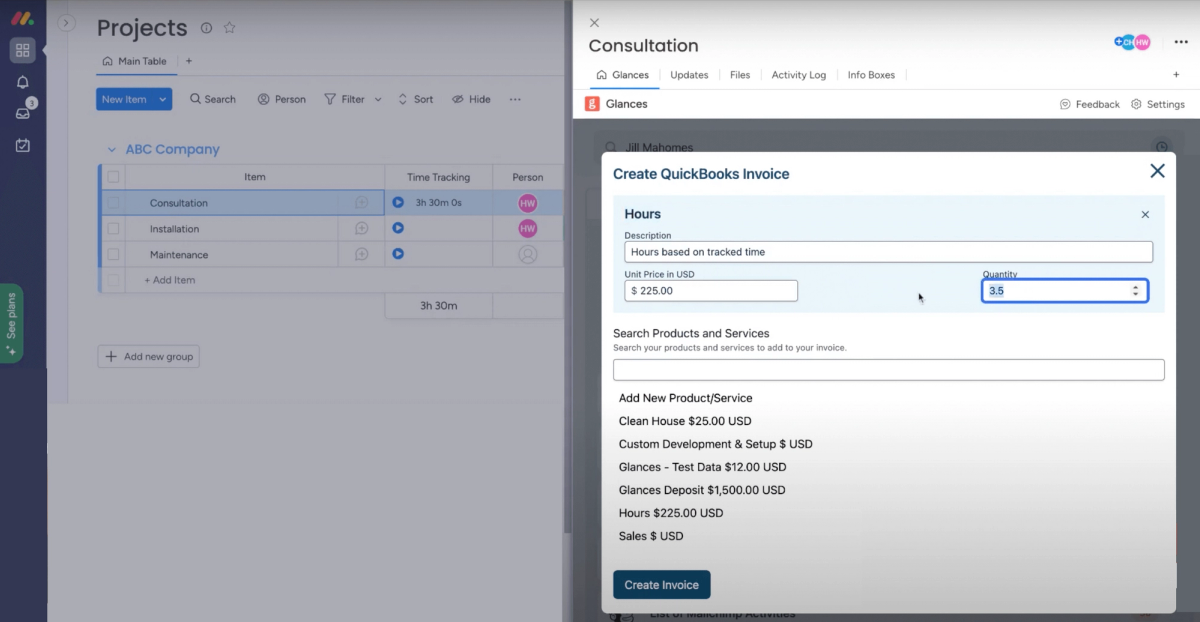
Instead of manually transferring data from monday.com to QuickBooks, Glances allows you to create invoices and estimates from monday.com using the data directly on monday.com, using the item and sub-item fields.
Here's how it works
1. Organize your monday.com boards
Start by setting up your monday.com boards to effectively manage your customers and projects. We recommend creating two separate boards: one customer board and one project or deals board. You can easily connect these boards using the steps here: Create a Connect Boards Column. If you’re using monday sales CRM, you can use their pre-built Accounts and Deals boards. This allows you to maintain clarity and organization.
2. Utilize your project board
Use your project board to create items for each project, order, or deal. These items serve as containers for customer and billing information and can be managed and tracked throughout the process.
3. Harness the power of sub-items
Use sub-items within each deal to represent each product or service that will be included in the invoice or estimate. These products and services should match the ones you have on QuickBooks. Sub-items allow you to capture more detailed descriptions, quantities, prices, and all the other data you need for accurate and straightforward billing. See more about sub-items here: All About Sub-Items.
4. Use Glances
When using Glances to create estimates and invoices, we map the data from monday.com sub-items and automatically pre-fill the corresponding fields for QuickBooks. This saves you time and reduces the risk of errors from manual data entry.
Benefits of using monday.com sub-items
Accuracy
By pulling data directly from monday.com from sub-items, we can ensure the information is created accurately on the QuickBooks side, minimizing discrepancies and errors.
Efficiency
Extending your workflow with Glances saves you from clicking from app to app and copy/pasting data. Your team can spend less time on routine tasks and more on more strategic work.
Customization
Because Glances can be tailored to your workflow, you don’t need to force your routine into a box. This flexibility ensures you’re not constrained by rigid processes that feel clunky and difficult. We tailor the process to fit your needs, not the other way around.
Glances makes monday and QuickBooks work together, better
By harnessing the strengths of both monday and QuickBooks through Glances, your business can achieve a smoother, more integrated billing process. Our unique data-mapping methods can be applied not only to invoices and estimates, but also for customer creation in QuickBooks and other app Actions, such as Stripe or Xero.
To put mapping into place, schedule a quick call with our team using the link below. We’ll review your process, capture details on the field data you need, and get to work.
Click to schedule an onboarding call or reach out to us at support@glances.com.
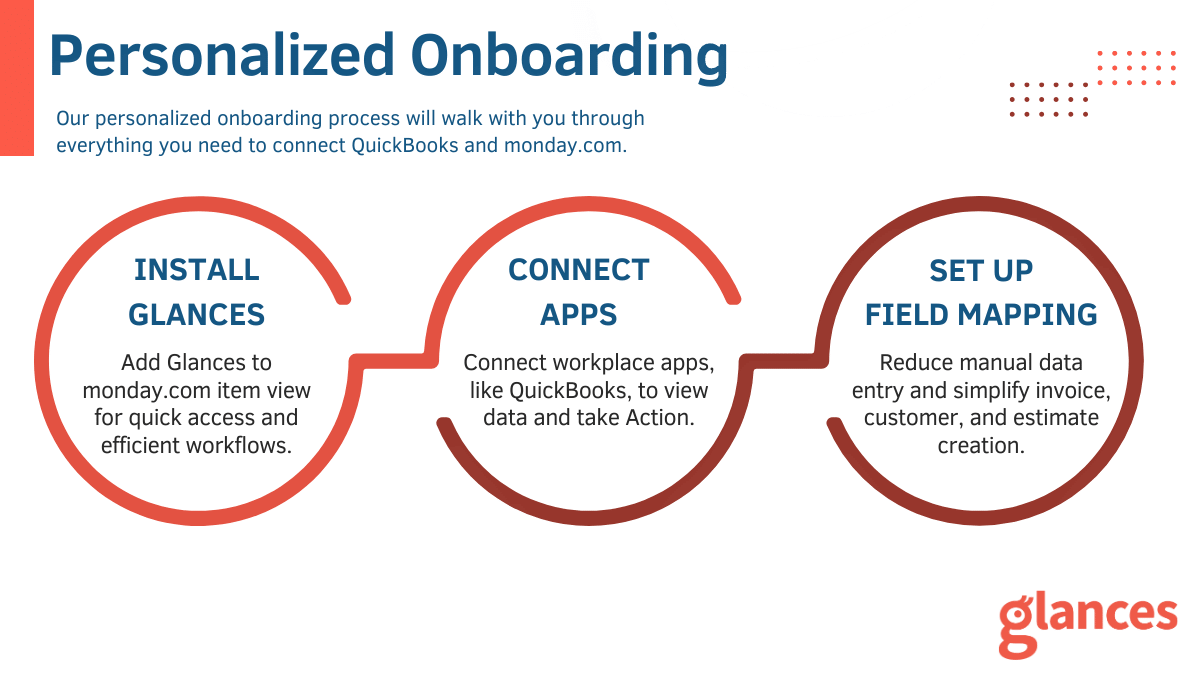
What to expect during your onboarding call
- Learn About Your Work: Each business is unique so we’ll chat about yours to learn what you do and what you need. Understanding your process and requirements helps us configure Glances.
- Install Glances: Adding Glances to the item view allows you quick access to all your data and enables you to take Action with ease.
- Connect QuickBooks: We’ll walk you through connecting QuickBooks and other favorite workplace apps, if needed.
- Configure Mappings: We’ll set up Glances to pre-fill relevant data into invoices, estimates, and more so that you create new QuickBooks records without retyping or copy/pasting from one platform to the other.
Glances makes all your business apps work together
Glances securely connects all of your business apps, empowering you and your team with a 360-degree view of customer and personal data while working anywhere online. Built with patented, no-code technology and backed by 5-star support, Glances has reimagined software integrations with all of the convenience and none of the data-syncing, downtime, and maintenance costs. You can find and connect support software like monday.com, QuickBooks, Intercom, and many others when you are logged in to your Glances account.
Start your free trial today.
More helpful steps
Schedule a demo to see the time-saving benefits of Glances in action or ask our team questions.
If you need to connect a specific app or platform with Glances that is not currently available on glances.com, please send your requests to hello@glances.com.
Find more step-by-step articles with the latest information on our support site.