Glances Loves Connecting Your A-List Apps with monday.com

Valentine’s Day celebrates all things love and connection, but let’s take a moment to address one of the most important relationships inhabiting your personal workspace: your software apps and how they work (or don’t work) together.
With more than 180,000 customers worldwide, monday.com remains a top project management platform that many Glances customers choose to work with. Follow along as we share the most-requested and most-connected apps for Glances and monday.com users. Combined with Glances Actions, these app pairings work to drastically improve daily workflows, so you can fall back in love with the talent-based work you were hired to do. Let’s go!

Glances connects monday.com and QuickBooks
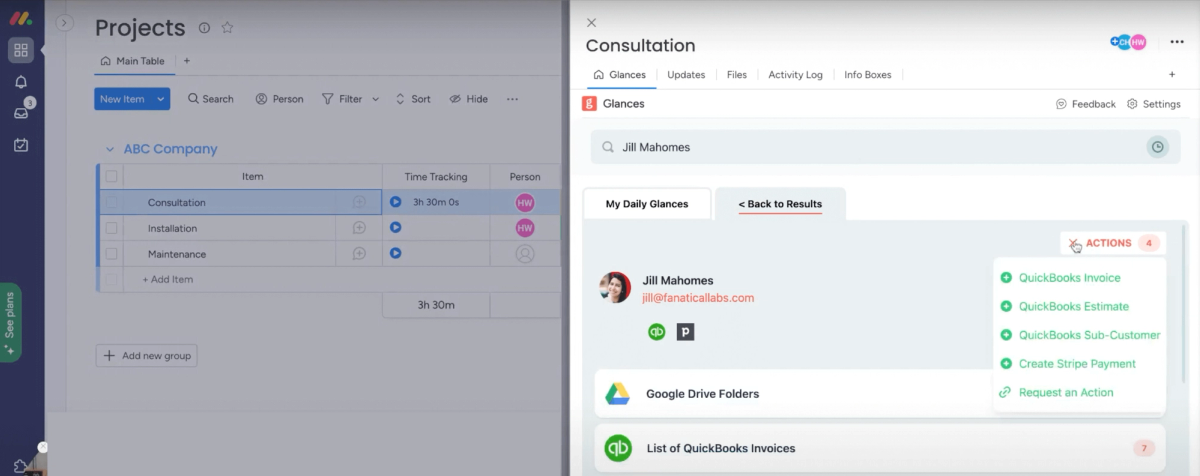
Accuracy in accounting is everything. Save yourself (and your teammates) from making embarrassing and costly data-entry mistakes for project-based accounting by using Glances to connect monday and QuickBooks. This super-popular app pairing helps you save time, complete invoicing tasks with super efficiency, and keep the books clean. Using Glances, you can stay focused working in monday and perform these multitasking Actions for QuickBooks:
✔️ Create and send QuickBooks estimates and invoices
✔️ Add new products or services as line items for QuickBooks
✔️ Create new customers and sub-customers, plus update existing ones
✔️ Convert QuickBooks estimates to invoices
✔️ Get time-tracking data from projects to auto-populate within invoices
✔️ Give teammates accounting insights and Actions without direct access to QuickBooks
Visit our support site for a step-by-step instructions on installing Glances in-app with monday.com, connecting QuickBooks, and learning more about managing Actions for QuickBooks. You can also find Glances for QuickBooks listed on the monday marketplace.
Glances connects monday.com and Xero
If QuickBooks isn’t your accounting platform of choice, look to Xero as another must-have app for viewing accounting data and handling tasks related to your monday projects. Do it all directly within the monday platform, while working in another business app, or while browsing online.
Learn more about connecting Xero with Glances on our support site and check out the video below.
Glances connects monday.com and Salesforce
If you keep customer records and sales activities in Salesforce, you can use Glances to easily view CRM data while working on customer projects in monday (or anywhere else online). If you rely on a different CRM like Hubspot, Pipedrive, or SugarCRM, no sweat! Glances can connect with virtually any business platform.
Learn more about connecting Salesforce with Glances on our support site.
Love monday.com, but despise app overload?
If you are balancing the high-maintenance, love-hate tendencies of multiple apps in your tech stack, this message of hope is for you. Apps and platforms of all kinds can lovingly coexist and work better together with Glances. Just like an expert relationship therapist, Glances connects your favorite business apps (even those not on speaking terms), helping them to get on the same (web)page and show your important data in one 360-degree view. It’s the tranquility you have been searching for in a world with too many open tabs, too many clicks to find information, and too many digital distractions.
Achieve your dream workflows with Glances
Start your free trial to make your favorite business apps work together and perform time-saving Actions. You can find and connect apps like Salesforce, QuickBooks, Zendesk, Stripe and more when you are logged in to your Glances account.
More helpful steps
Schedule a demo to see the time-saving benefits of Glances in action or ask our team questions.
If you need to connect a specific app or platform with Glances that is not currently available on glances.com, please send your requests to hello@glances.com.
Find more step-by-step articles with the latest information on our support site.