New Feature: Use Monday.com Time Tracking Data for QuickBooks Invoicing

Another go-to Glances feature for monday.com and QuickBooks users
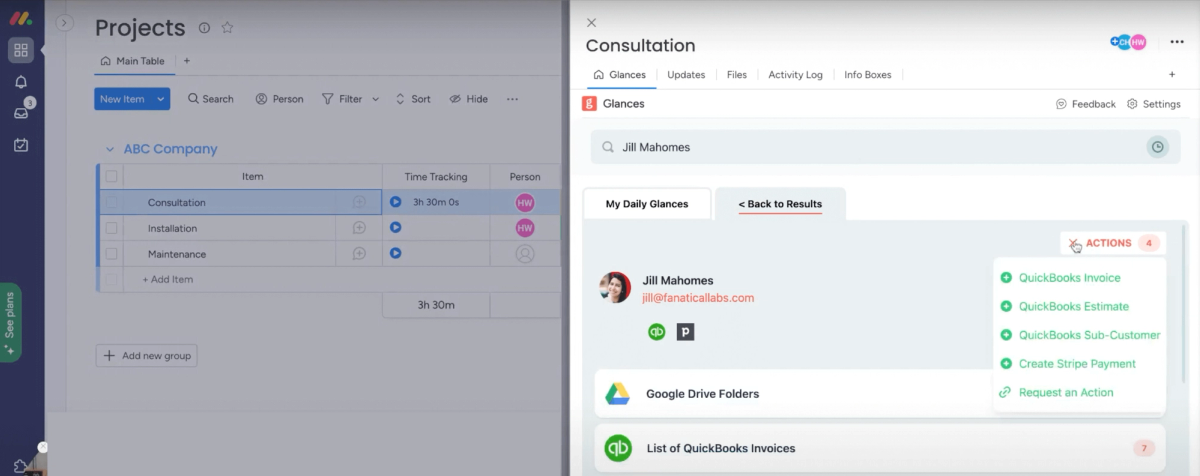
Accurately tracking your team’s time spent on projects to properly invoice clients just became a no-brainer, thanks to a new feature our developers have recently rolled out. Now, any Glances users with the monday.com and QuickBooks apps connected can have time tracking data from projects auto-populate within invoices. Once set up by our team, this automation takes place when you select the Create QuickBooks Invoice Action directly in Glances, for quickly creating invoices while working anywhere online.
Why should you care? Outside of saving time and continuing to work in monday.com, your favorite CRM, or browsing online, below are some immediate benefits of using this new Glances function:
✔️ Avoid duplicate data entry and making mistakes when creating invoices
✔️ Empower users to create invoices without direct access to QuickBooks account
✔️ Ensure QuickBooks accounting data remains clean and error-free
Watch the walkthrough video below to see it all in action, presented by Glances Co-founder and CEO Jason Eggers.
Getting started with this feature
This Glances feature requires some initial mapping of the right monday.com field to the proper QuickBooks line item for your unique business needs. Send in a request via our support site and our team will set that up for you.
From there, use Glances in-app with monday.com, or click to open Glances anywhere online, to access the Actions menu and start creating new invoices, estimates, customers, and many other multi-tasking items across apps.
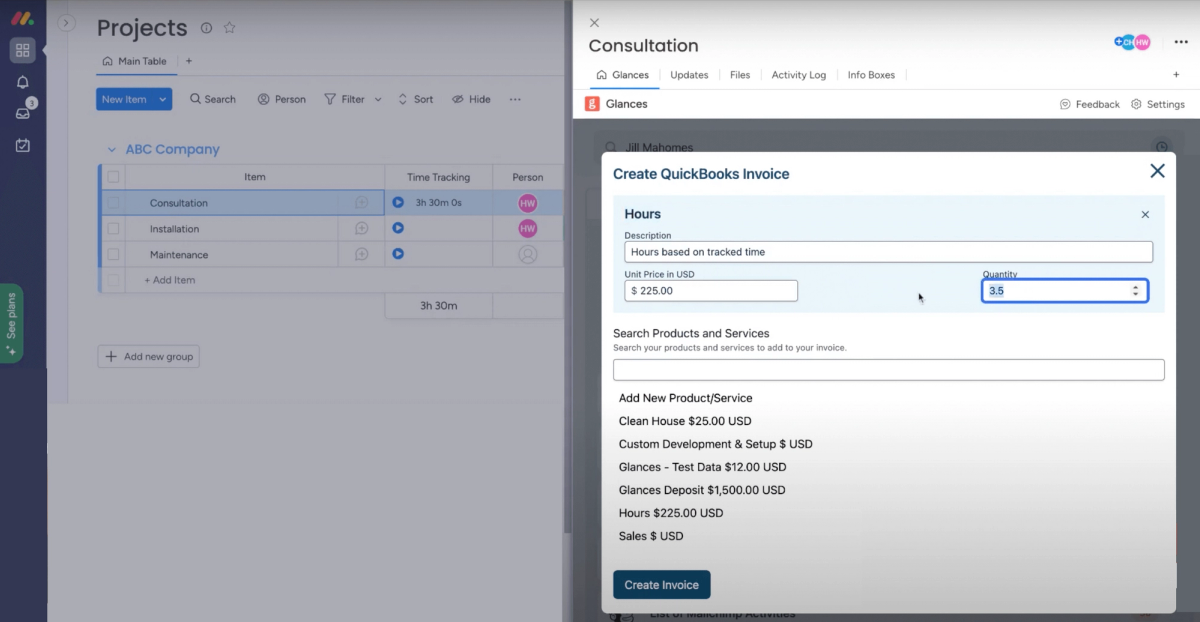
So many businesses rely on time tracking not only for client invoicing, but to keep tabs on employees’ time entries for payroll purposes. You can read up on time tracking with monday and how to best use this feature within the platform and also be sure to check out Glances on monday’s app marketplace.
What actions can improve your daily workflow?
Did you know auto-populating time tracking data for invoices is possible for all Glances users because one of our customers requested it? If you have an action or function in mind for any of your apps connected with Glances that will make your workday simpler, we’re here for it. Use our Request an Action calendar to select a time to briefly discuss your current apps and needs with our team.
Integrate all your favorite apps and perform actions, using Glances
Start your free trial to connect your favorite business apps and access your data in one easy click, from any app or webpage. You can find and connect monday.com and QuickBooks when you are logged in to your Glances account.
More helpful steps
Schedule a demo to see the time-saving benefits of Glances in action or ask our team questions.
If you need to connect a specific app or platform with Glances that is not currently available on glances.com, please send your requests to hello@glances.com.
Find more step-by-step articles with the latest information on our support site.