Glances Delivers Ultimate Flexibility for monday.com and QuickBooks Invoicing

Manage invoicing your way
Through our experience working with companies that use both monday and QuickBooks, we’ve discovered a common priority: flexibility. Glances already offers flexibility in creating items like estimates, invoices, and customers, as well as in generating invoices—whether manually, pre-filled, or pulled from sub-items. Recently, we’ve expanded these options with even more flexible ways to move invoice data from QuickBooks to monday. When it comes to managing invoices and financial data, flexibility, efficiency, and accuracy are essential.
Below, we’ll explore two primary use cases for using Glances and QuickBooks together. You are also welcome to read more on this topic in our support article.
Use Case 1: Create invoices from multiple boards, sync QuickBooks data to one unified invoices board
Whether your team operates across multiple boards tailored to specific functions, such as event registrations, large projects, or enterprise accounts or you invoice from one main projects board, invoices can be created from any board, as needed.
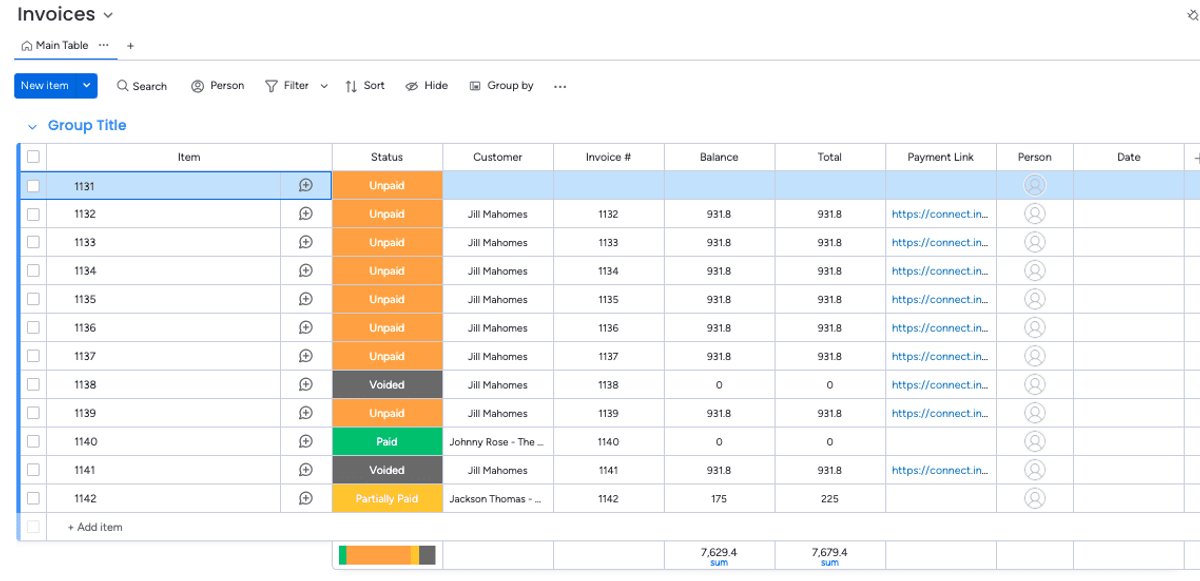
After invoices are generated, invoice data from QuickBooks syncs back to one unified invoicing board for consolidated tracking. This is ideal for teams who:
- Have diverse workflows
- Use multiple boards they invoice from
- Want one unified invoices board where all invoice and data appears
By maintaining separate boards for distinct workflows while consolidating invoice data in a unified board, teams gain enhanced organization and custom workflow flexibility. This is particularly beneficial for teams that frequently utilize temporary boards for specific events, customer segments, or projects. With this approach, teams can tailor boards to their unique needs without compromising access to invoice information. All invoice-related data seamlessly flows to the unified board, ensuring a central repository for all invoices, regardless of their origin.
By having one invoice board, teams can more easily pull invoice-related reports to stay connected to the latest data and allow them to easily monitor all invoices without the need to gather data from multiple sources. One unified board is highly scalable, allowing businesses to evolve and grow when new fields or automations are needed.
Use Case 2: Create invoices from one board, sync QuickBooks data back to same board
You and your team use a single board to create and manage invoices. Invoices are generated directly from this board, streamlining the creation process. Once created, the invoice data syncs back to the same board from QuickBooks. This setup can be configured by the Glances team and is ideal for:
- Those who want to view invoice data directly within their projects
- Have static boards that don’t frequently change
- Don’t want to connect or mirror invoice data from a dedicated invoice board
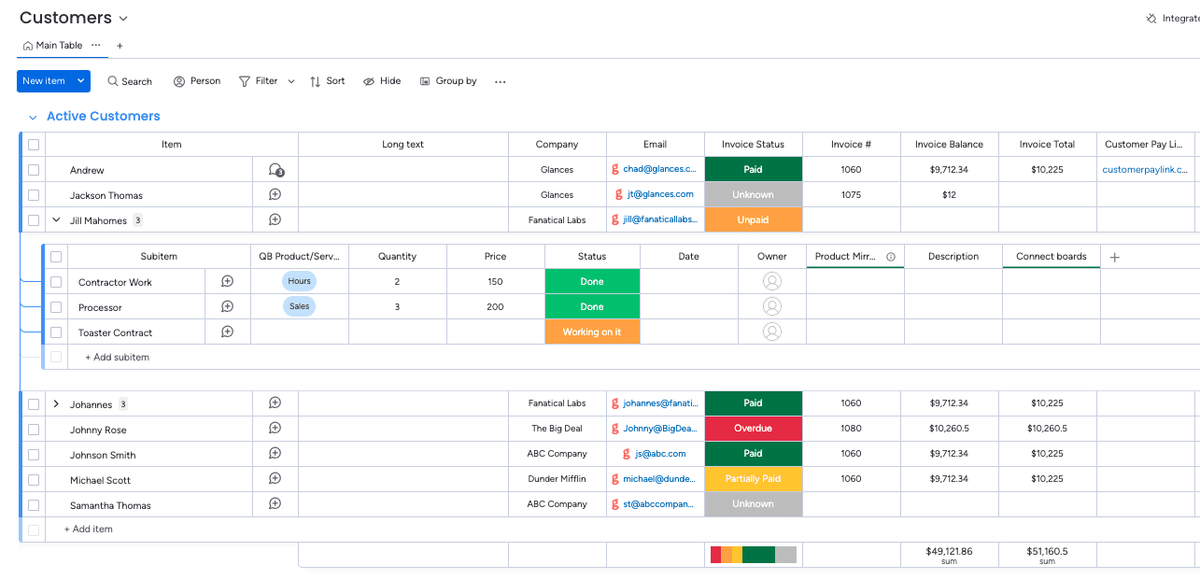
This approach simplifies management by displaying invoice data directly within the project board where they were created, fostering consistent sales pipelines while maintaining the flexibility for necessary adjustments. Streamlined collaboration is enhanced as teams working within a single board can effortlessly access, update, and track invoices, minimizing confusion and eliminating redundant work.
By adhering to standardized processes for creating and managing invoices within a single board, teams can maintain consistency across projects and clients. Real-time syncing ensures that updates made in QuickBooks, such as payment status or customer details, are instantly reflected on the project board, maintaining data accuracy. This approach is particularly well-suited for teams with straightforward invoicing processes, small to mid-sized businesses, and organizations that primarily manage invoices for a specific category of work.
Use Case 2: Create invoices from one board, sync QuickBooks data back to same board
You and your team use a single board to create and manage invoices. Invoices are generated directly from this board, streamlining the creation process. Once created, the invoice data syncs back to the same board from QuickBooks. This setup can be configured by the Glances team and is ideal for:
- Those who want to view invoice data directly within their projects
- Have static boards that don’t frequently change
- Don’t want to connect or mirror invoice data from a dedicated invoice board
Choosing the right option for your team
The approach that’s right for your team is based on your workflow and your goals. Both options leverage Glances powerful no-code integration with QuickBooks to ensure your invoicing processes are efficient and accurate while still offering:
- Reduced Errors: Data is sent directly to and brought from QuickBooks, no mistypes or copy/paste mistakes.
- Real-Time Updates: Balance and payments made on QuickBooks Invoices are reflected immediately, reducing delays in communication.
- Ease of Use: Teams can focus on your sales and customers without juggling multiple apps or sources of data.
Whether you’re a small business or a large organization, Glances can be tailored to meet your unique needs. Are you ready to streamline your invoicing workflow and shave off hours of time, every workday?
Start your free trial today and check out Glances on the monday app marketplace.
Glances makes all your business apps work together
Glances securely connects all of your business apps, empowering you and your team with a 360-degree view of customer and personal data while working anywhere online. Built with patented, no-code technology and backed by 5-star support, Glances has reimagined software integrations with all of the convenience and none of the data-syncing, downtime, and maintenance costs. You can find and connect support software like monday.com, QuickBooks, Zendesk, Intercom, and many others when you are logged in to your Glances account.
More helpful steps
Schedule a demo to see the time-saving benefits of Glances in action or ask our team questions.
If you need to connect a specific app or platform with Glances that is not currently available on glances.com, please send your requests to hello@glances.com.
Find more step-by-step articles with the latest information on our support site.