Feature Update: Loan Selection Dropdown Prefills Data in Appraisal Orders

Across the banking industry vertical, Relationship Managers and Loan Officers rely on Glances partnered with Realwired every day to safely connect and integrate their CRM, Loan Origination System (LOS), appraisal management software, email inboxes, and any other platforms necessary to keep banking workflows flowing smoothly.
Today’s update will take a look at the current process for using Glances to create new YouConnect orders and how the loan selection dropdown feature makes it easier and more flexible to pre-fill relevant customer loan data from nCino, Fiserv, or your LOS of choice directly into new appraisal orders!
As usual, your team can save serious amounts of time, eliminate data entry mistakes, and remain working in your favorite banking system without losing focus. More output and less mistakes create happy banking teams and a healthy, repeat clientele.
How to create new appraisal orders with pre-filled loan details
Once your appraisal management software, such as YouConnect, is connected with Glances, new appraisal orders can be created directly within the Glances browser extension while working anywhere online. For example, if your banking team also relies on Fiserv as the core platform, they can continue working in Fiserv and use Glances to instantly create new YouConnect orders with relevant loan data pre-filled into each appraisal order form.
Since multiple loans can exist at once or be related to the same data point, the new loan selection dropdown feature enables users to first select the correct corresponding loan from a dropdown menu. Then, like magic, Glances will auto-populate all the correct loan details in the YouConnect appraisal form. Check out how it works in the step-by-step product shots below.
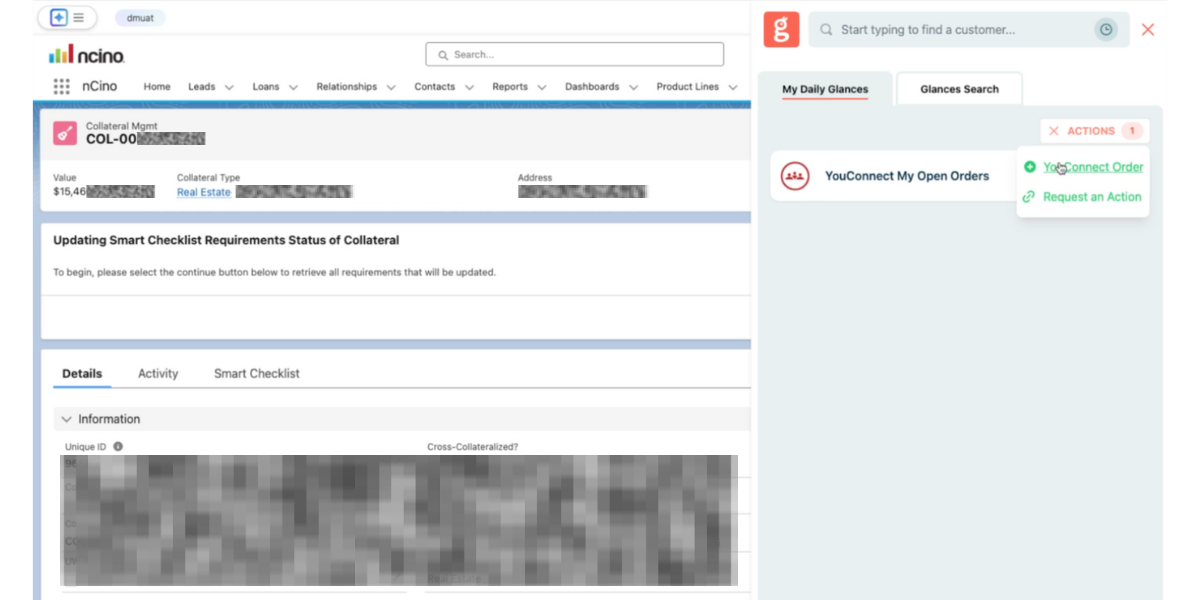
1. Click to open the Glances browser extension within any app or webpage. Go to the Actions menu in the top-right corner, then click YouConnect Order from the dropdown menu.
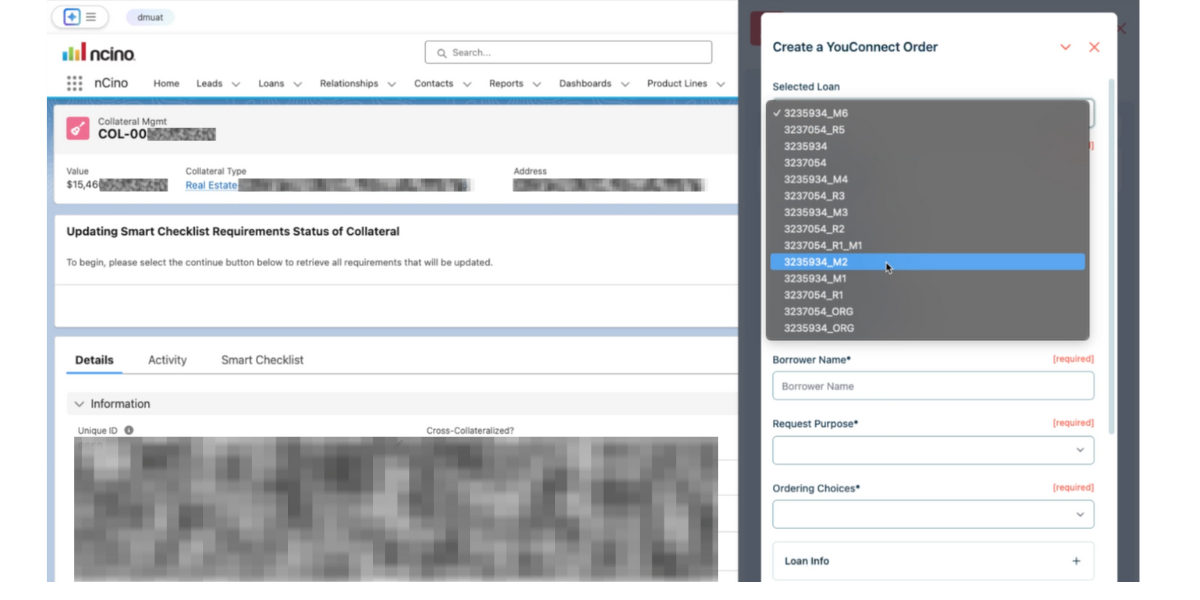
2. Click the Selected Loan field to open the dropdown menu, then select the appropriate loan name related to the new appraisal order.
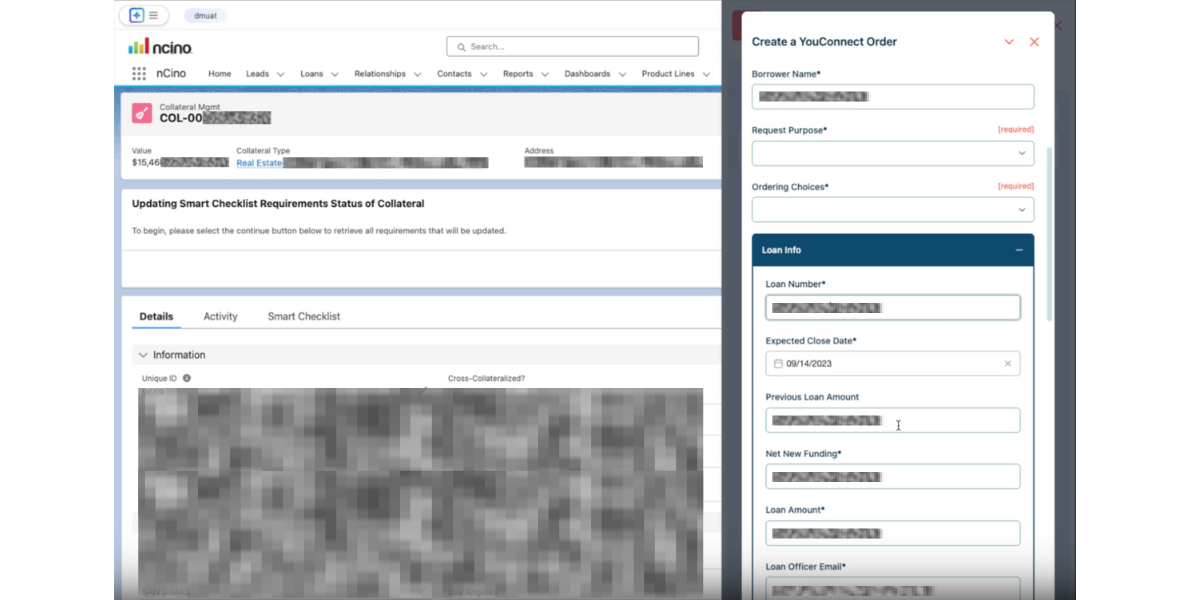
3. Glances will pull all the relevant loan data into any applicable fields within the appraisal order form. Continue editing the form before you save or submit it. If you accidently chose the wrong loan, simply go back to the dropdown and select a different loan to re-load new data. Easy peasy.
This handy feature not only saves loads of time from manual work, it prevents crucial data-entry errors that can halt the loan process in its tracks. Curious about some other Glances workflow ideas popular with banks? Check out this article.
How Glances helps banking teams save time and reduce errors
There are endless ways for bank employees to shave off hours of time from their daily work using Glances to view more and do more with their customer data across apps. For example, the lending department can create new appraisal orders, update customer profiles, check on loan statuses, upload and download documents, see internal comments on a file, and many more multi-tasking Actions.
In one customer’s workflow story, it used to take their bank’s Relationship Managers (RMs) over 30 minutes to create an appraisal request. By working with Glances, they were able to reduce that process to under 10 minutes while at the same time improving the thoughtfulness of the data they were providing. This particular bank discovered that RMs spent less time rushing and more time on quality input due to the automation of data flow Glances conveniently provided.
Using Glances, bank employees can:
- Search their CRM, LOS, YouConnect, and other apps all at once
- Get real-time results on customers, loans, order statuses, comments, etc.
- Eliminate clicks and tab switching between banking apps
- Stay focused working in their banking app of choice
- Perform Actions for other apps without navigating away
- Avoid expensive and problematic 2-way data integrations
Get your bank on board with Glances
Seamlessly and securely integrating your bank’s software applications from Abrigo to YouConnect (and everything between) starts with a courtesy demo and app consultation so we can understand your tech stack and workflow goals. From there, we can discuss implementation strategies, security requirements, user pricing, and answer any other questions your banking team may have.