3 Ways Banks Use Glances to Simplify Team Tasks

In a short amount of time, Glances powered by Realwired has become an invaluable tool for customers in the banking industry. Not only does Glances securely integrate platforms like nCino, Fiserv, Microsoft Outlook, YouConnect, and any API-based business app, it saves teams countless hours each day on tasks that were formerly repetitive and error-prone. Today we will share a few ways real bank teams are actively relying on Glances throughout the workday.
1. Create new appraisal orders with auto-filled details
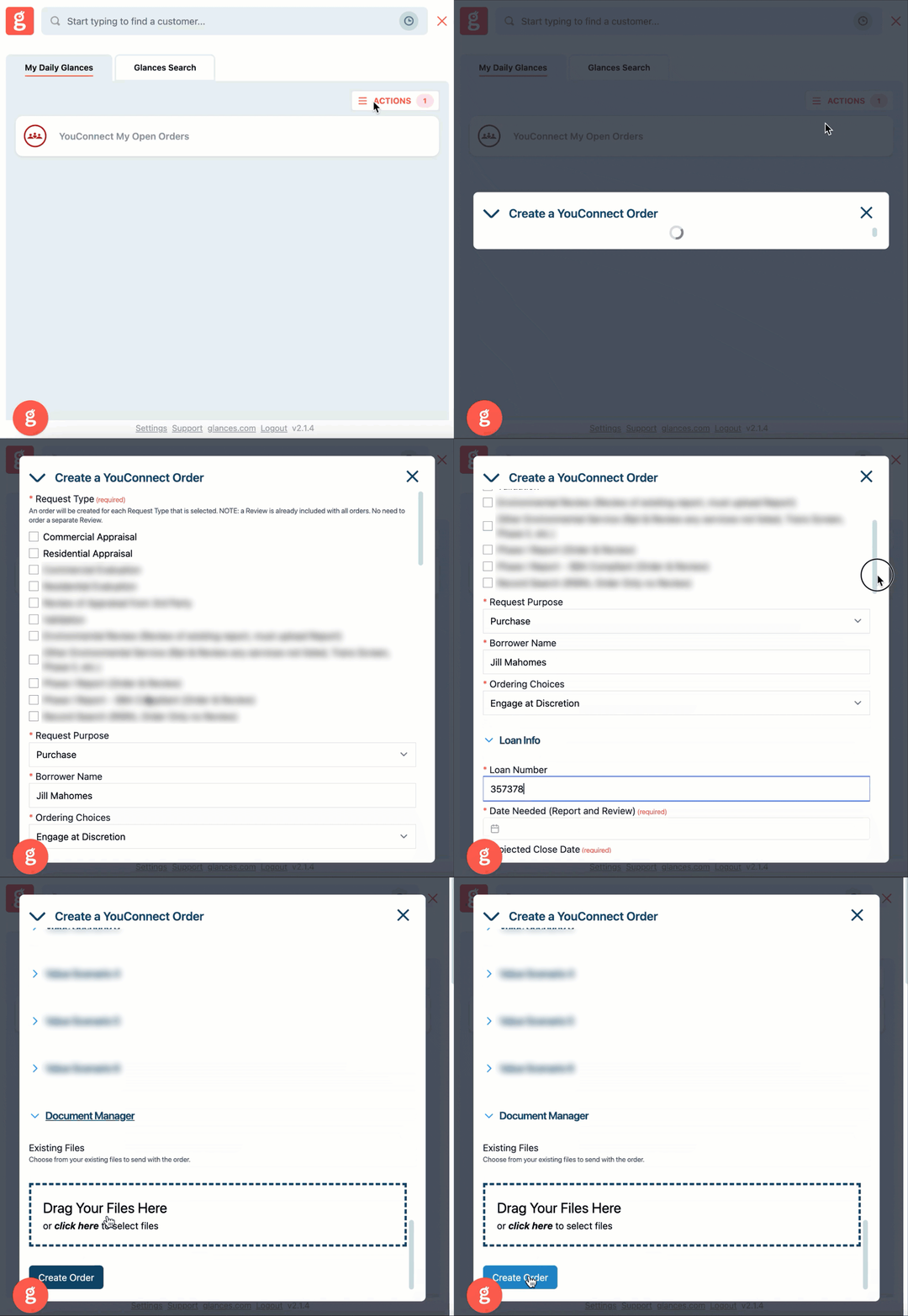
Many Loan Officers (LOs), Relationship Managers (RMs), and other teams within a bank utilize YouConnect’s popular appraisal management software to order appraisals as part of the loan process. Once YouConnect is connected with Glances, new appraisal orders can be created directly within the Glances browser extension, anywhere online. For example, if a LO also relies on nCino as their Loan Origination System (LOS), they can stay working in nCino and use Glances to instantly create new YouConnect orders with relevant loan data pre-filled into each appraisal order form. This handy feature not only saves loads of time from manual work, it prevents crucial data-entry errors that can halt the loan process in its tracks. More output and less mistakes create happy bank teams (and happy customers).
See how it works in the quick animation below.
2. Select and upload related documents in a flash
Bank loans are complex and require a digital paper trail of sensitive documents, averaging around 12-15 per loan! Traditionally, LOs and bank teams juggling several software systems would need to login and download docs from one platform, then login to another platform and upload the same docs. This time-suck not only slows production, it can create confusion and security issues with versions of the same files saved outside of their originating platform.
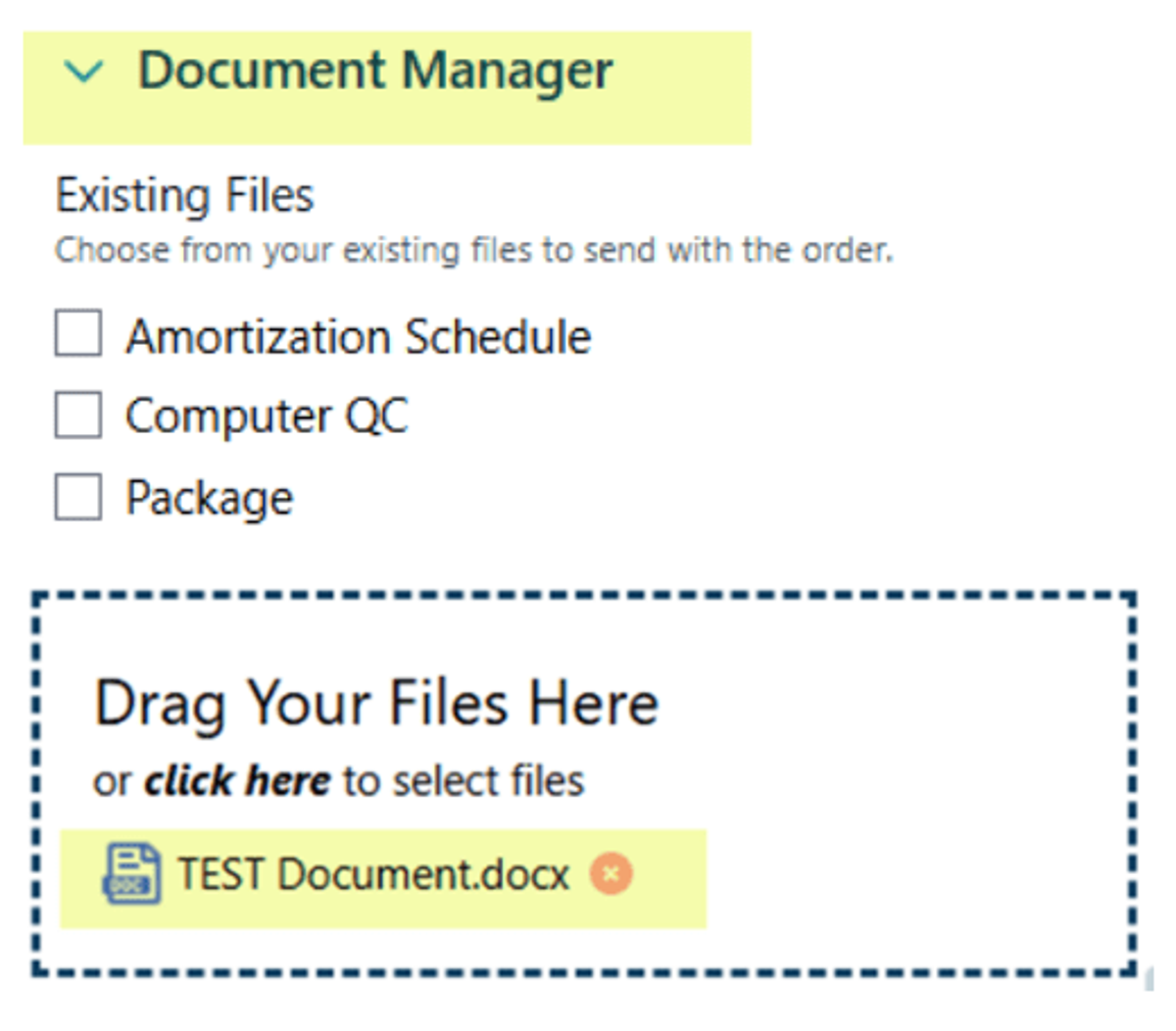
Since Glances lets data live in its native application, bank teams can use the document manager within Glances to streamline this annoying file process. When creating a new YouConnect order using Glances, simply select existing files to include with the appraisal from other connected apps, such as nCino. If new docs need to be uploaded, users also have the option to drag and drop files.
Also note the flow of docs and data can go both ways. Files (like appraisal reports) can also move from an appraisal system (YouConnect) back to the LOS (nCino) for easier compliance and access.
3. Add internal comments on orders
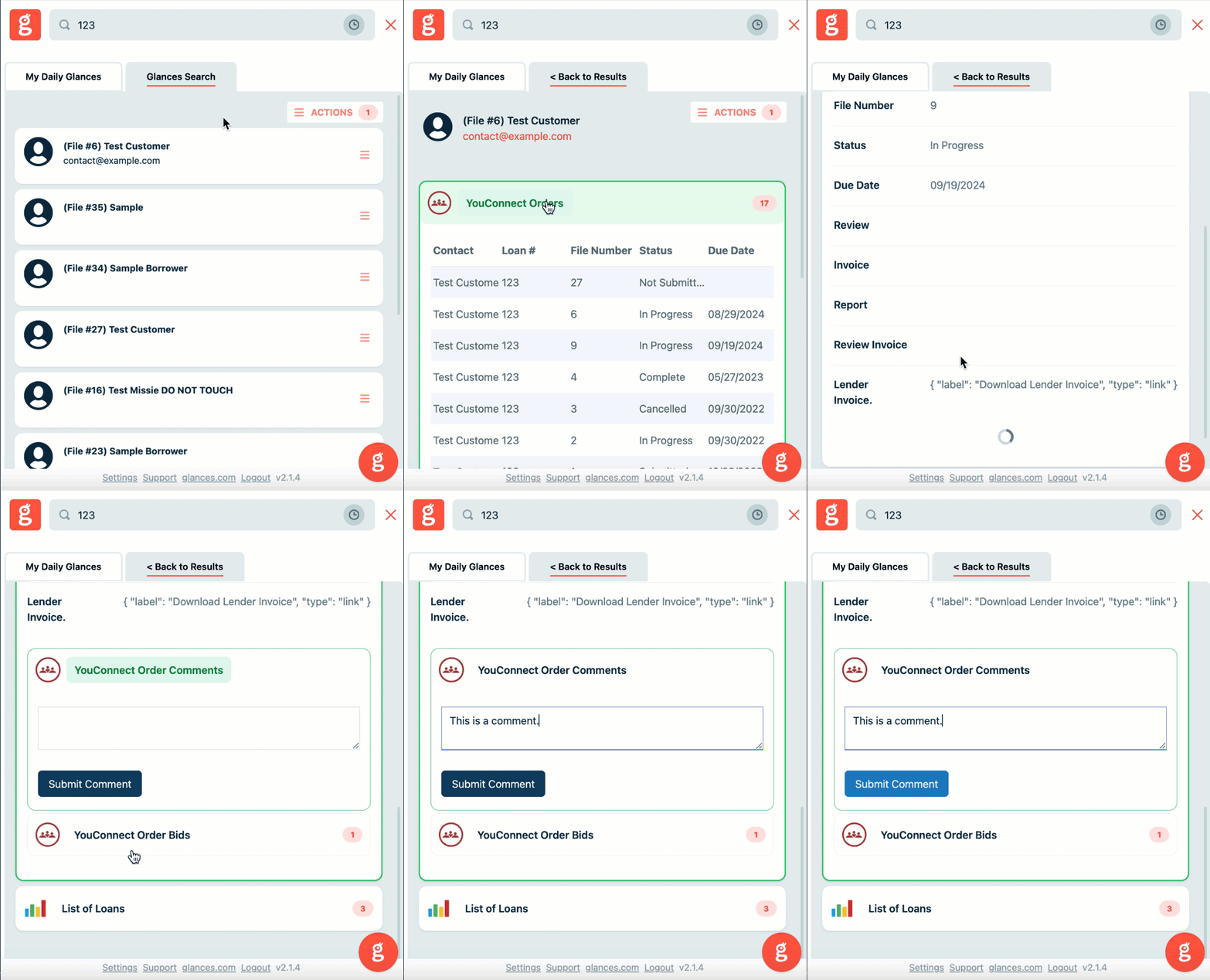
It is crucial for teams managing loans to know the latest information about any appraisal report – and that’s why the comment feature is a fan favorite. Directly within Glances, LOs and teammates can discreetly leave internal-only comment threads on YouConnect appraisal statuses and important updates. Watch how commenting in Glances works in the sample animation below.
Coming soon! Comment notifications are currently sent to users via email; however, our development team is working to create pop-up notifications in app.
How Glances helps banking teams save time and reduce errors
There are endless ways for bank employees to shave off hours of time from their daily work using Glances to view more and do more with their customer data across apps. For example, the lending department can create new appraisal orders, update customer profiles, check on loan statuses, upload and download documents, see internal comments on a file, and many more multi-tasking Actions.
In one customer’s workflow story, it used to take their bank’s Relationship Managers (RMs) over 30 minutes to create an appraisal request. By working with Glances, they were able to reduce that process to under 10 minutes while at the same time improving the thoughtfulness of the data they were providing. This particular bank discovered that RMs spent less time rushing and more time on quality input due to the automation of data flow Glances conveniently provided.
Using Glances, bank employees can:
✔️ Search their CRM, LOS, YouConnect, and other apps all at once
✔️ Get real-time results on customers, loans, order statuses, comments, etc.
✔️ Eliminate clicks and tab switching between banking apps
✔️ Stay focused working in their banking app of choice
✔️ Perform Actions for other apps without navigating away
✔️ Avoid expensive and problematic 2-way data integrations
Get your bank on board with Glances
Seamlessly and securely integrating your bank’s software applications from Abrigo to YouConnect (and everything between) starts with a courtesy demo and app consultation so we can understand your tech stack and workflow goals. From there, we can discuss implementation strategies, security requirements, user pricing, and answer any other questions your banking team may have.