3 Sweet Glances Features You'll Love

If you’ve been following Glances the past year, it’s possible your heart may have skipped a beat over the exciting new apps and features we’ve released to help teams work faster and better than ever before. From adding well-loved workplace apps like PandaDoc, monday.com, and WooCommerce to increasing access to Actions, like creating customers, invoices, and payments, Glances plays the perfect melody for any Valentine out there. While additional functions are always worthy of adoration, today we’ll cover 3 features released in 2022 that make us swoon every time we use Glances and get closer to productivity perfection.
1. Search filters
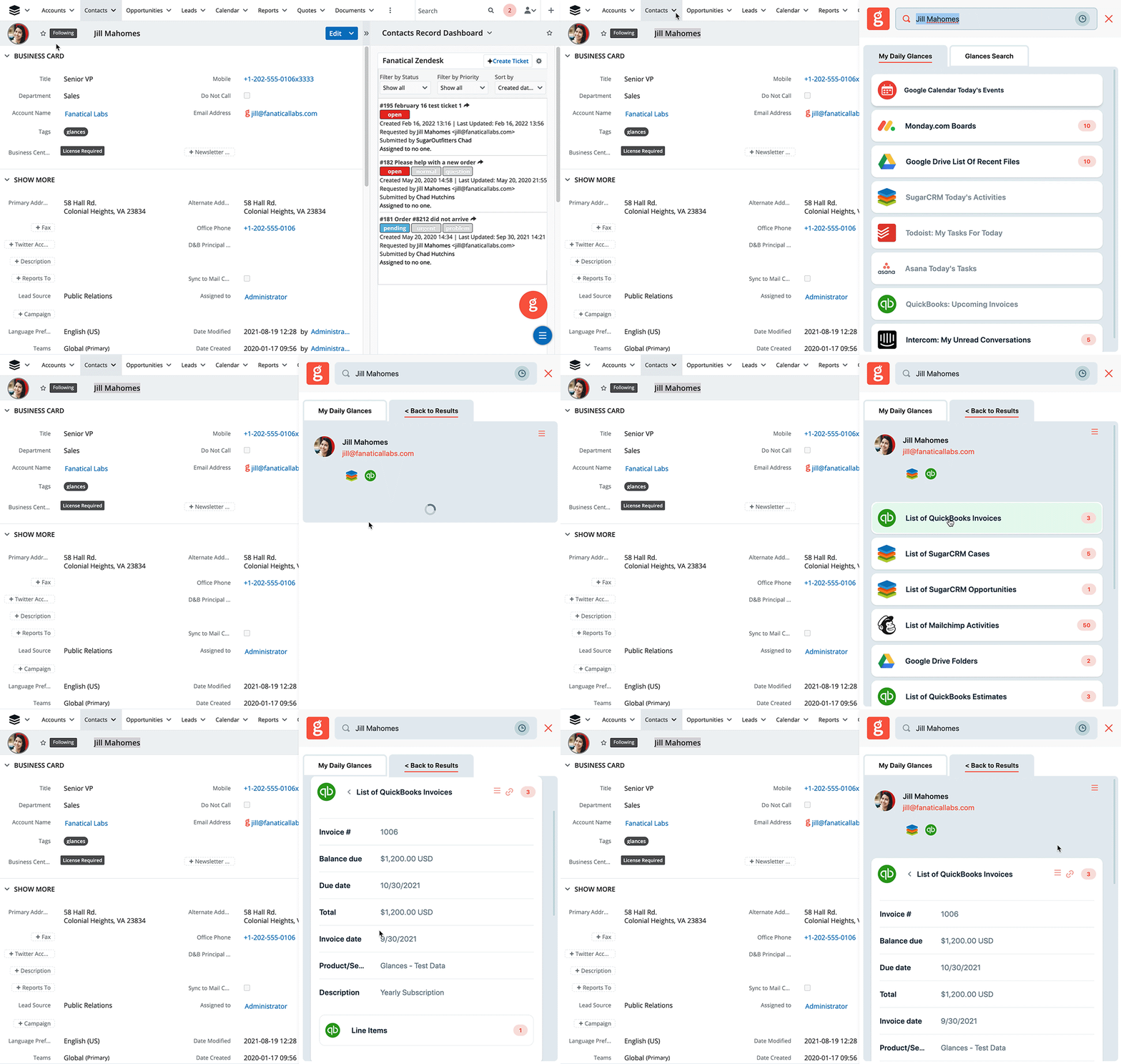
Love takes time, but data doesn’t have to. Finding the right customer data shouldn’t feel tedious, like constantly swiping on Tinder. Finding your one and only is made even easier with our quick, one-click access. Quickly narrow down the scope of your search by viewing just the type of record you’re looking for, from contacts to cases to files. Just like Cupid, our data-finding heroine Glancey hits her mark every time, empowering you to find the right data in the right moment.
2. Enhanced Actions
Customers fall head over heels when they see our convenient Actions feature. Now find Actions closer than ever – not just within any webpage you visit, but right where you’d expect them to be within the Glances browser extension. Whether you need to refund a Stripe payment, create a QuickBooks estimate, or create a new bill.com customer, we’ve brought Actions to the forefront and made them more accessible so your team can stay working in the platforms they love while simultaneously checking off daily tasks. Watch how Actions work in the video below or learn more in this support article.
3. Triple the search!
Using Glances, there are so many ways to find that special someone (aka your contacts, customers, files, and much more). This past year we increased the ways you can search for data – that’s three times the love!
✔️ Glancey Stamp: Glancey is always finding data. When she identifies something on your webpage that might have helpful data from your connected app, she stamps it so you can easily find the data with one satisfying click.
✔️ Manual Search: Glancey likes to be flexible and understands that perhaps her stamp isn't sufficient. For this reason, she will also go out and find the data you need at any time with your text search.
✔️ Highlight & Search: When email addresses just won't do, use Glancey's Highlight & Search feature to highlight any text on the page, click the Glancey pop-up, and auto-search using the Glances widget.
If you haven’t checked out these latest updates, now is the perfect time. Glances makes your work life a little sweeter and keeps your team engaged on what matters most. Follow the steps below to get more information or start a free trial. We know you’ll fall in love with the Glance no-code integration platform.
It's love at first Glance when you connect your apps with Glances!
Start your free trial to connect your favorite business apps and access your data in one easy click, from any app or webpage. You can find and connect apps when you are logged in to your Glances account.
More helpful steps
Schedule a demo to see the time-saving benefits of Glances in action or ask our team questions.
If you need to connect a specific app or platform with Glances that is not currently available on glances.com, please send your requests to hello@glances.com.
Find more step-by-step articles with the latest information on our support site.