Workday Distractions: How to Make Technology Work in Your Favor

We all get distracted while we’re at work. It’s unavoidable. But with some knowledge and assistance, we can minimize the impact of distractions on our productivity and job satisfaction. First, consider these eye-opening statistics that offer just a glimpse of the problems distractions cause:
✔️ According to this study, it takes almost 25 minutes to return focus to the original task after an interruption.
✔️ TeamStage notes that distractions can contribute to a worker making twice as many errors as usual.
✔️ Udemy's 2018 Workplace Distraction Report reveals that workday distractions cause 54% of respondents to believe they aren’t performing as well as they should, 50% to say they’re significantly less productive, and 20% to feel unable to reach their full potential or advance in their career.

Graphic courtesy of Udemy.com, 2018 Workplace Distraction Report
Across multiple studies, surveys, and reports, the same workplace distractions show up. These are 10 of the most common ones:
1. Smartphones
2. Email
3. Business apps
4. Social media
5. Co-workers
6. Internet browsing
7. Meetings
8. Family responsibilities
9. Health issues
10. Multitasking
For those who work from home, there are additional distractions noted, such as: Television, Children, Pets, Noise, Housework (e.g., cleaning, cooking, laundry), and Errands.
"According to a UC Irvine study, ‘People compensate for interruptions by working faster, but this comes at a price: experiencing more stress, higher frustration, time pressure, and effort.’” – Udemy Business
Let’s look more closely at the first few distractions on the list and then consider some ways to minimize their impact.
Smartphones
52% of employers believe cell phones (in particular, texting) to be the biggest productivity killer in the workplace.
The average smartphone user checks her/his phone 47 times a day (86 times for those ages 18 to 24).
Seven out of 10 employees report that emails have a detrimental effect on their work quality.
The average worker spends 28% of the workday reading and responding to emails.
Business Apps
On average, employees toggle between different apps and websites nearly 1,200 times each day.
This “toggle tax” is a little over two seconds, resulting in employees spending about 4 hours a week reorienting themselves after switching apps.
Although these tools and technologies are designed to make work easier, faster, and smarter, too many disconnected apps slow things down and make work more complicated.
Social Media
One in five employees feels their social media use hurts their work performance.
For employees who use social media for work-related purposes, 56% of them believe social media distracts from the work they need to do.
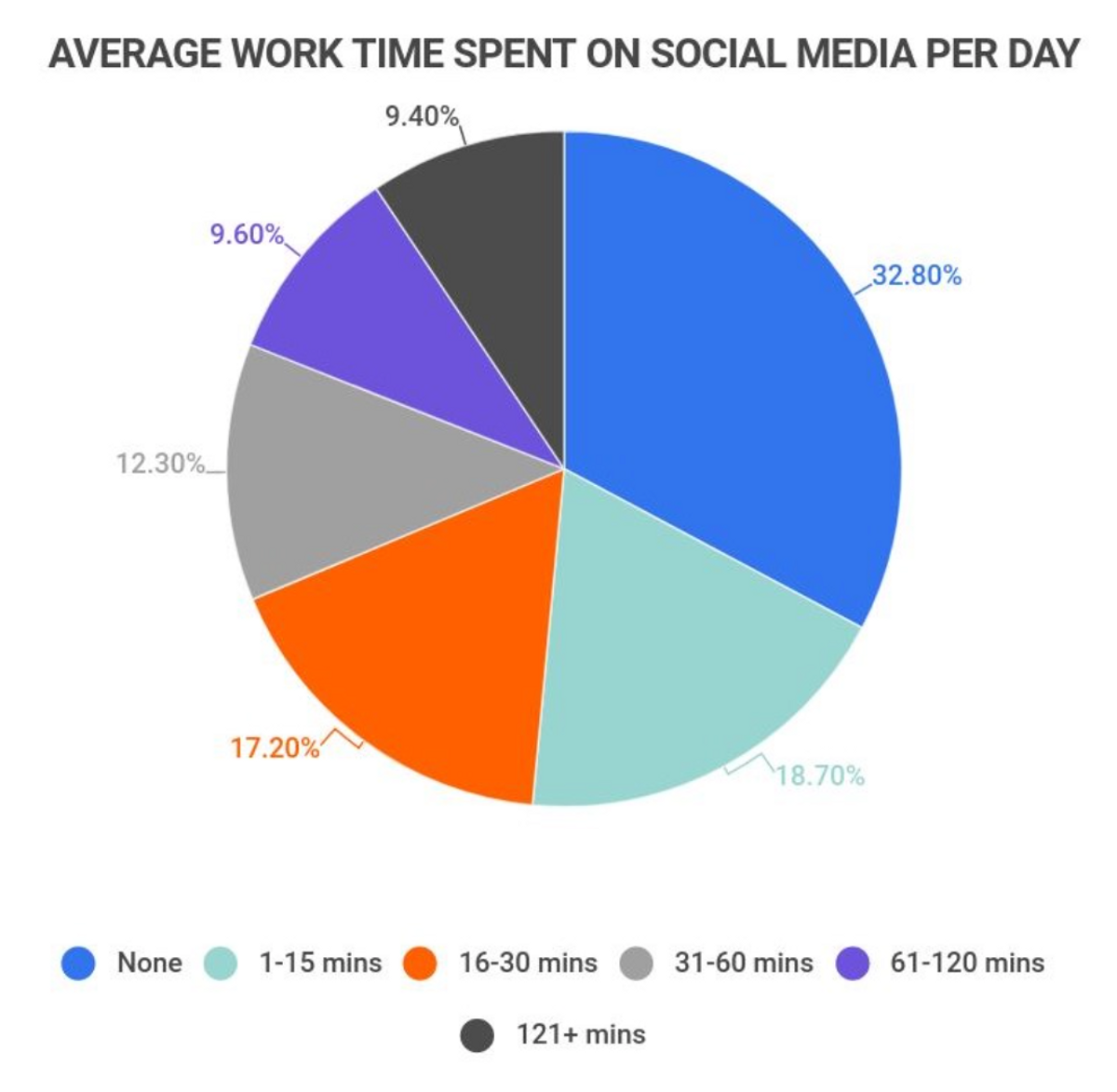
Graphic courtesy of Zippia.com, 30 Surprising Social Media at Work Statistics
Notice that these top distractions all involve technology? Digital technology is a major part of our lives—professionally and personally—and it’s only going to keep growing. Learning how to deal with distractions caused by our technology dependence is key to success at work.
In other words, make technology work for you rather than against you.
If you find that checking your phone, reading emails, managing workplace apps, or scrolling through social media are damaging your productivity, try the following:
1. Create parameters and set time limits for your devices
Business coach Mark Pettit suggests setting specific timeframes for when you allow yourself a break to check Instagram or watch YouTube. Also, most devices now have a way for you to monitor and limit what times of day and for how long you can use certain apps and websites. Make use of such tools.
2. Use smart integration platforms
Glances is a no-code integration platform that helps simplify workflows and reduce disruptions caused by juggling multiple apps. For instance, Glances Actions allow you to complete tasks in other apps without needing to navigate away from the current app or website you’re working in.
3. Place distracting devices out of reach
Place your phone in a drawer or across the room when you need to focus on something important. If the ringer is set on vibrate, you’ll still hear when a phone call comes through (in case of emergency), but you won’t see those distracting notifications popping up left and right.
Limit your workday distractions with Glances!
Start your free trial to connect your favorite business apps and access your data in one easy click, from any app or webpage. You can find and connect apps when you are logged in to your Glances account.
More helpful steps
Schedule a demo to see the time-saving benefits of Glances in action or ask our team questions.
If you need to connect a specific app or platform with Glances that is not currently available on glances.com, please send your requests to hello@glances.com.
Find more step-by-step articles with the latest information on our support site.