One Board, Every App, Full Context: How Glances Enhances Your monday.com Experience

If you ask many of our customers, monday.com has become their command center for project management. In monday terms, creating hoards of boards — for projects, customers, and anything that needs tracking and a due date — gives teammates one organized place to see what’s happening and who owns specific tasks.
The only downfall? It’s not built to show everything else that’s true about the customer behind that board item, because that data almost never lives in monday as its native app. It lives in CRMs, accounting software, support platforms, and wherever the rest of the relationship actually happens. So while the monday board succeeds at showing tasks and deadlines, it misses the full-picture customer intel, leaving workers no choice but to tab-toggle their way across apps to find complete answers.
We’ve written before about using Glances to connect monday.com to specific tools like QuickBooks. Today, we’re going to zoom out, because the real story isn't about any single integrated app. It's what happens when your monday board can see across all of your connected apps at once.
Search, view, and take Action without leaving the board
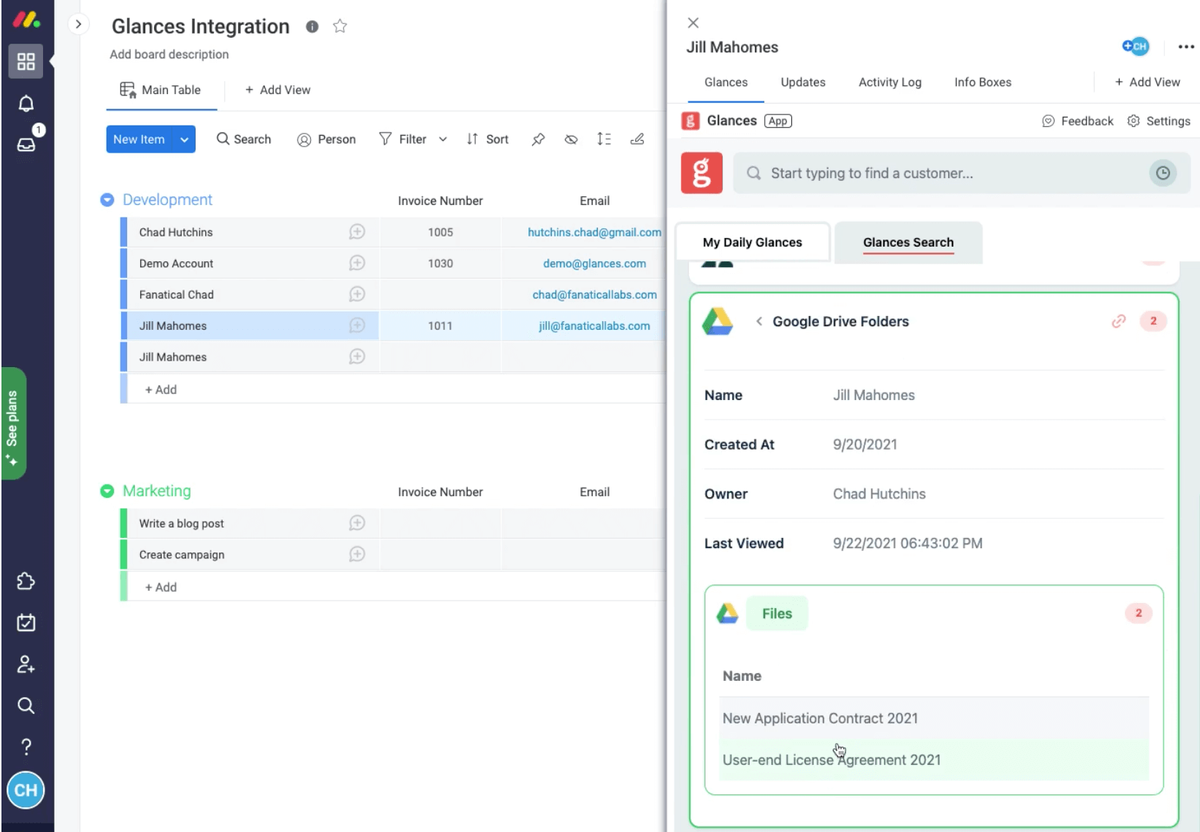
Glances works directly in-app with monday, supporting your existing and new boards, and instantly visible from the item or sub-item view. After a quick setup, Glances enables the other apps and tools you use to be accessible within your monday workspace experience (or anywhere else you use Glances). Without the need to shift apps, you can stay focused in monday and access customer data from Salesforce, invoices from QuickBooks, relationship history from HubSpot, open tickets from Zendesk, and any other software-based tasks that drive your team’s unique workflow.
Whether you use Glances within monday.com, while using another platform, or visiting any webpage, getting a 360-degree view of your customer data follows the same simple process:
1. Search
Within your monday board, click to open the item view of a customer name, or type any name within Glances search, to view all related data across your connected apps at the same time. No more re-searching the same name in different systems, copying/pasting data, or making mistakes.
2. View
Quickly see all relevant data across your connected apps for complete context on the customer: invoice status, recent CRM activity, open tickets, and much more right alongside the monday board you're already working in.
3. Take Action
Create and perform Actions for apps outside of monday without switching tools. It’s the same “stay in your workflow” principle that Glances was founded on.
Check out how it all works in the video below showcasing monday and QuickBooks as connected apps.
Glances and monday at work
Let’s say you work as a project manager with a monday.com board tracking client deliverables and a new customer requests an update on their invoice. Instead of opening QuickBooks in a new tab, searching their name, and reading through recent invoices, you can use Glances to search once from inside the monday board item and see their invoice status right there. Same workspace view, same screen, no new tabs, no separate logins.
If this single task takes a few minutes, multiply it by the number of times you and your teammates verify client data across various apps every day. Those "few minutes" quickly add up to hours of wasted time, re-work, and frustration on a daily basis.
Yes, your data is safe
Glances doesn't save or store any of the data it shows you. Everything is retrieved live from the connected app, displayed, and never cached. Your monday.com board isn't becoming a second copy of your CRM or your accounting system; Glances is just showing you data that exists in its native app, from wherever you choose to work. Learn more about how Glances works with your data.
Try it inside your own monday board
Visit our support site for step-by-step instructions on installing Glances in-app with monday.com. Whether you’re a small business or a large organization using monday and other platforms, Glances can be tailored to meet your unique needs. Are you ready to streamline your workflows and shave off hours of time, every workday?
Start your free trial today and check out Glances on the monday app marketplace.
More helpful steps
Schedule a demo to see the time-saving benefits of Glances in action or ask our team questions.
If you need to connect a specific app or platform with Glances that is not currently available on glances.com, please send your requests to hello@glances.com.
Find more step-by-step articles with the latest information on our support site.