How to Add Glances as a Dashlet in SugarCRM

If your team uses SugarCRM to manage your customer data and sales processes, you have likely heard of dashlets as a functional feature that helps personalize your CRM experience. And just like adding a dash of sugar to your morning coffee, it takes less than 1 minute of your time to add Glances as a dashlet within Sugar.
Before you dash off to read the how-to instructions below, let’s cover a few important details about why you might consider adding this particular dashlet, based on how you like to view and navigate your customer data within Sugar. Otherwise, here’s your courtesy reminder that Glances already works flexibly within SugarCRM, any business app, or any webpage – dashlet or no dashlet.
To dashlet or not to dashlet? That is the question.
1. It’s purely optional, based on your preference
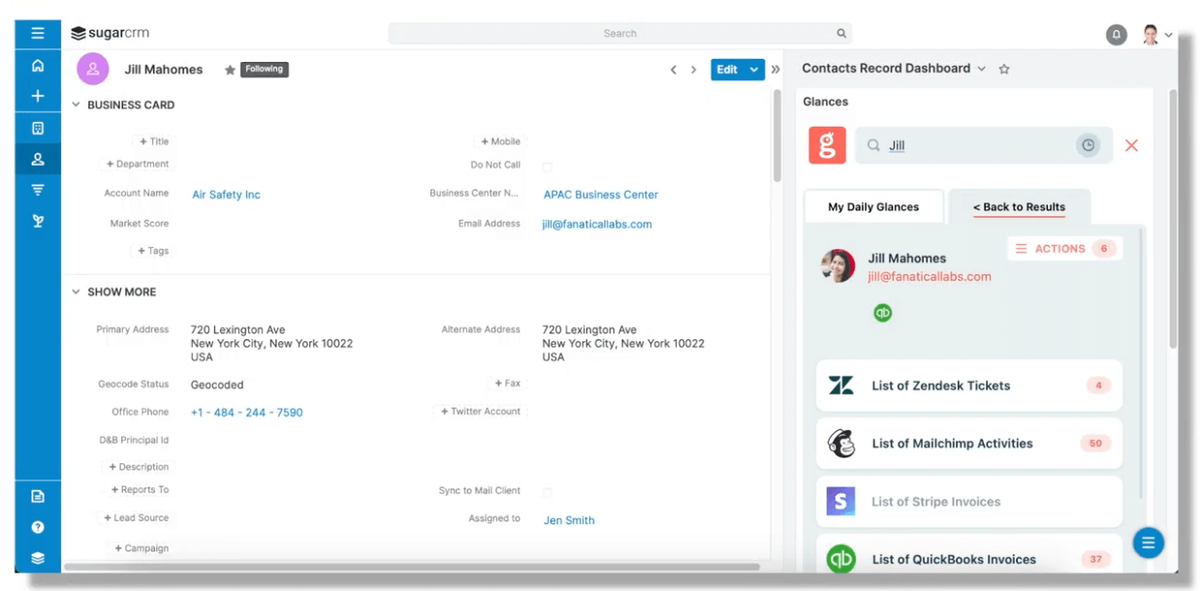
Think about how you like to navigate Sugar. Do you spend the majority of your day working in SugarCRM and already rely on dashlets as a helpful feature? If yes, adding Glances as a dashlet means you will be able to search for customers and always see a 360-degree view of your data across apps located in the right-side pane of your Sugar platform when you’re on an account, contact, or lead. This unique dashlet view of Glances will stay in Sugar and will not follow you to your other apps.
2. Glances works within Sugar, regardless of the dashlet
If you spend a lot of time in SugarCRM, but still need to jump to other business apps like Gmail, Zendesk, monday.com, etc., you can use Glances in its intended method. Use the Glances Highlight and Search feature or click the Glances widget to open the platform and view all of your relevant data in one place. Hop apps, switch tabs, and work wherever you prefer. This traditional view of Glances will follow you anywhere online.
3. BTW, what are Sugar dashlets?
If you are new to the world of dashlets, this helpful Sugar support article explains, “Sugar dashlets allow users to build specific data, insights, and useful visualizations into their Sugar views. Dashlets live within dashboards that are available on the Home page, list view and record view intelligence panes, and focus drawers.”
How to add Glances as a dashlet in Sugar
In addition to installing the Glances browser extension, you can install Glances directly to SugarCRM as a dashlet. This dashlet will allow you to search for records when you're on an account, contact, or a lead. You can also add the dashlet to Sugar’s home dashboard. To get started, watch the detailed video above, read the how-to article on our support site, or check out the steps below.
Step 1: Add Glances as a trusted domain
✔️ From within SugarCRM, navigate to the Admin page.
✔️ Under System, click Content Security Policy.
✔️ Within Trusted Domains, add https://*.glances.com
✔️ Click Save

Step 2: Add a web page dashlet with https://m.glances.com as the URL
✔️ From within a record (such as a contact, target, lead, or account) click the blue circle in the bottom right of the page.
✔️ Select Add Dashlet.
✔️ Click Web Page which appears at the bottom of the list.
✔️ Title the dashlet to Glances and add https://m.glances.com as the URL.
✔️ Click Save.
Glances makes all your business apps work together
Don’t forget that Glances not only works with your CRM platform of choice, it also helps you locate and view data across any of your business apps in one 360-degree view. Beyond viewing data, you can crush your daily to-dos using Glances Actions, the feature that empowers you and your team to perform tasks for other apps directly within Glances. Create and send QuickBooks invoices, start Zoom meetings, make Aircall calls, create new CRM contacts, and whatever time-saving tasks your team can dream up.
Forget tab toggling and constantly losing focus. Glances makes your favorite business apps work together anywhere online, so you and your team can create consistent processes that save time and reduce data entry errors. Start your free trial today.
More helpful steps
Schedule a demo to see the time-saving benefits of Glances in action or ask our team questions.
If you need to connect a specific app or platform with Glances that is not currently available on glances.com, please send your requests to hello@glances.com.
Find more step-by-step articles with the latest information on our support site.