From Text to Full Customer Context: Are You Using Highlight and Search?

One highlight and click launches the full customer story
Imagine working through your morning emails in Outlook and landing on a high-priority message containing a customer’s order number and note to quickly resolve a payment processing issue. Your mind is already organizing the next steps needed to complete this workflow: toggle tabs over to HubSpot to review the customer’s information, then switch to Stripe to check the payment status, then click over to Zendesk to review the support ticket status…on and on it goes until you have the complete information needed to circle back to Outlook and draft an accurate response.
This task alone sounds routine and simple enough, but it adds up to hours of wasted time per week for you and your teammates. Did you know there’s a way to reach full context across your favorite business apps that’s lightyears ahead of your basic and even semi-automated workflows?
If you are new to Glances or not actively using our fan-favorite feature called Highlight and Search, now is the time to get acquainted with its endless use cases—no matter your industry, number of apps, or daily processes.
Solving problems using Highlight and Search
Back to that cumbersome order issue we opened with.
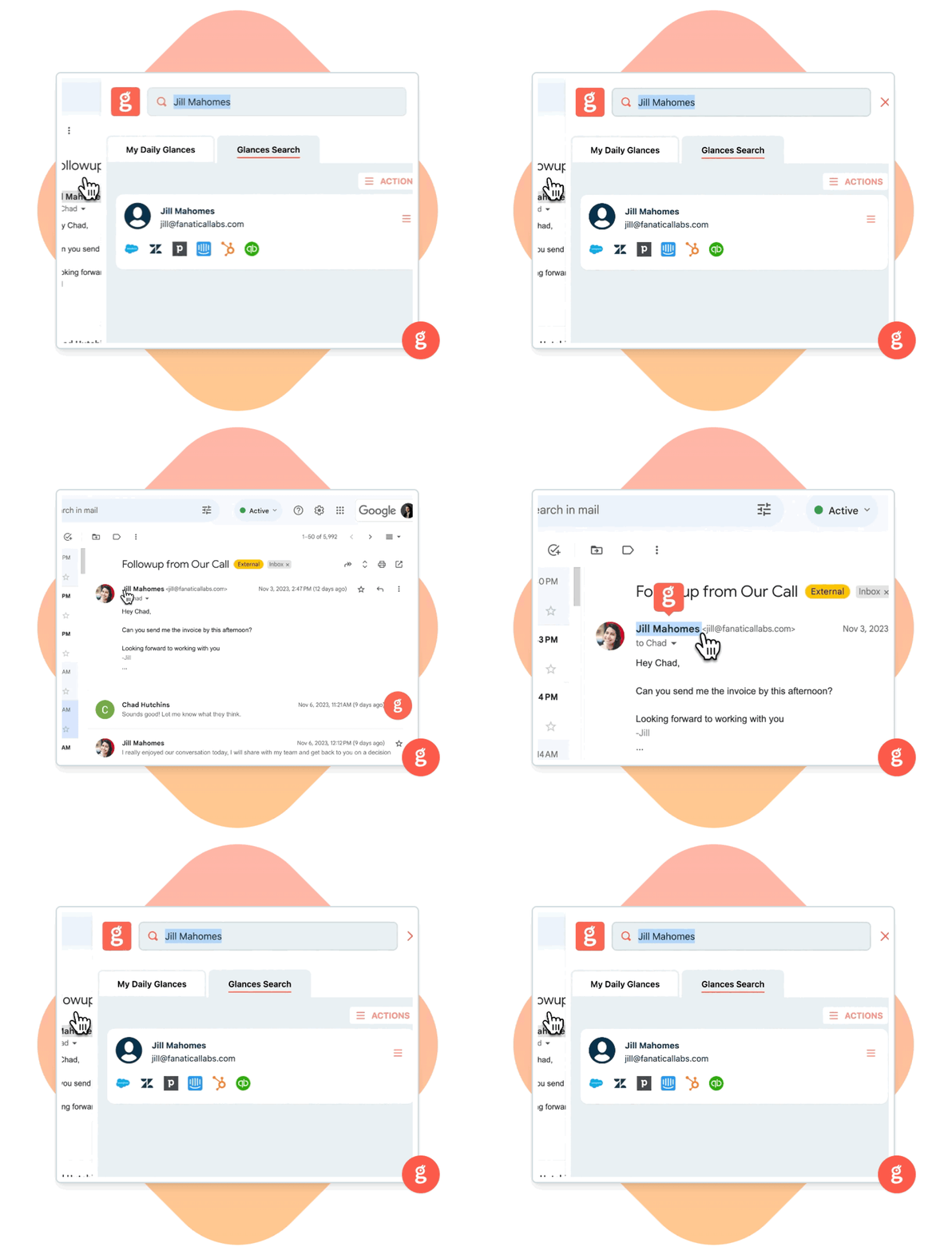
Using Glances Highlight and Search, you can now quickly see everything you need to help resolve the customer’s order issue without ever leaving your email inbox. While working in Outlook, simply highlight the order number and click on the Glancey icon to auto-launch Glances and view all related customer details across your connected platforms: HubSpot, Stripe, Zendesk, and any other business apps.
Gain complete understanding of this customer’s history and order issue in one workspace, then close out the task faster than ever.
Highlight and Search works beyond order numbers. Try highlighting names, emails, project IDs, file names, pricing, or any other text that is key to how your data and naming conventions are set up across platforms. In real time, Glances will pull all your relevant data in one convenient view.
You can also choose to search manually using the Glances search bar. To learn all the ways you can search and find data, check out our support site article.
How industries save time using Highlight and Search
Context switching between apps is one of the biggest productivity killers, so this invaluable feature is your launchpad to a unified view of your customer data, personal insights, and multitasking Actions. The use case ideas can be completely tailored to your needs, but below are some ways industry professionals rely on Glances every day.
Customer Service and Support
Support agents can highlight a customer’s email or order number from a help ticket, chat thread, or billing page and instantly see the customer’s full history: previous orders, past support tickets, notes, and related contacts. This reduces context switching and helps deliver faster, more informed service.
Sales and Account Management
When a salesperson is reviewing a contract, email, or lead form, they can highlight the contact’s name or email, pull up related CRM records, payment history, open deals, and previous communications—directly within Glances. No more toggling between Salesforce, Stripe, email, and spreadsheets.
Billing and Finance Teams
Finance teams can highlight invoice numbers, client names, or email addresses from a vendor page, email, or document, then bring up billing history, outstanding invoices, payment status, and more. Useful especially when working across accounting platforms like QuickBooks, Bill.com, or other billing tools.
Project Management and Operations
When working in project-management systems like Airtable, task trackers, or internal databases, teams can highlight a customer name or project ID and access related orders, files, communications, calendar events—helping cross-functional teams stay aligned without fragmenting data across tools.
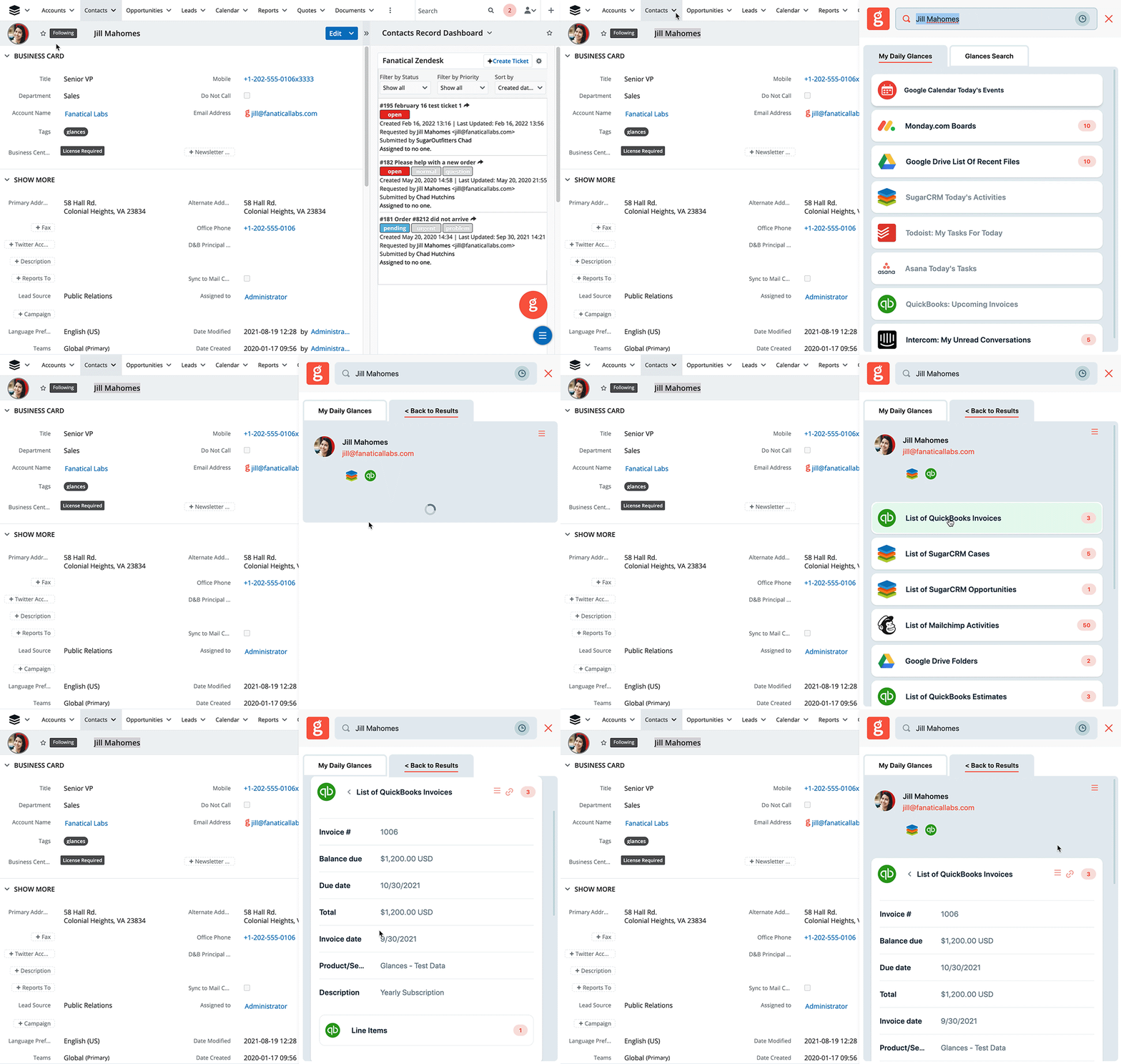
Watch how Glances Highlight and Search works inside SugarCRM in the quick animation below.
Make your dream workflows possible with Glances
Start your free trial to connect your favorite business apps and access your data in one easy click, from any app or webpage. You can find and connect Salesforce, monday.com, QuickBooks, Mailchimp, and more apps when you are logged in to your Glances account.
More helpful steps
Schedule a demo to see the time-saving benefits of Glances in action or ask our team questions.
If you need to connect a specific app or platform with Glances that is not currently available on glances.com, please send your requests to hello@glances.com.
Find more step-by-step articles with the latest information on our support site.