From Panic to Prepared: What Glances Can Show You Before Your Next Client Call

It happens to the best of us… a forgotten client call. It’s inevitable that at some point while you’re deep in your work that your calendar reminder pops up with this message: “Client call in 5 minutes.”
Yikes. Your focus is drawn from whatever project you were just working on and you have just a few moments to remember where your last conversation left off. Honestly, a little panic sets in.
- “Did they pay that most recent invoice?”
- “Have they had trouble or reached out to support recently?”
- “Wasn’t the marketing team planning a special campaign for certain clients? Was this client included?”
So you scramble to open all relevant apps and search for the client in each of them. You’re jumping between tabs on your CRM, digging through client notes in your docs, navigating back and forth between invoices in your accounting tool, and payment activity in your processing app. You might be up to 4 or 5 tabs at this point and you haven’t even checked on marketing or support. For that you ping your teammates last minute and just hope they reply with the 2 minutes you have left before the client joins the call.
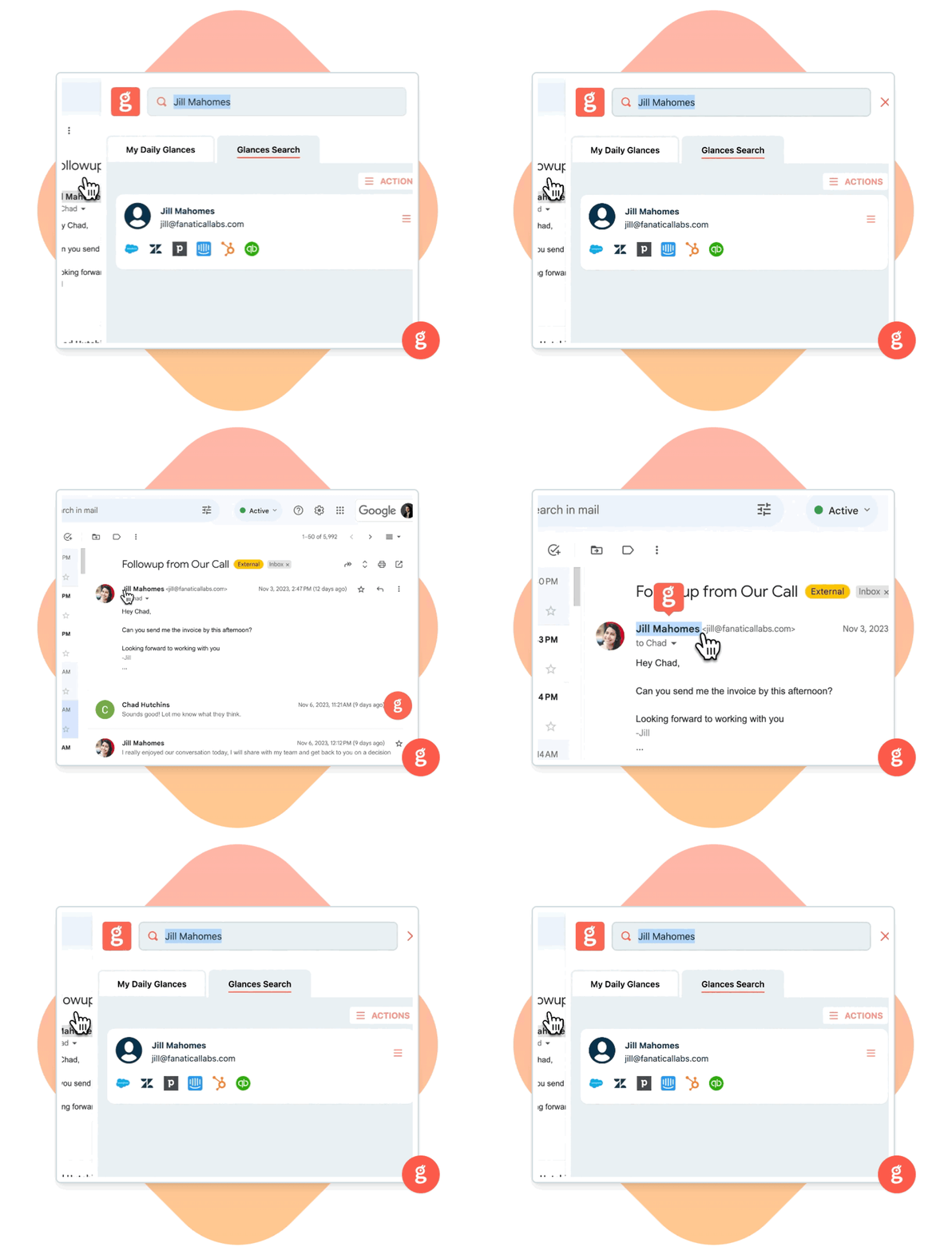
Enter Glances. Ditch the app-hoping and close up those unnecessary tabs. Let Glances act as your personal pre-call briefing assistant. From account management teams to zen-seeking ops crews (and everything in between) Glances gives you a quick view into the client’s full journey, right from your browser (in any app you're working in).

The pre-call power of Glances
Before joining that call, here are all the informative things Glances can show you about your client on the fly, in a single workspace view:
1. Recent activity across all apps
With one quick search (using one of our 3 search methods), you can see:
- Latest email conversations, such as from Zendesk, Intercom, HelpScout
- Past purchases or orders, such as from Stripe, QuickBooks, WooCommerce
- Submitted tickets or open issues, such as from Freshdesk, Zoho CRM, or Salesforce
- Project or task status, such as from monday.com, Asana, or Google Docs
A quick glance shows you everything that’s happened with the client that you didn’t personally touch: no bouncing between tabs, no guessing games, and no more awkward pauses when the client brings up something you weren’t looped in on.
2. Invoice and payment status
Glances pulls in real-time financial data from apps like Stripe, Xero, or bill.com. You’ll know:
- If an invoice is outstanding or overdue
- What payment amount was made and the frequency of payments
- Whether it’s time to offer a yearly plan or follow up on a missed payment
- If there are estimates that need to be converted to invoices for the next project
Now you’ve turned from a panicked employee (who feels like you forgot your homework) to a confident superstar. This insight shows your client that you’re organized, informed, and on top of their account in a meaningful and powerful way.
3. Context for smarter conversations
Need to know if they’ve been interacting with your latest campaign or onboarding materials? Glances shows you email marketing stats from tools like Mailchimp or Constant Contact:
- Which messages they've received
- Whether they’ve opened or clicked an email
- How engaged they are with recent campaigns
This insight is often overlooked but can be gold for sales and account managers because it allows you to personalize how you frame conversations and recognize opportunities for upsells or changes in sales strategies. If a client opens every onboarding email or clicks into every marketing campaign, but hasn’t yet followed through, you can provide a little education and reassurance to a smoother experience.
Glances pulls the full client experience into view so your next interaction isn’t just timely or frequent, but relevant to what the client needs.
4. Actions without distraction
Found something that needs to be handled before the call ends?
Create a QuickBooks invoice, refund a Stripe payment, or send a PandaDoc contract from whatever screen you’re on during the call. No tab-hunting and no disengaging from the client conversation while you figure out how to log in to each app. Just simple Actions ready for you to take without navigating away.
With Glances Actions, you’re not just viewing data. You’re completing tasks across apps with just a few clicks while the conversation continues.
Bonus: No tab-surfing required!
Honestly, the best part of Glances might be that it works wherever you want to work? Your favorite workplace app monday.com? No problem, we’ve got an app there that works seamlessly in the item view. Prefer to manage your workday in your email inbox? We’ve got you covered there with our handy browser extension. Glances slides in seamlessly wherever you are.
How to use Glances before your next call:
- Use Highlight & Search to auto-find the client’s details by name, company, or email.
- Skim their full history across every workplace app you use, click into any view where you need more details.
- Complete any tasks right from Glances with the Actions menu.
- Jump on the call feeling calm, prepared, and confident (Glances will let you take all the credit).
When you’re ready to start your next call with confidence, start a free trial with Glances.
Achieve your dream workflows with Glances
Start your free trial to make your favorite business apps work together and perform time-saving Actions. You can find and connect apps like Salesforce, QuickBooks, Zendesk, Stripe and more when you are logged in to your Glances account.
More helpful steps
Schedule a demo to see the time-saving benefits of Glances in action or ask our team questions.
If you need to connect a specific app or platform with Glances that is not currently available on glances.com, please send your requests to hello@glances.com.
Find more step-by-step articles with the latest information on our support site.