Connect Groove with Glances to Manage Support Tickets Anywhere

Access Groove tickets when and where you need them, using Glances
Keeping your company’s support volume down not only provides a positive experience for your customers, it also positively impacts your revenue. The team at Groove set out to accomplish just that, creating an all-in-one customer service platform to help teams deliver fast, personal, high-quality support. If you currently use Groove, you can level up your support efforts with the ability to view tickets while working in any app outside of Groove, all made possible by the Glances no-code integration platform.
Whether you rely on Zoho, Mailchimp, QuickBooks, or any other tools in your SaaS stack, Glances empowers you with a single view of your customer insights and personal tasks data across multiple apps, in real time. Glances works on any webpage you visit or within any app you use, so the big-picture data you need is always by your side.

Available Groove views
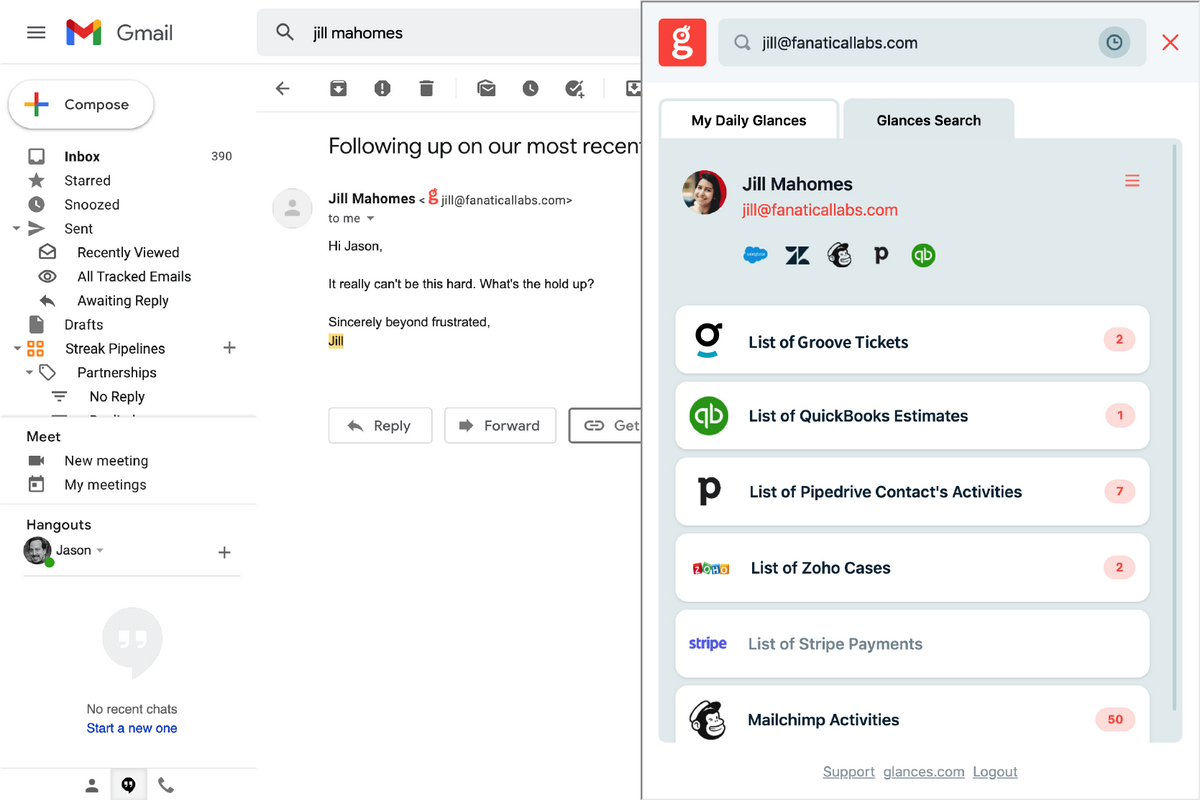
When Groove is connected to Glances, you can view support cases by customer or know what unresolved tickets are on your to-do list within any web app or platform you prefer to work in. In the example screenshots below, the Glances user is checking out the latest customer support issues while working through their Gmail inbox.
Viewing Support Tickets: From the Glances Search tab, enter any contact’s name or email address to pull up their related data across all connected apps. Click on the List of Groove Tickets Glance to expand the full list of tickets, then click on any line item to drill down to the support details. Also, from the My Daily Glances tab, you can view your personal list of active Groove tickets via the My Open Tickets Glance. Need to jump out of Glances and view any ticket directly in Groove? Just click on our handy external link to make it happen.
Our development team is continually optimizing Glances with additional views and actions, so stay tuned for more product updates. If you need to see a specific view or data set from any of your web apps, contact our team to discuss custom options for your business.
Immediate ways to view your Groove tickets using Glances
Glances acts as your go-to hub for viewing customer insights and personal tasks across all apps, unifying your once-siloed information so you can feel more organized, crush productivity, and get back in control of your workday goals. Below are the major pathways for using Glances to access not only your Groove data, but data from all of your connected web apps anywhere:
1. By Browser
Once the Glances browser extension is installed and you have connected your favorite apps, there are a few ways to access the data you need:
✔️ Click the Glances widget in the corner of the page to begin a manual search or view your upcoming tasks.
✔️ Click on any Glancey-stamped email address on any webpage you are viewing to see related data.
✔️ Try Glances Highlight and Search to auto-search by name, email, order numbers, and more criteria.
✔️ Use the My Daily Glances tab to view your personal tasks across apps: scheduled meetings, to-dos, and more.
2. By Web and Mobile
If you have an internet connection, you can access your Glances from anywhere, on any device. Log in to your glances.com account, locate the top search bar, then enter any contact’s name or email address to view any related data across your apps. For the best mobile experience, go to m.glances.com, log in, and start your search.
3. By Other Apps
Glances has in-app functionality with workplace platforms like monday.com. Learn more about connecting these two powerful platforms and stay tuned for more in-app product launches.
Glances is your go-to hub for multiple apps, not just Groove
You already depend on Groove every day for managing support, but we realize you likely spend a lot of time in other platforms important to your job. Finding both personal tasks and customer insights within various web apps is a huge, time-consuming struggle. Allow Glances to bring your favorite apps together, securely showing your data in a single view from whatever app you are using.
Integrate Groove with all your favorite apps, using Glances
Start your free trial to connect your favorite business apps and access your data in one easy click, from any app or webpage. You can find and connect Groove when you are logged in to your Glances account.
More helpful steps
Schedule a demo to see the time-saving benefits of Glances in action or ask our team questions.
If you need to connect a specific app or platform with Glances that is not currently available on glances.com, please send your requests to hello@glances.com.
Find more step-by-step articles with the latest information on our support site.