Calendly and Glances: Know Event Schedules Anywhere

Time is precious these days and if you’re like any hard-working professional, you hardly have the patience for the number of emails it takes to get a meeting on the books. Not to mention, how often meetings can get reworked and rescheduled. Because of this, our team heavily relies on the scheduling automation platform Calendly as part of our software stack. Since our own product, Glances, works to integrate all your favorite business apps, we were excited to add Calendly as a compatible app for our own selfish (and practical) needs. Below are just a few reasons why we save time and energy at work when Calendly is connected with Glances:
✔️ Know your customers’ Calendly events at a glance, anywhere online
✔️ View your personal Calendly events schedule anywhere using the My Daily Glances tab
✔️ Stay working in your app of choice while simultaneously viewing a list of Calendly events
✔️ Instantly know a contact’s scheduled events for full context before addressing any issues or questions

Available Calendly views (we call these Glances)
When Calendly is connected with Glances, you can search and view a customer’s list of scheduled events within any web app or platform you prefer to work in. Start by entering any contact’s name or email address in the Glances Search tab, or use Glances Highlight and Search feature to auto-search. From there, any available data related to your contact will appear, filtered and organized per connected app. Scroll through the list and click to view the details. If you need to jump out of Glances and view anything directly in an app, just click on our handy external link to make it happen.
In the screenshot below, the Glances user is choosing to work in their preferred platform, Zendesk. While chatting with a customer to resolve a ticket, they use Glances to instantly view the customer’s list of Calendly meetings, plus relevant data across their other connected apps.
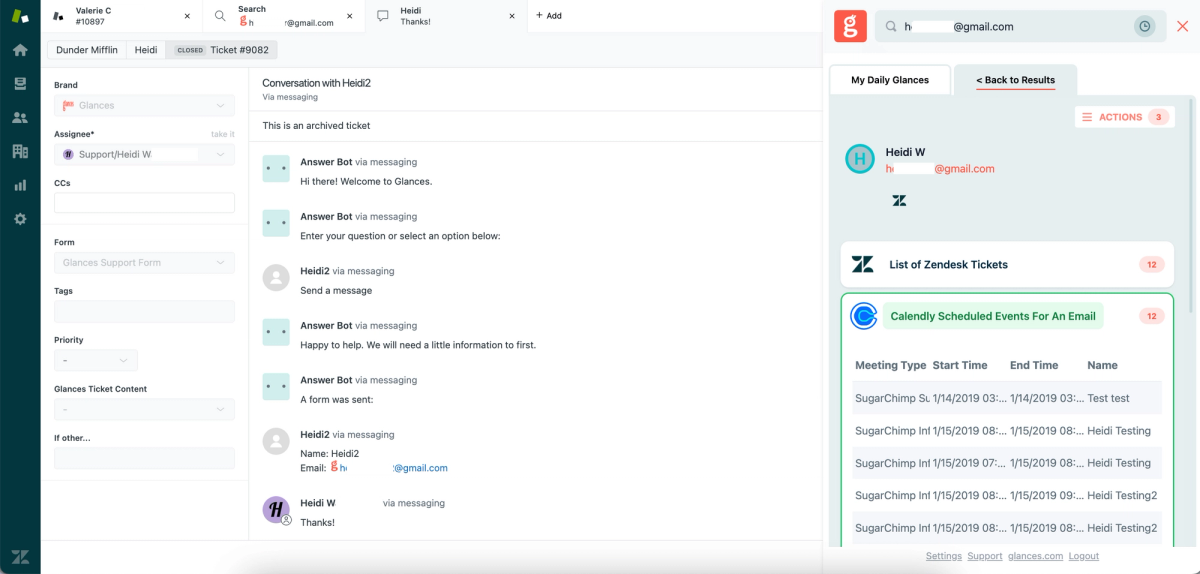
No matter if you choose to work in your favorite platform or browse online, you can also know your upcoming Calendly meetings for the day by simply opening the Glances widget and clicking on the My Daily Glances tab. Never miss out on a meeting or wonder about what’s next, all while maintaining focus on your work.
Getting started with Glances and Calendly
Simplify tasks and workflows with Actions
Glances Actions are a time-saving feature that help you complete tasks in other apps without navigating away from the current web app, platform, or webpage you are working in. For example, you can stay focused in your CRM platform while simultaneously creating a new estimate, invoice, or application for a customer – no need to toggle to other apps to handle each task.
If you have an action in mind for any of your apps connected with Glances that will make your workday simpler, use our Request an Action calendar to select a time to briefly discuss your current apps and needs with our team.
Integrate Calendly with all your favorite apps, using Glances
Start your free trial to connect your favorite business apps and access your data in one easy click, from any app or webpage. You can find and connect Calendly when you are logged in to your Glances account.
More helpful steps
Schedule a demo to see the time-saving benefits of Glances in action or ask our team questions.
If you need to connect a specific app or platform with Glances that is not currently available on glances.com, please send your requests to hello@glances.com.
Find more step-by-step articles with the latest information on our support site.