Access Your Freshsales CRM Data While Working in Any Platform

With Glances, view Freshsales CRM data when and where you need it
Freshsales (by Freshworks) is a customer relationship management platform that provides a 360-degree view of customers by capturing and combining their experiences in a centralized place. Now its community of users can benefit from another tool that will help them accomplish more during the workday: the ability to seamlessly view Freshsales data while working in any other online platform or webpage!
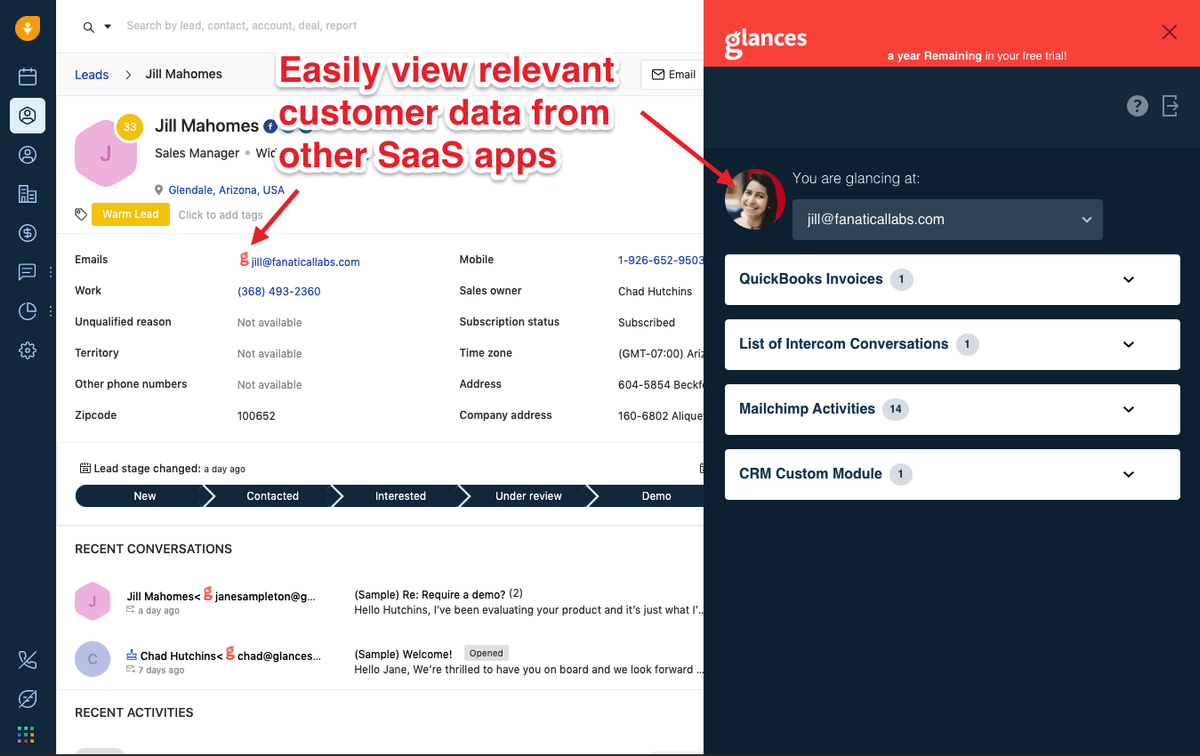
This time-saving solution also works the opposite way: users can be in the Freshsales platform and view data from any other applications necessary to their job, like QuickBooks, Mailchimp, Intercom or whatever makes up their SaaS stack. Glances and its no-code technology makes all of this possible, which is why we are excited to announce it is now available on the Freshworks Apps Marketplace.
How this dynamic duo helps you get more done
Glances unifies data from your multiple apps into a single view; Freshsales acts as a single source of truth for your business. Use them together during your workday and slash hours of your formerly wasted time searching and toggling through your various web-based platforms for crucial customer data. When Freshsales is connected to Glances, you can effortlessly glance at the following data categories from whatever webpage you are on:
- Contacts
- Contact’s account details
- Contact’s notes
- Contact’s activity
- Contact’s deals
- Contact’s email conversations
- Contact’s phone conversations
- Leads
- Lead’s notes
- Lead’s activity
- Lead’s email conversations
- Lead’s phone conversations
How it works
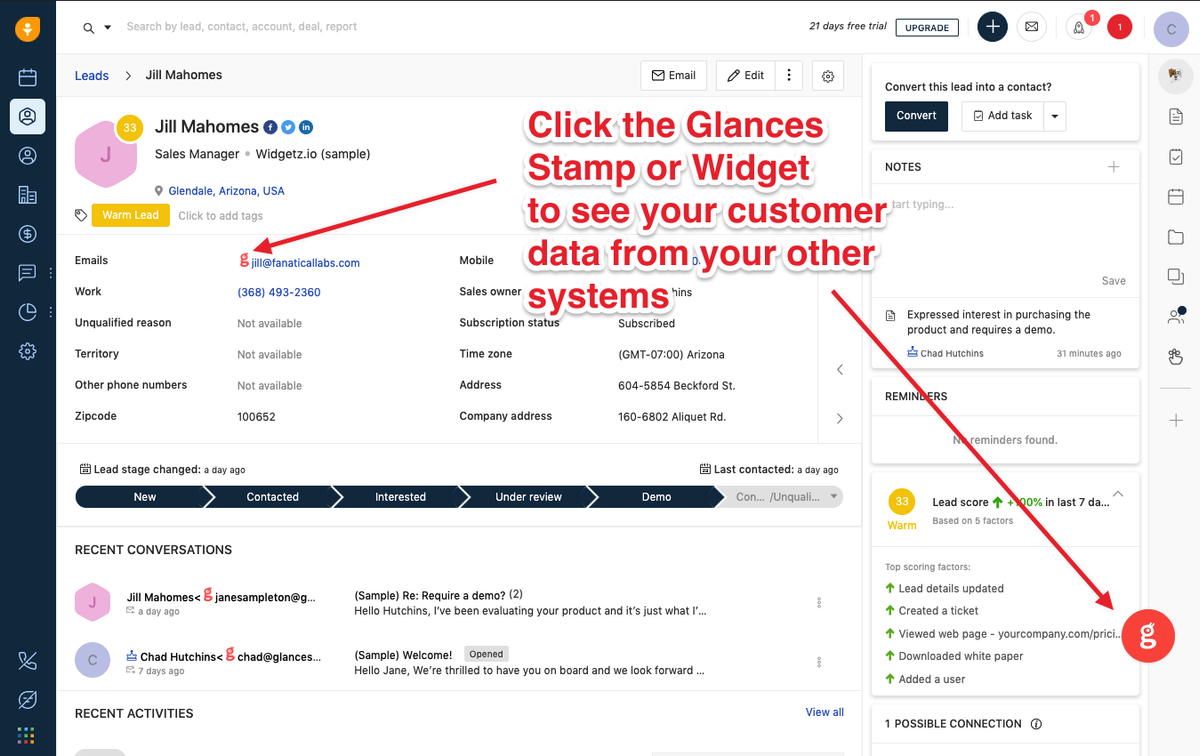
Accessing the data mentioned above is incredibly simple and secure. When signed in to Glances, Glancey will stamp a data point, such as an email address, that displays on the webpage you are viewing. To see data associated with that email, click the stamp. Alternatively, you can use the Glances widget in the corner of the page to see relevant data, including the ability to search by any name or email address. This allows you to quickly gain a holistic picture of the customer, client, or record you are currently viewing. Need to dive deeper? One click is all it takes to access the full source of information. See how it works below.
Glances works with multiple web-based apps, not just Freshworks CRM
You already live in your Freshsales CRM, but we can almost guarantee that you also work with several other platforms. Whether you rely on Mailchimp, Slack, QuickBooks, Monday.com, Zendesk, or any other combo of popular applications, we understand that finding customer information within various systems is a huge, time-consuming struggle. Glances brings your favorite online apps together, securely showing your customer data in a single view from whatever app you are using.
Integrate Freshsales with all your favorite apps, using Glances
Start your free trial to connect your favorite business apps and access your data in one easy click, from any app or webpage. You can find and connect Freshsales when you are logged in to your Glances account, or get started by finding Glances on the Freshworks Apps Marketplace.
More helpful steps
Schedule a demo to see the time-saving benefits of Glances in action or ask our team questions.
If you need to connect a specific app or platform with Glances that is not currently available on glances.com, please send your requests to hello@glances.com.
Find more step-by-step articles with the latest information on our support site.