5 Systems for 1 Change Order: Why Construction Teams Lose Hours to App Switching

Small change, big workarounds
A change order for a large-scale construction job lands on a project manager’s desk. It's a minor change to swap out one material and slightly update the scope of work (nothing drastic). However, in today’s app-overloaded workspace, small doesn't mean simple.
Before that “small” change order can be approved, it has to pass through the project management platform where the original scope lives, the accounting software where the budget gets adjusted, the contract or e-signature tool where the client signs off, and an email thread where someone confirms the field team knows about the change before the wrong slab of concrete gets poured. That’s multiple systems, one decision, and one project manager who just spent 20 minutes being the human API between all of the disconnected apps. Across a 50-unit project with 30+ change orders per month, that’s over 10 hours of project management time just shuttling data!
If this scenario sounds familiar, you're not alone — and it's the reason our team is highlighting something new today: Glances for the construction industry.

“The pattern in construction looks almost identical to what we’ve spent years solving in banking — regulated, high-stakes, and running on great tools that were never built to talk to each other. That's exactly the kind of problem we know how to think about and solve.” — Jason Eggers, Glances co-founder and CEO

New vertical, familiar problem
Outside of helping multiple businesses across a wide scope of industries since its inception, Glances has also filled in major software integration gaps for the financial sector. Along the way, it became impossible to ignore the same pattern of workflow disruptors: highly-regulated industries, fragmented tech stacks, and costly integration projects with no completion date in sight. For customers working in construction, it’s the same frustrating story.
Construction teams are just as reliant on specialized software as any other business, and just as likely to be running several platforms that were never designed to talk to each other. A general contractor might manage projects in a tool built for scheduling and field communication, keep the books in dedicated accounting software, handle contracts and change orders through a separate e-signature platform, and coordinate with subcontractors over email or text. Every one of those tools is good at its job, but none of them were built to work well together.
Where the hours actually go
Here’s the thing about a typical change order: the data doesn't move on its own; a human has to move it.
Someone has to open the project management platform to confirm the original scope and drawings. Someone has to translate that into a budget adjustment in the accounting system, often by hand, often by re-typing numbers that already exist somewhere else. Someone has to generate the change order document, route it for signature, and then circle back to confirm it was actually signed before work proceeds. Somewhere in that process, the field crew needs to know what changed, or the wrong materials show up and the whole frustrating scenario starts over.
Multiply that by however many change orders move through a mid-size project in a given month, and the “quick update” becomes a quiet, steady drain on the people whose job is supposed to be building things, not reconciling them across 25 open tabs.
This is the same pattern we've seen show up again and again for modern businesses. It's rarely one dramatic failure, but instead it’s the accumulation of small, repeated re-entry tasks that never show up on anyone's timesheet as “app-switching,” but absolutely show up in how long everything takes.
It's not a software problem, it's a connection problem
It's tempting to blame the tools themselves, but that is rarely the problem. One platform built for field scheduling doesn't need to also be a stellar accounting system (and vice versa). Trying to force one app to do everything usually makes it worse at its intended job. The real issue is these systems exist in isolation and the workers using them are stuck being the connective tissue.
That's the recurring problem Glances was built to solve, and it's the same underlying idea whether the workflow in question is a new sale, customer support issue, loan file, or change order. Give teams one place to search, view, and act on the information that lives across their disconnected systems without ripping out and replacing the tools that already work.
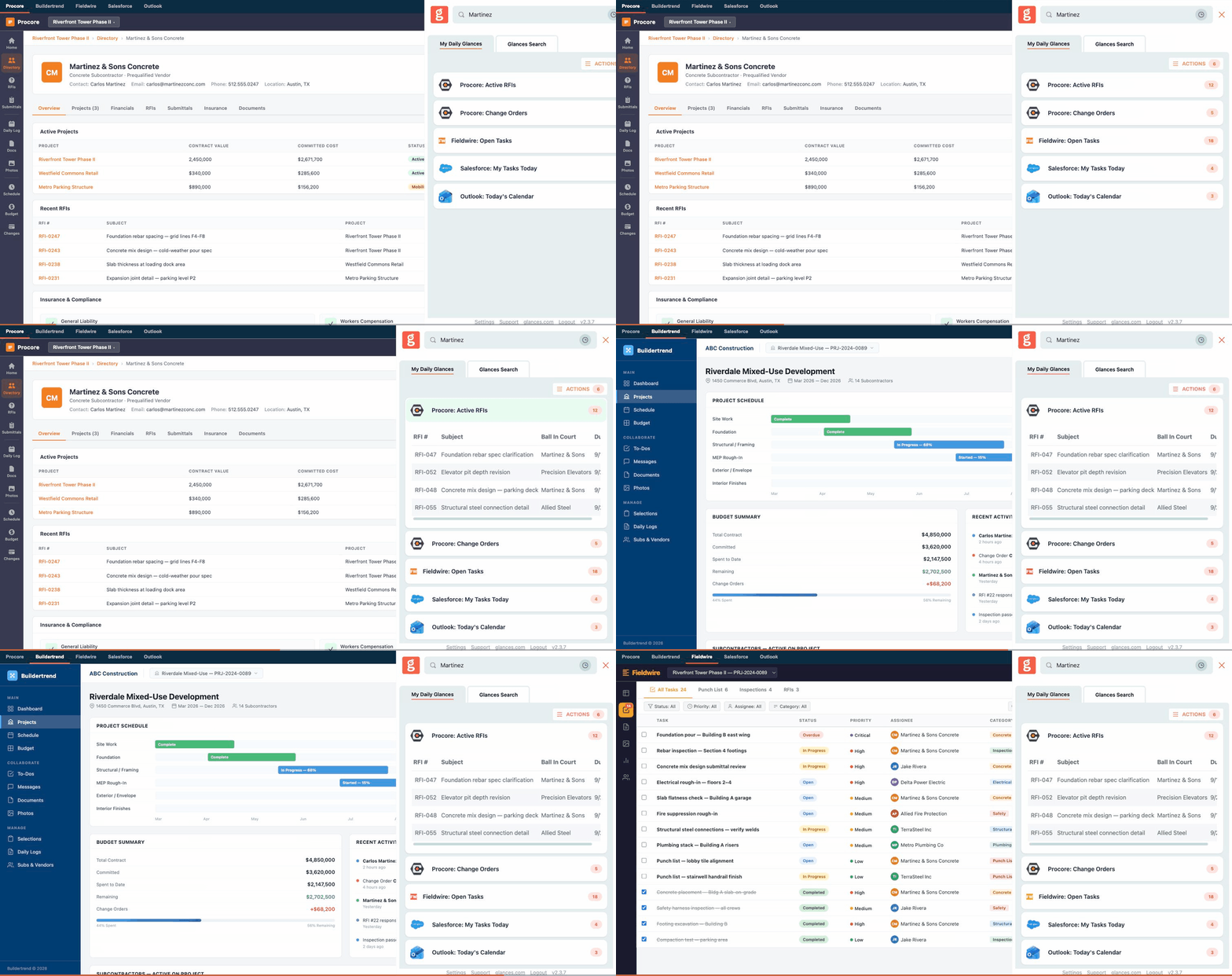
What a connected view looks like using Glances
In the product animation above, watch how a project manager can easily search Glances for client job ‘Martinez’ to view the insurance certificate from Procore, any open RFIs from Fieldwire, billing information from Sage, emails, and CRM tasks. This is done in seconds without leaving their current app, website, or workspace view.
Using Glances for construction projects and planning, there’s zero need for opening multiple tabs, logging in to different apps, and re-checking multiple sources of truth. Imagine approving a change order quickly without re-typing a single number that already exists somewhere in the stack.
If you work in the business end of construction and use apps like Procore, Fieldwire, Autodesk, Smartsheet, Buildertrend, Salesforce, monday.com, and virtually any app, Glances can securely integrate your platforms and transform your daily workflows from clunky to seamless.
This is the direction we're heading to help construction pros, so we’re excited to start the conversation today about what workflows are possible and share new development updates as they launch. Until then, we’d love to hear from you and understand where your change orders get stuck and how we can implement Glances to fix it.
Build better construction workflows with Glances
Seamlessly and securely integrating your construction software applications from Autodesk to Fieldwire (and everything between) starts with a courtesy demo and app consultation so we can understand your tech stack and workflow goals. From there, we can discuss implementation strategies, security requirements, user pricing, and answer any other questions your team may have.
More helpful steps
Schedule a demo to see the time-saving benefits of Glances in action or ask our team questions.
If you need to connect a specific app or platform with Glances that is not currently available on glances.com, please send your requests to hello@glances.com.
Find more step-by-step articles with the latest information on our support site.