Use Glances to Stop the Endless Hunt for Your Customer Data

Chasing your customers’ scattered data trails within multiple workplace apps is an endless job. What if instead of hunting for your vital data, it followed you and was at the ready in your platform of choice? Sink your teeth into this: Glances (https://glances.com/) and its simple-yet-powerful stamp and widget features are always at your service, ready to show a holistic view of your customers within any online platform or app you prefer to work in.

Stop chasing data with Glances and its fantastically-functional features
Once the Glances browser extension has been installed and you have taken a few quick minutes to connect your workplace apps of choice, accessing your key data is incredibly simple and secure. Just choose your favorite of the two data-viewing options below.
1. Glancey ‘stamps’ notify you when relevant information is available
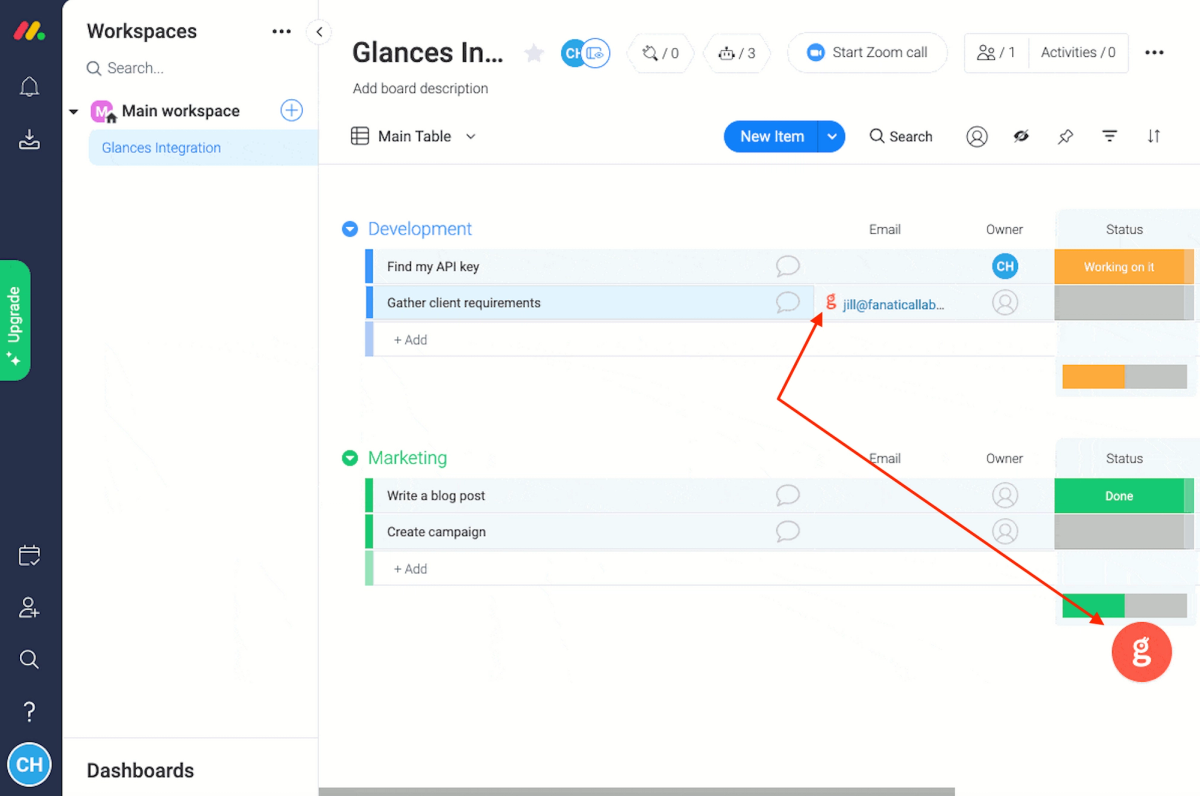
When signed in, Glancey – the helpful persona of Glances – will ‘stamp’ a data point, such as an email address, that displays on the webpage you are viewing with an orange 'g' icon. To see data associated with that email, simply click the stamp. See how the stamp icon appears below.

2. Glances customizable widget follows you from one platform to another, ready to show your data in one click
There is no longer a need to click the Glances icon in the top of the browser bar to view your data. Instead, click the handy Glances widget in the corner of the webpage you are on. Also, the location where the widget appears can be customized in Settings. For example, many websites have chatbot widgets in the bottom right corner of a page, so the Glances widget can be relocated based on your preference. See the difference between the Glances stamp and widget in the configuration below, using Monday.com as the online platform of choice.
Whether you choose to view your data via clicking Glances stamps, using the handy widget, or trying the Highlight and Search feature, the end result is the same. You will quickly gaine a more complete picture of the customer, client, or record being currently viewed. Watch searching works in the video below.
Stop painful tab switching, stop losing focus
Glances unifies your multiple applications and delivers a simplified customer view. It is a modern and often frustrating reality that today’s sales, marketing, service, and support professionals need to work in 3-10+ different apps on a daily basis. While the data these various apps host offer powerful knowledge, what good is that knowledge when it is scattered, siloed, and incomplete? The purpose of Glances is to consolidate data from all of your connected apps into a focused, single customer view – readily available to glance at in the precise moment you need it.
The more apps you connect, the more data you can see in one handy-to-use spot. Imagine the hours of time you and your teammates will save with the ability to view crucial customer data efficiently within a single glance. Love working in Salesforce, Zendesk, Mailchimp, QuickBooks, Slack, and Monday.com? There are dozens of popular platforms to connect – start by searching the always-updated list of compatible apps.
Stop hunting for the data you need
Start your free trial to connect your favorite business apps and access your data in one easy click, from any app or webpage.
More helpful steps
Schedule a demo to see the time-saving benefits of Glances in action or ask our team questions.
If you need to connect a specific app or platform with Glances that is not currently available on glances.com, please send your requests to hello@glances.com.
Find more step-by-step articles with the latest information on our support site.