Glances 101: About the No-Code Software and How it Works

While Glances is designed to be simple and seamless for users, there’s a lot of behind-the-scenes brainpower that went in to developing this software and its trailblazing abilities. In this article, we’ve broken down the basics of what Glances is, the process of connecting apps, and how this solution works to make your work life easier.
What is this new software called Glances?
Glances unifies your multiple applications and delivers a simplified customer view. It’s like an Integration Platform as a Service (iPaaS), but without being time consuming, expensive, or untrustworthy.
As a user, you can quickly see data from all of your connected apps in one convenient place, right from the webpage you are viewing. Say farewell to your tab-switching and time-wasting days searching for crucial customer information. In one click, Glances presents your current customer data in the exact moment you need it.

Now let’s dive into the details. Developed using the latest no-code technology, Glances is a software application that works with browsers like Chrome, Firefox, Microsoft Edge, and Brave, enabling you to efficiently see related data across various web-based platforms.
Once you install the Glances browser extension, accessing your data is incredibly simple and secure. When signed in, Glancey – the helpful persona of Glances – will “stamp” email addresses that display on the webpage you are viewing with an orange 'g' icon. To see data associated with that email, simply click the stamp.
Alternatively, you can click on the Glances widget in the corner of the page to see relevant data, or try the Highlight and Search feature. This allows you to quickly gain a holistic picture of the customer, client, or record you are currently viewing. Watch how easy it is to search your data using Glances in the video below.
What exactly is a glance?
A glance is a group of data related to your contact’s email address that is securely pulled from your connected apps and appears on the webpage you are viewing.
This combination of relevant data is displayed in a single view for your convenience and it is based on the data from the online app or platform you are currently using. It gets populated by clicking on 1) any email address that Glances has stamped, or 2) the Glances widget embedded within your browser.
As a simple example, let’s say you work in Zendesk as your customer support platform and you need to view a customer’s recent invoice created in QuickBooks. As long as you have Zendesk and QuickBooks connected with Glances, you can easily see the information while working in any app or webpage.
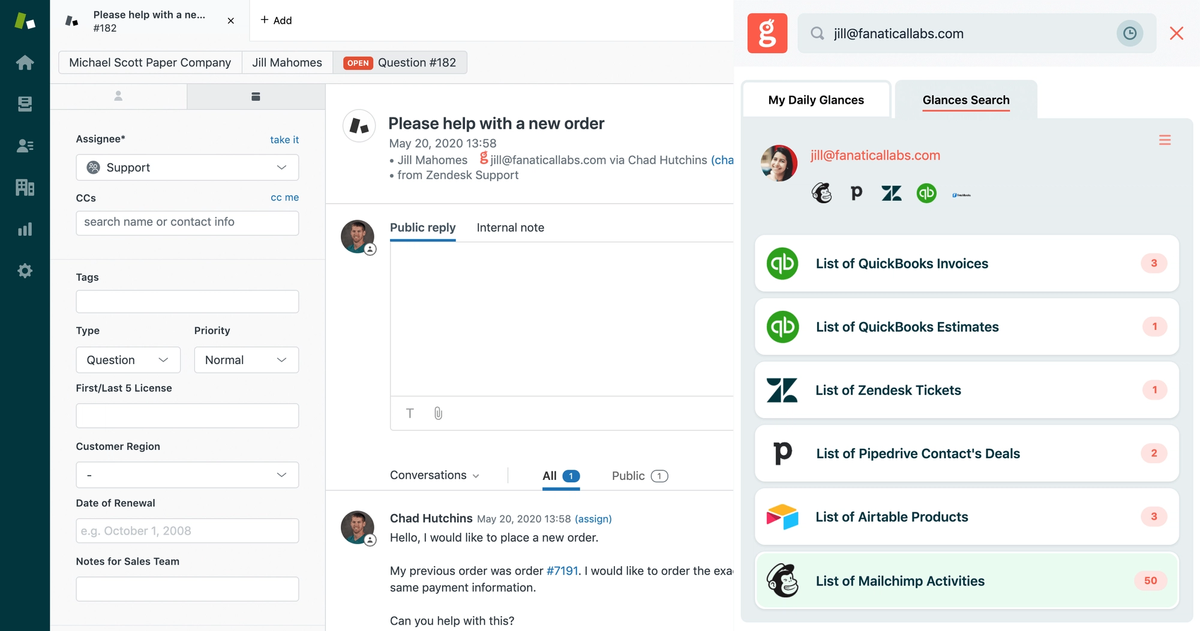
While that scenario only focuses on two connected apps, the reality is that professionals will likely connect dozens of everyday apps to save the maximum amount of time using Glances. The potential is unlimited for you and your teammates to keep working in your system of choice instead of tab hopping and losing focus in order to locate the data you need.
As you continue through your workday, Glances is always there and ready to help show you important related details in real time. It’s as easy as connecting your apps and choosing the fields you need to view.
How do you access your glance?
The first steps are to sign up on glances.com and connect your favorite apps in your Glances account. You will also need to install the extension on your favorite browser. Follow the quick, helpful instructions in our support article below.
How to Connect an App in Glances
After connecting your apps, Glances will immediately provide a default glance based on the app you connect and the most commonly desired data. You can edit your glance at any time, removing or adding fields to customize it to your workday needs. It is also sharable with your team members, so they can view the same related data from their own Glances browser extension and widget. Use the support article below as your guide for editing a glance.
Ultimately, how you use Glances is entirely up to you
The more apps you connect, the more data you can see in one handy-to-use spot. Imagine the hours of time and frustration you will save by viewing your data super efficiently within a glance.
Ready for the single customer view you’ve been missing?
Start your free trial to connect your everyday apps and access your customer data in one easy click, from whatever webpage you are on.
More helpful steps
Schedule a demo to see the time-saving benefits of Glances in action or ask our team questions.
If you need to connect a specific app or platform with Glances that is not currently available on glances.com, please send your requests to hello@glances.com.
Find more step-by-step articles with the latest information on our support site.