Crush Productivity Using Glances to View Monday.com Data in Any Platform

Now view monday.com data in your platform of choice
Let’s be honest: Mondays are usually dreaded because they feel overwhelming – and it doesn’t help that emails and project requests can quickly pile up during the weekend or within the day! Thankfully monday.com, a leading work management platform, helps the beginning of your week feel more organized and focused.
Now monday fans can crush daily productivity even more with the ability to seamlessly view monday.com data while working in other online platforms or applications. It also works the opposite way: users can work in the monday platform and view data from their chosen CRM, support, email marketing, and/or other platforms necessary to their job. Glances makes all of this possible, which is why we are excited to announce it is now available on the newly-launched monday.com Apps Marketplace.
If you currently use monday to manage your workflow or you are considering making the switch, you and your team can save on time and frustration by using Glances and its simplified customer view to access the data you need. All it takes is connecting Glances to your monday.com account, so keep reading to learn more.
How this productivity duo improves your workday
Glances unifies data from your multiple apps; monday.com hosts your daily tasks in one workspace. Use them together during your workday and slash hours of your formerly wasted time searching and toggling through your various web-based platforms for crucial information. When monday is connected to Glances, you can effortlessly glance at your boards and daily task data from whatever webpage you are on.
How it works
Accessing the data mentioned above is incredibly simple and secure. When signed in to Glances, Glancey will stamp a data point, such as an email address, that displays on the webpage you are viewing. To see data associated with that email, click the stamp. Alternatively, you can use the Glances widget in the corner of the page to see relevant data, including the ability to search by any name or email address. This allows you to quickly gain a holistic picture of the customer, client, or record you are currently viewing. Need to dive deeper? One click is all it takes to access the full source of information. See how it works below.
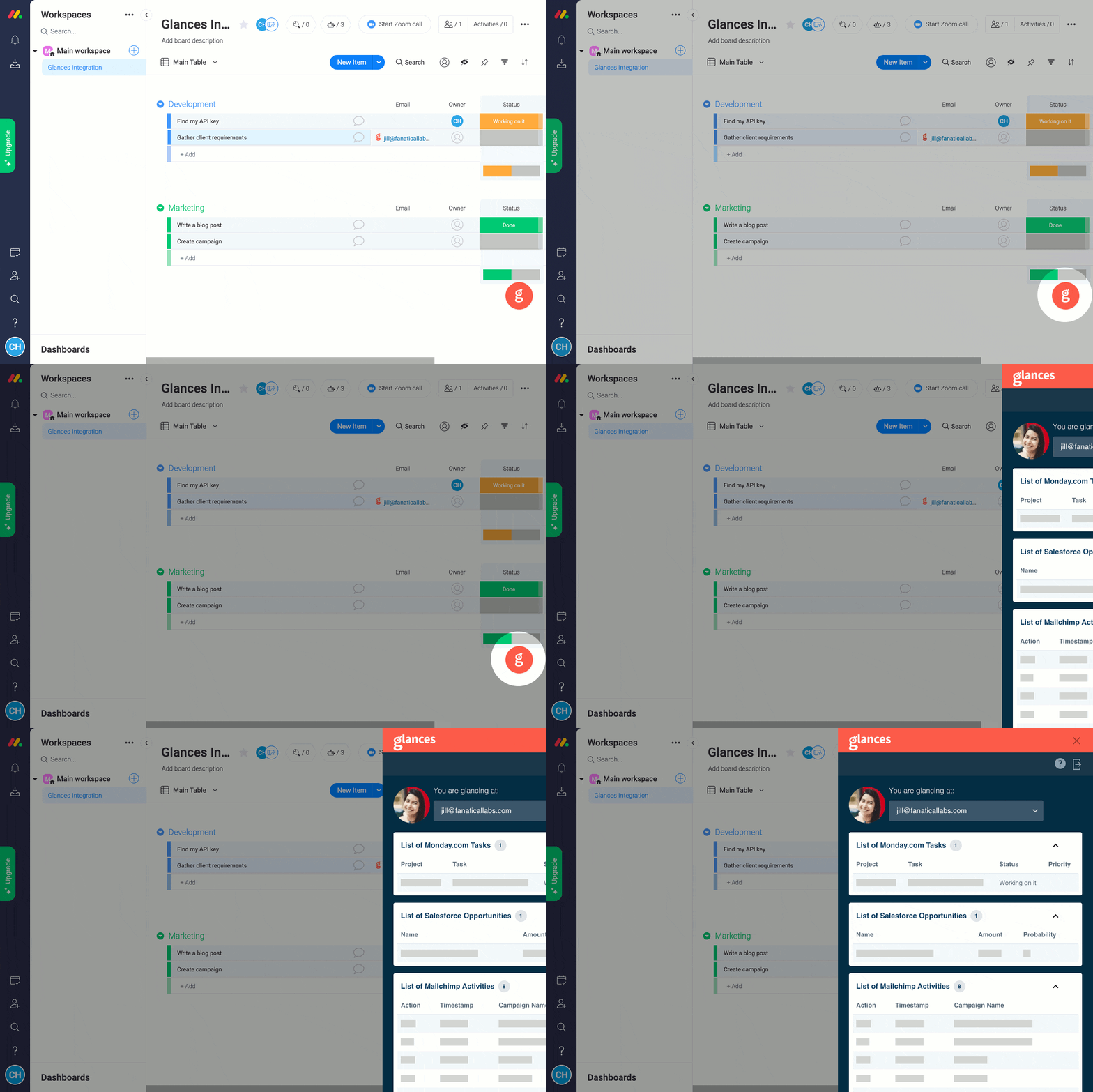
Glances works with multiple apps, not just monday
You already live in your monday platform, but we can almost guarantee that you also work with several other platforms. Whether you rely on Salesforce, Slack, Mailchimp, QuickBooks, Zendesk, or any other combo of popular applications, we understand that finding customer information within various systems is a huge, time-wasting struggle. Glances brings your favorite online apps together, securely showing your customer data in a single view from whatever app you are using.
Integrate monday with all your favorite apps, using Glances
Start your free trial to connect your favorite business apps and access your data in one easy click, from any app or webpage. You can find and connect monday when you are logged in to your Glances account, or get started by finding Glances on monday's Apps Marketplace.
More helpful steps
Schedule a demo to see the time-saving benefits of Glances in action or ask our team questions.
If you need to connect a specific app or platform with Glances that is not currently available on glances.com, please send your requests to hello@glances.com.
Find more step-by-step articles with the latest information on our support site.